What is a CDN? How CloudFront and Cloudflare Work Under the Hood
Understand how CDNs work at the edge: PoPs, Anycast vs GeoDNS, cache behaviors, Origin Shield, invalidation strategies, and a detailed CloudFront vs Cloudflare comparison with pricing.
Infrastructure engineer with 10+ years building production systems on AWS, GCP,…
Pick Your CDN in 30 Seconds
Before any architecture explanation, the decision tree I give teams. If the table picks your CDN, the rest of this guide tells you why -- and which knobs you will be tuning a month into production.
| Your situation | Pick | Reason |
|---|---|---|
| Stack is AWS-heavy, S3 origins, ALB backends | CloudFront | IAM-based Origin Access Control, native ACM, Lambda@Edge |
| Predictable monthly cost matters more than anything | Cloudflare | Flat pricing even at 100 TB/month; CloudFront bills by GB |
| DDoS protection is a hard requirement | Cloudflare | Unmetered L3/L4/L7 mitigation on every plan including free |
| Complex per-path cache rules across many origins | CloudFront | Ordered cache behaviors are more flexible than Page Rules |
| Edge compute with large code bundles | Cloudflare Workers | Faster cold start, larger free tier, V8 isolates vs Lambda@Edge |
| Multi-cloud or not on AWS at all | Cloudflare | Provider-neutral; any HTTPS origin works identically |
| You need > 400 PoPs specifically | CloudFront | Largest edge footprint in measured last-mile latency |
This guide covers the architecture that explains those trade-offs: how requests flow through a CDN, the difference between Anycast and GeoDNS routing, how each provider implements cache behaviors, and the invalidation strategies that actually work. It also covers the scenarios where CDNs do not help at all -- because bolting edge caching onto the wrong workload just adds a hop without reducing latency.
A CDN in One Sentence
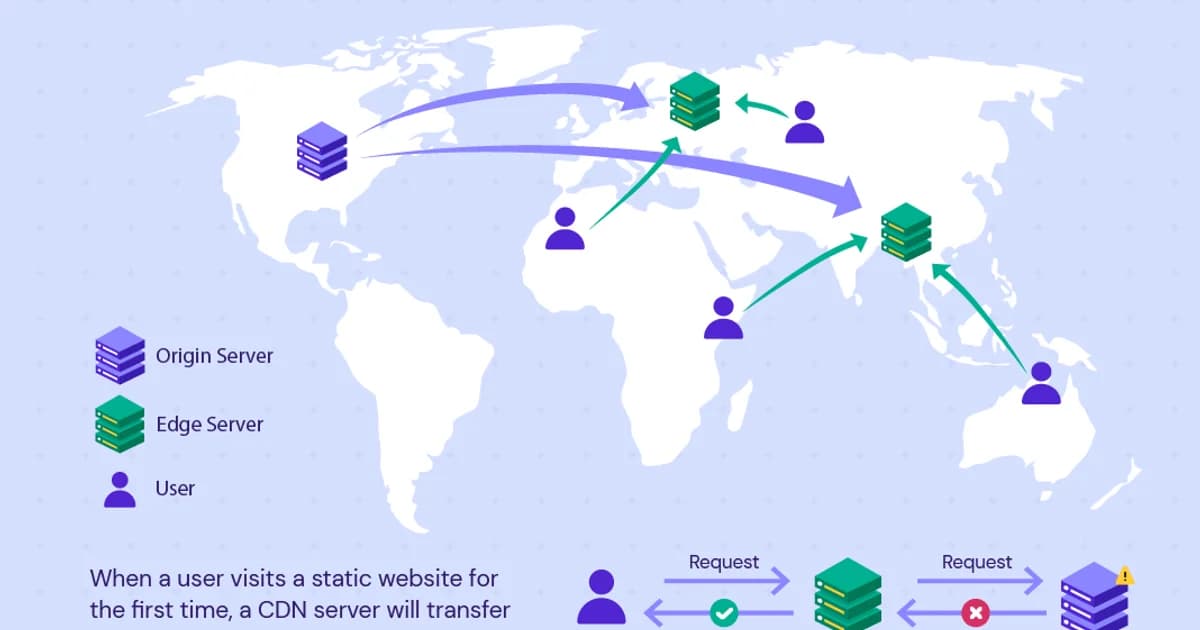
A Content Delivery Network (CDN) is a geographically distributed network of proxy servers that cache and serve content from locations closest to end users. That single sentence hides the three moving parts that matter: (1) how the user's request reaches the nearest edge, (2) what the edge does on cache miss, and (3) how you invalidate stale content without stampeding the origin. The rest of this guide unpacks each of those.
How CDN Requests Flow: Step by Step
Step 1: DNS Resolution to the Edge
When a user requests cdn.example.com, DNS resolves to the nearest CDN edge location. CloudFront uses GeoDNS (Route 53 returns different IPs based on the user's location). Cloudflare uses Anycast (all edge locations share the same IP addresses, and BGP routing sends the user to the nearest one).
Step 2: Cache Lookup
The edge server checks its local cache for the requested content. The cache key typically includes the URL path and query string, plus any headers you've configured (like Accept-Encoding). If the content is cached and not expired, it's returned immediately -- this is a cache hit.
Step 3: Origin Fetch (Cache Miss)
If the content isn't cached, the edge server forwards the request to your origin server (S3, an ALB, a custom server). The origin responds, the edge caches the response based on the cache headers, and returns it to the user.
Step 4: Subsequent Requests
Other users in the same region get the cached response without hitting your origin. The cache entry lives until the TTL expires or you invalidate it.
Pro tip: Monitor your cache hit ratio. A well-configured CDN should hit 90%+ for static content. If your ratio is below 70%, you likely have cache key misconfiguration, low TTLs, or too many unique query strings busting the cache.
Anycast vs GeoDNS
| Approach | How It Works | Used By | Failover Speed |
|---|---|---|---|
| Anycast | Same IP announced from every PoP; BGP routes to nearest | Cloudflare, Fastly | Seconds (BGP reconvergence) |
| GeoDNS | DNS returns different IPs based on user location | CloudFront, Akamai | Minutes (DNS TTL) |
Anycast is simpler and faster for failover. If an edge server goes down, BGP automatically routes to the next nearest server within seconds. GeoDNS requires waiting for DNS TTLs to expire. However, GeoDNS allows more granular control over which edge locations serve which users.
CloudFront: AWS's CDN
Architecture
CloudFront has 400+ Points of Presence (PoPs) across 90+ cities. It integrates natively with AWS services -- S3, ALB, API Gateway, Lambda@Edge, and CloudFront Functions. You create a "distribution" that defines your origin(s), cache behaviors, and edge settings.
Cache Behaviors
CloudFront's most powerful feature. Each behavior is a URL pattern (like /api/* or /images/*) with its own caching policy, origin, and headers. This lets you serve static assets from S3 with long cache TTLs while proxying API requests to your ALB with no caching.
# Terraform: CloudFront with multiple behaviors
resource "aws_cloudfront_distribution" "cdn" {
  origin {
    domain_name = aws_s3_bucket.assets.bucket_regional_domain_name
    origin_id   = "s3-assets"
  }

  origin {
    domain_name = aws_lb.api.dns_name
    origin_id   = "alb-api"
    custom_origin_config {
      http_port              = 80
      https_port             = 443
      origin_protocol_policy = "https-only"
      origin_ssl_protocols   = ["TLSv1.2"]
    }
  }

  # Static assets: cached aggressively
  default_cache_behavior {
    target_origin_id       = "s3-assets"
    viewer_protocol_policy = "redirect-to-https"
    cached_methods         = ["GET", "HEAD"]
    allowed_methods        = ["GET", "HEAD"]
    default_ttl            = 86400
    max_ttl                = 31536000
  }

  # API routes: no caching
  ordered_cache_behavior {
    path_pattern           = "/api/*"
    target_origin_id       = "alb-api"
    viewer_protocol_policy = "https-only"
    allowed_methods        = ["GET", "HEAD", "OPTIONS", "PUT", "POST", "PATCH", "DELETE"]
    cached_methods         = ["GET", "HEAD"]
    default_ttl            = 0
    max_ttl                = 0
  }
}
Origin Shield
Origin Shield adds a centralized caching layer between regional edge caches and your origin. Without it, each regional edge independently fetches from your origin on a cache miss. With Origin Shield, all regional edges fetch from a single shield location, which fetches from your origin only once. This dramatically reduces origin load for popular content.
Cloudflare: Security-First CDN
Architecture
Cloudflare operates 300+ PoPs with an Anycast network. Unlike CloudFront, Cloudflare runs a full security stack at every edge: DDoS protection, WAF (Web Application Firewall), bot management, and DNS. The CDN is one layer in a broader security and performance platform.
Key Differences from CloudFront
- DNS + CDN integrated -- Cloudflare is your DNS provider and CDN in one. The orange cloud toggle controls whether traffic proxies through Cloudflare's edge.
- DDoS protection included -- unmetered DDoS mitigation on all plans, including free.
- Workers -- serverless JavaScript/Wasm at the edge, similar to Lambda@Edge but with faster cold starts and a larger free tier.
- Simpler caching model -- Cloudflare uses standard cache-control headers with page rules for overrides, less flexible than CloudFront behaviors but easier to configure.
CloudFront vs Cloudflare Comparison
| Feature | CloudFront | Cloudflare |
|---|---|---|
| PoPs | 400+ in 90+ cities | 300+ in 100+ countries |
| Pricing model | Per GB transferred + per request | Flat monthly (free tier available) |
| DDoS protection | AWS Shield Standard (basic), Shield Advanced ($3,000/mo) | Included on all plans |
| WAF | AWS WAF (separate service, per-rule pricing) | Included on Pro+ plans ($20/mo) |
| Edge compute | Lambda@Edge / CloudFront Functions | Workers (generous free tier) |
| SSL | ACM certificates (free with AWS) | Universal SSL (free, auto-provisioned) |
| Origin | AWS-native integration (S3, ALB) | Any HTTP origin |
| Best for | AWS-heavy architectures | Multi-cloud or independent deployments |
Cache Invalidation
The hardest problem in CDN management. When you update content, cached copies on edge servers still serve the old version until the TTL expires. Your options:
- Cache busting with versioned URLs --
/app.v2.3.jsor/app.abc123.js. New content gets a new URL, so caches don't need invalidating. This is the best approach for static assets. - Invalidation API -- tell the CDN to drop specific cached paths. CloudFront allows 1,000 free invalidation paths per month; additional invalidations cost $0.005 each. Cloudflare offers unlimited purge requests.
- Short TTLs -- set low cache TTLs (60-300 seconds) for frequently changing content. This sacrifices cache hit ratio for freshness.
Watch out: CloudFront invalidations are not instant. They propagate to all edge locations over 5-15 minutes. If you need immediate updates, use versioned URLs instead of invalidation. Cloudflare purge is faster (typically under 30 seconds globally) but still not instantaneous.
When CDNs Don't Help
CDNs are not universal performance improvements. They don't help when:
- Content is user-specific -- personalized dashboards, authenticated API responses, and user-specific data can't be cached at the edge (unless you use edge compute to personalize).
- Users are in one region -- if all your users are in the US East, a CDN adds a hop without reducing latency.
- Origin is the bottleneck -- if your database query takes 2 seconds, a CDN only caches the first slow response. The next cache miss is just as slow.
- Cache hit ratio is low -- long-tail content with millions of unique URLs won't cache effectively. Each URL gets requested once, misses the cache, and expires before the next request.
CDN Failure Modes I Have Seen in Production
Cache Key Exploding on Query Strings
A tracking script appends ?utm_source=...&utm_campaign=...&_=1712345678 to every request. CloudFront's default cache key includes the full query string. Cache hit ratio crashes from 95% to 3% overnight because every request has a unique cache key. Origin load multiplies 30x. Fix: set the cache policy to include only id,category and ignore all other query strings; or strip tracking params at the edge with a CloudFront Function.
Vary: Cookie Nuking Your Hit Rate
Your origin sets Set-Cookie on every response (session ID, analytics, feature flags). Cloudflare and CloudFront both respect Vary: Cookie by default, which means each user gets their own cache entry. On a logged-out marketing page this is a 10x origin-load increase for zero functional benefit. Fix: strip Set-Cookie from cacheable responses, or explicitly override the cache policy to ignore cookies.
Stampeding Herd After Mass Invalidation
You invalidate /* after a deploy. Every edge location sees a miss on the next request and all 300 PoPs fetch from origin simultaneously. Origin load spikes 300x, origin drops requests, users see errors. CloudFront Origin Shield and Cloudflare Tiered Cache both solve this by funneling regional misses through a single shield location, reducing origin fanout to ~10x. Enable one of them before your next invalidation.
Range Request + Partial Cache Mismatch
Video players send HTTP Range requests. If you serve videos through a CDN without enabling range-aware caching, each byte range becomes its own cache entry and origin load multiplies by the number of distinct ranges. CloudFront needs Origin Access policy set to cache-based-on-headers for Range; Cloudflare requires the Stream product or an explicit caching rule. Check headers -- CF-Cache-Status: HIT with a 206 response means it is working.
Pricing Comparison
| Usage | CloudFront | Cloudflare Pro |
|---|---|---|
| 1 TB/month transfer | ~$85 | $20 (flat) |
| 10 TB/month transfer | ~$850 | $20 (flat) |
| 100 TB/month transfer | ~$6,000 | $20 (flat, Enterprise for this volume) |
| DDoS protection | Basic free, Advanced $3,000/mo | Included |
| WAF | $5/rule/mo + request charges | Included on Pro+ |
Cloudflare's flat pricing is dramatically cheaper at scale. CloudFront's advantage is deep AWS integration -- native S3 origins, IAM-based signing, and Origin Access Control eliminate the need for public S3 buckets.
Frequently Asked Questions
What is a Point of Presence (PoP)?
A PoP is a physical location where a CDN has servers to cache and serve content. Each PoP contains multiple servers that handle DNS resolution, TLS termination, caching, and request routing. Larger CDNs have PoPs in hundreds of cities worldwide, ensuring most users are within 20-50ms of a cache server.
How do I know if my CDN is working?
Check response headers. CloudFront returns X-Cache: Hit from cloudfront for cache hits. Cloudflare returns cf-cache-status: HIT. If you see MISS, the request went to your origin. Monitor your overall cache hit ratio in the CDN dashboard -- it should be above 90% for static content.
Should I use a CDN for API responses?
It depends. Public, read-heavy API endpoints with the same response for all users (product catalogs, public data feeds) benefit from CDN caching. Authenticated or user-specific API endpoints generally shouldn't be cached at the edge unless you're using edge compute for personalization. Even for uncached APIs, a CDN can provide DDoS protection and TLS termination closer to users.
What is Origin Access Control in CloudFront?
Origin Access Control (OAC) lets CloudFront access a private S3 bucket without making the bucket public. CloudFront signs requests to S3 using its own identity, and the S3 bucket policy only allows access from that CloudFront distribution. This replaced the older Origin Access Identity (OAI) method and supports more S3 features including SSE-KMS encryption.
Can I use both CloudFront and Cloudflare together?
Technically yes, but it's almost never a good idea. Stacking two CDNs means double cache invalidation, confusing cache headers, and debugging nightmares. Pick one. If you're on AWS and want native integration, use CloudFront. If you want flat pricing, built-in security, and provider independence, use Cloudflare.
How does a CDN handle HTTPS/TLS?
The CDN terminates TLS at the edge, decrypts the request, serves from cache if possible, and re-encrypts if it needs to forward to the origin. Both CloudFront and Cloudflare provide free TLS certificates. The user's connection is encrypted to the edge, and the edge-to-origin connection can also be encrypted (and should be in production).
Start Simple, Optimize Later
Put your static assets behind a CDN with long cache TTLs and versioned filenames. That alone handles the biggest performance win. Once that's working, add cache behaviors for different content types, enable Origin Shield if your origin is getting hammered, and monitor your cache hit ratio weekly. Don't over-engineer caching rules on day one -- start with aggressive caching for static content and no caching for dynamic content, then selectively add caching where your metrics show it'll help.
Written by
Abhishek Patel
Infrastructure engineer with 10+ years building production systems on AWS, GCP, and bare metal. Writes practical guides on cloud architecture, containers, networking, and Linux for developers who want to understand how things actually work under the hood.
Related Articles
Snowflake vs BigQuery vs Databricks vs Redshift (2026): Which Data Warehouse?
Snowflake wins on concurrency, BigQuery on serverless simplicity, Databricks on ML, Redshift on AWS depth. Real 2026 pricing, TPC-DS benchmarks, and a clear decision matrix.
16 min read
AI/ML EngineeringRunPod vs Vast.ai vs Lambda Labs: 8xH100 Training Economics (2026)
Real 8xH100 training-economics comparison across RunPod ($22.32/hr Secure Cloud), Vast.ai (spot $12.16/hr floor), and Lambda Labs (reserved $14.80/hr). MFU benchmarks, break-even math for spot vs reserved, interruption rates, and which provider wins per job shape.
16 min read
CloudRender vs Railway vs Fly.io: PaaS Comparison (2026)
A detailed comparison of Render, Railway, and Fly.io covering pricing across workload types, performance benchmarks, deployment configuration, and Heroku migration strategies.
12 min read
Enjoyed this article?
Get more like this in your inbox. No spam, unsubscribe anytime.