SSRF Attacks: What They Are and Why Cloud Environments Make Them Dangerous
SSRF lets attackers reach internal services through your server. Learn how cloud metadata endpoints amplify the risk and how to defend against SSRF.
Infrastructure engineer with 10+ years building production systems on AWS, GCP,…
Capital One, 106 Million Records, and a Single SSRF
On July 19, 2019 a former AWS engineer named Paige Thompson exploited a Server-Side Request Forgery (SSRF) vulnerability in a Capital One ModSecurity WAF rule. The attack was mechanically simple: she made the WAF send an HTTP request to 169.254.169.254 -- the EC2 instance metadata service -- and the response contained temporary IAM credentials for a role named *****-WAF-Role. Those credentials could s3:ListBucket and s3:GetObject across roughly 700 S3 buckets. She used them for four months, exfiltrating 106 million customer records, including 140,000 Social Security numbers and 80,000 bank account numbers.
The Department of Justice indictment, the 2022 conviction, and the $190 million class-action settlement all trace back to one unvalidated URL in a WAF filter. No kernel exploit, no zero-day, no supply chain compromise. SSRF plus cloud metadata is the highest-impact-per-line-of-code vulnerability in modern web applications, and the attack surface has only grown since 2019 as applications added more outbound HTTP features (webhook delivery, URL previews, PDF rendering, user-supplied image imports, LLM plugin tools).
This guide walks the full SSRF kill-chain, explains why IMDSv2 is necessary but not sufficient, and gives you a defensive checklist that would have stopped the Capital One breach before the first byte of data left the VPC.
The Capital One Kill Chain, Step by Step
- Find the SSRF sink. The WAF had a feature that fetched URLs on behalf of rules -- intended to resolve remote RBL feeds. Attacker control over the URL parameter was the initial foothold.
- Point at the metadata endpoint.
http://169.254.169.254/latest/meta-data/iam/security-credentials/returned the role name attached to the WAF's EC2 instance. - Read the temporary credentials.
http://169.254.169.254/latest/meta-data/iam/security-credentials/*****-WAF-RolereturnedAccessKeyId,SecretAccessKey, andToken. - Use the credentials from anywhere. IAM does not care where API calls originate.
aws s3 lsfrom the attacker's laptop worked exactly as it would from inside Capital One's VPC. - Enumerate and exfiltrate.
s3:ListAllMyBucketslisted the targets.s3:GetObjectpulled the data. No S3 bucket policy restricted which IPs could read with those credentials.
Every step was a defensive opportunity missed. IMDSv2 was not yet enforced. The IAM role had s3:* instead of a scoped-down list. The S3 buckets had no IP condition. The WAF had no URL validation for its own fetches. That is the real lesson: SSRF becomes a breach because defence in depth was absent at every layer, not because the initial bug was catastrophic on its own.
How SSRF Works: Step by Step
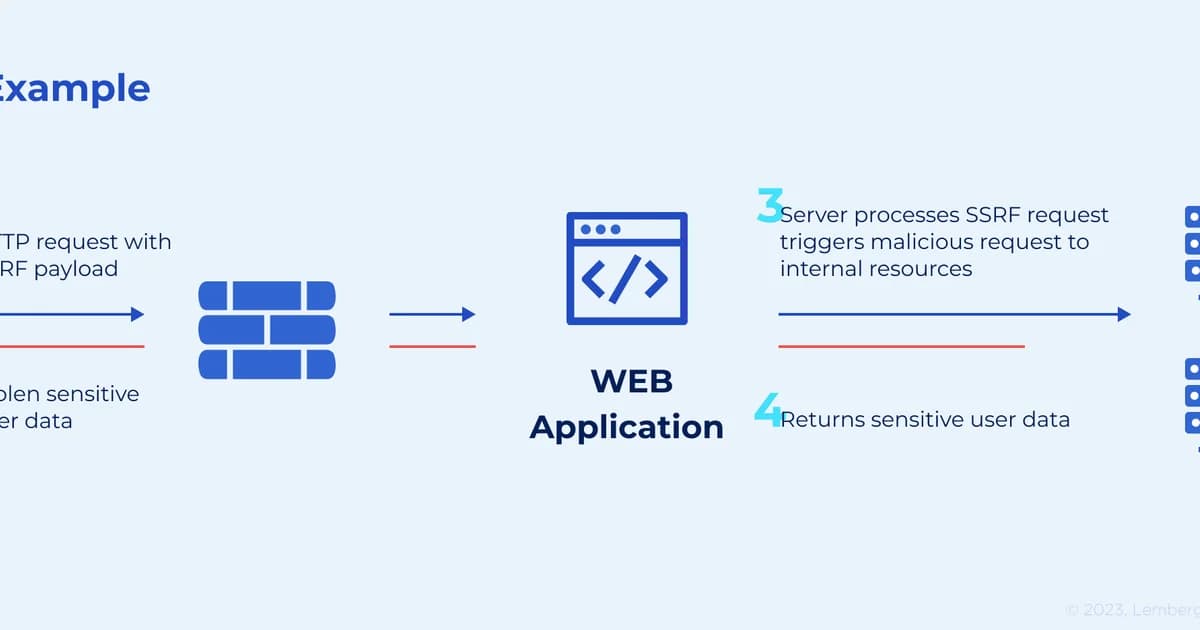
- Find a server-side URL fetch. Any feature where your server fetches a URL based on user input is a potential SSRF vector: image imports, webhook delivery, URL previews, PDF rendering, file downloads.
- Supply an internal URL. Instead of a legitimate external URL, the attacker provides a URL pointing to an internal resource:
http://169.254.169.254/latest/meta-data/,http://localhost:6379/, orhttp://10.0.0.5:8080/admin. - The server makes the request. Because the request originates from your server (inside the network perimeter), firewalls and security groups allow it. The server sends the response back to the attacker.
- Extract sensitive data. The attacker reads internal API responses, metadata credentials, configuration files, or anything else accessible from the server's network position.
# Vulnerable endpoint: fetches a URL and returns the content
@app.route('/preview')
def url_preview():
    url = request.args.get('url')
    # No validation -- attacker controls the URL
    response = requests.get(url)
    return response.text

# Attack: GET /preview?url=http://169.254.169.254/latest/meta-data/iam/security-credentials/my-role
The response contains temporary AWS credentials: AccessKeyId, SecretAccessKey, and Token. With these, the attacker can call AWS APIs as your EC2 instance's IAM role.
Definition sidebar: Server-Side Request Forgery (SSRF) is a vulnerability class where an attacker coerces a server into making HTTP (or other protocol) requests to destinations the attacker chooses. The server's network position -- inside the VPC, past the firewall, with IAM credentials available via metadata -- is the multiplier that turns a simple fetch feature into a cloud breach.
Why Cloud Environments Make SSRF Devastating
The EC2 Metadata Endpoint
Every EC2 instance has access to a link-local metadata service at 169.254.169.254. It exposes instance information, user data scripts, and -- critically -- IAM role credentials. The original Instance Metadata Service (IMDSv1) responds to simple GET requests with no authentication. Any process on the instance (or any SSRF vulnerability) can read these credentials.
# What an attacker gets from the metadata endpoint
curl http://169.254.169.254/latest/meta-data/iam/security-credentials/my-role

{
  "Code": "Success",
  "AccessKeyId": "ASIA...",
  "SecretAccessKey": "wJalr...",
  "Token": "FwoGZX...",
  "Expiration": "2026-04-07T18:00:00Z"
}
Beyond AWS: Other Cloud Metadata Services
| Cloud Provider | Metadata Endpoint | What It Exposes |
|---|---|---|
| AWS EC2 | 169.254.169.254 | IAM credentials, user data, instance info |
| GCP | metadata.google.internal (169.254.169.254) | Service account tokens, project metadata |
| Azure | 169.254.169.254 | Managed identity tokens, instance metadata |
| DigitalOcean | 169.254.169.254 | Droplet metadata, user data |
Every major cloud uses the same IP address for metadata. SSRF is a cross-cloud problem.
IMDSv2: A Partial Mitigation
AWS introduced Instance Metadata Service v2 (IMDSv2) as a defense against SSRF. Instead of responding to simple GET requests, IMDSv2 requires a session token obtained via a PUT request with a custom header:
# IMDSv2: requires a PUT to get a session token first
TOKEN=$(curl -X PUT "http://169.254.169.254/latest/api/token" \
  -H "X-aws-ec2-metadata-token-ttl-seconds: 21600")

# Then use the token in subsequent requests
curl -H "X-aws-ec2-metadata-token: $TOKEN" \
  http://169.254.169.254/latest/meta-data/iam/security-credentials/my-role
This blocks basic SSRF attacks because most HTTP libraries follow redirects with GET requests and don't send custom headers. However, IMDSv2 isn't bulletproof:
- If the attacker can control the full HTTP request (method, headers), they can perform the PUT request.
- Some SSRF vulnerabilities allow arbitrary HTTP methods and headers (e.g., through SSRF in a proxy or HTTP client library).
- IMDSv2 is not enabled by default on all instance types. You must enforce it via launch templates or account-level settings.
Watch out: IMDSv2 is necessary but not sufficient. Enforce it across your account with
aws ec2 modify-instance-metadata-options --http-tokens required, but don't treat it as a complete SSRF defense. You still need input validation and network controls.
SSRF Attack Variants
Basic SSRF
The server fetches the attacker-supplied URL and returns the response. The attacker can read internal resources directly.
Blind SSRF
The server makes the request but doesn't return the response to the attacker. The attacker infers information from response timing, status codes, or by directing the request to an attacker-controlled server that logs the incoming connection (with headers that may contain internal data).
SSRF via URL Parsing Discrepancies
Different URL parsers handle edge cases differently. An attacker might use:
http://169.254.169.254encoded ashttp://0xa9fea9fe(decimal to hex)http://2852039166(decimal IP)http://[::ffff:169.254.169.254](IPv6-mapped IPv4)http://169.254.169.254.nip.io(DNS rebinding)http://attacker.com@169.254.169.254(URL authority confusion)
These bypass naive URL validation that only checks for the literal string 169.254.169.254.
How to Prevent SSRF
1. URL Validation with Allowlisting
The strongest defense is an allowlist of permitted domains or IP ranges. If your feature needs to fetch images from user-supplied URLs, restrict it to known image hosting domains. If it calls webhooks, validate against registered callback URLs.
from urllib.parse import urlparse
import ipaddress
import socket

ALLOWED_DOMAINS = {'images.unsplash.com', 'cdn.example.com'}
BLOCKED_RANGES = [
    ipaddress.ip_network('169.254.0.0/16'),   # Link-local
    ipaddress.ip_network('10.0.0.0/8'),        # Private
    ipaddress.ip_network('172.16.0.0/12'),     # Private
    ipaddress.ip_network('192.168.0.0/16'),    # Private
    ipaddress.ip_network('127.0.0.0/8'),       # Loopback
]

def is_url_safe(url: str) -> bool:
    parsed = urlparse(url)

    # Check scheme
    if parsed.scheme not in ('http', 'https'):
        return False

    # Check domain allowlist
    if parsed.hostname not in ALLOWED_DOMAINS:
        return False

    # Resolve DNS and check IP against blocked ranges
    try:
        ip = ipaddress.ip_address(socket.gethostbyname(parsed.hostname))
        for blocked in BLOCKED_RANGES:
            if ip in blocked:
                return False
    except (socket.gaierror, ValueError):
        return False

    return True
Pro tip: Always resolve the hostname to an IP and validate the IP against blocked ranges. Validating only the hostname is insufficient because DNS rebinding attacks can make a domain resolve to an internal IP between your validation check and the actual request.
2. Enforce IMDSv2 on All EC2 Instances
# Enforce IMDSv2 at instance launch
aws ec2 run-instances \
  --metadata-options "HttpTokens=required,HttpPutResponseHopLimit=1"

# Enforce for existing instances
aws ec2 modify-instance-metadata-options \
  --instance-id i-1234567890abcdef0 \
  --http-tokens required \
  --http-put-response-hop-limit 1
Setting HttpPutResponseHopLimit=1 prevents containers running on the instance from reaching the metadata service through the host's network stack.
3. Network-Level Egress Controls
Restrict what your application servers can reach on the network:
- Block outbound traffic to
169.254.169.254via iptables, security groups, or network policies. - Use an egress proxy that enforces URL allowlists for all outbound HTTP requests.
- In Kubernetes, use NetworkPolicies to restrict pod egress to specific CIDR ranges.
4. Disable Unnecessary URL Fetching
If a feature doesn't need to fetch arbitrary URLs, don't build it that way. Instead of letting users provide URLs for profile images, have them upload files directly. Instead of server-side URL previews, use client-side rendering.
SSRF Testing Tools and Costs
| Tool | Type | Cost | SSRF Detection |
|---|---|---|---|
| Burp Suite Pro | Web scanner | $449/yr | Collaborator for blind SSRF detection |
| OWASP ZAP | Web scanner (OSS) | Free | Active scan rules for SSRF |
| Nuclei | Vulnerability scanner (OSS) | Free | SSRF-specific templates |
| SSRFmap | SSRF exploitation (OSS) | Free | Automated SSRF exploitation and escalation |
| Snyk | SAST/DAST | Free tier available | Static analysis for SSRF patterns in code |
Frequently Asked Questions
What is the most common target of SSRF attacks in cloud environments?
The cloud instance metadata service at 169.254.169.254. This endpoint returns IAM credentials (AWS), service account tokens (GCP), or managed identity tokens (Azure) that let attackers access cloud APIs. It's reachable from any process on the instance and requires no authentication in IMDSv1.
Does IMDSv2 completely prevent SSRF on AWS?
No. IMDSv2 makes SSRF harder by requiring a PUT request with a custom header to obtain a session token. This blocks basic SSRF through HTTP redirects and simple GET-based fetches. But if the attacker can control the HTTP method and headers, they can still reach the metadata service. IMDSv2 is a necessary layer, not a complete solution.
Can SSRF affect non-cloud applications?
Yes. SSRF targets any internal resource reachable from the server: internal APIs, databases with HTTP interfaces (Elasticsearch, CouchDB), Redis instances, admin panels, and internal microservices. Cloud metadata is the highest-impact target, but SSRF is dangerous in any environment with internal services.
What is blind SSRF and how is it exploited?
Blind SSRF occurs when the server makes the request but doesn't return the response to the attacker. Attackers exploit it by directing requests to an attacker-controlled server to confirm the vulnerability, using timing differences to infer information, or chaining it with other vulnerabilities to extract data indirectly.
How do I test my application for SSRF?
Identify every feature that makes server-side HTTP requests based on user input. Test each with internal IPs (127.0.0.1, 169.254.169.254, 10.x.x.x), encoded IP variants, and DNS rebinding payloads. Use Burp Suite's Collaborator or a request bin to detect blind SSRF. Automate with tools like Nuclei's SSRF templates.
Is URL validation enough to prevent SSRF?
URL validation is necessary but has pitfalls. Attackers bypass hostname checks with IP encoding tricks, DNS rebinding, and URL parser inconsistencies. Effective validation requires resolving the hostname, checking the resulting IP against blocked ranges, and performing this check at request time -- not just at validation time. Combine with network-level egress controls.
What is DNS rebinding and how does it relate to SSRF?
DNS rebinding is a technique where a domain initially resolves to a safe external IP (passing validation), then quickly changes to resolve to an internal IP (127.0.0.1 or 169.254.169.254). If your application validates the URL and then makes the request in separate steps, the DNS resolution can change between them. Mitigate by pinning the resolved IP for the duration of the request.
Defense in Depth Is Non-Negotiable
SSRF is a problem that demands layered defenses because no single control is sufficient. Validate URLs with allowlists and IP range checks. Enforce IMDSv2 with a hop limit of 1. Block metadata IP ranges at the network level. Minimize server-side URL fetching features. Monitor outbound traffic for anomalous connections to internal IPs. The organizations that get breached via SSRF aren't the ones without any defenses -- they're the ones relying on a single layer that an attacker found a way around.
Written by
Abhishek Patel
Infrastructure engineer with 10+ years building production systems on AWS, GCP, and bare metal. Writes practical guides on cloud architecture, containers, networking, and Linux for developers who want to understand how things actually work under the hood.
Related Articles
Best Vulnerability Scanners for Containers (2026): Snyk vs Trivy vs Grype vs Aqua
Benchmarked comparison of Snyk, Trivy, Grype, and Aqua against 100 production images. Real 2026 pricing, false-positive rates, scan times, and a decision matrix for picking the right scanner.
15 min read
DatabasesSnowflake vs BigQuery vs Databricks vs Redshift (2026): Which Data Warehouse?
Snowflake wins on concurrency, BigQuery on serverless simplicity, Databricks on ML, Redshift on AWS depth. Real 2026 pricing, TPC-DS benchmarks, and a clear decision matrix.
16 min read
AI/ML EngineeringRunPod vs Vast.ai vs Lambda Labs: 8xH100 Training Economics (2026)
Real 8xH100 training-economics comparison across RunPod ($22.32/hr Secure Cloud), Vast.ai (spot $12.16/hr floor), and Lambda Labs (reserved $14.80/hr). MFU benchmarks, break-even math for spot vs reserved, interruption rates, and which provider wins per job shape.
16 min read
Enjoyed this article?
Get more like this in your inbox. No spam, unsubscribe anytime.