VPCs Explained: How Virtual Private Clouds Actually Work
A practitioner's guide to Virtual Private Clouds covering subnets, route tables, gateways, security groups, NACLs, and VPC peering across AWS, GCP, and Azure.
Infrastructure engineer with 10+ years building production systems on AWS, GCP,…
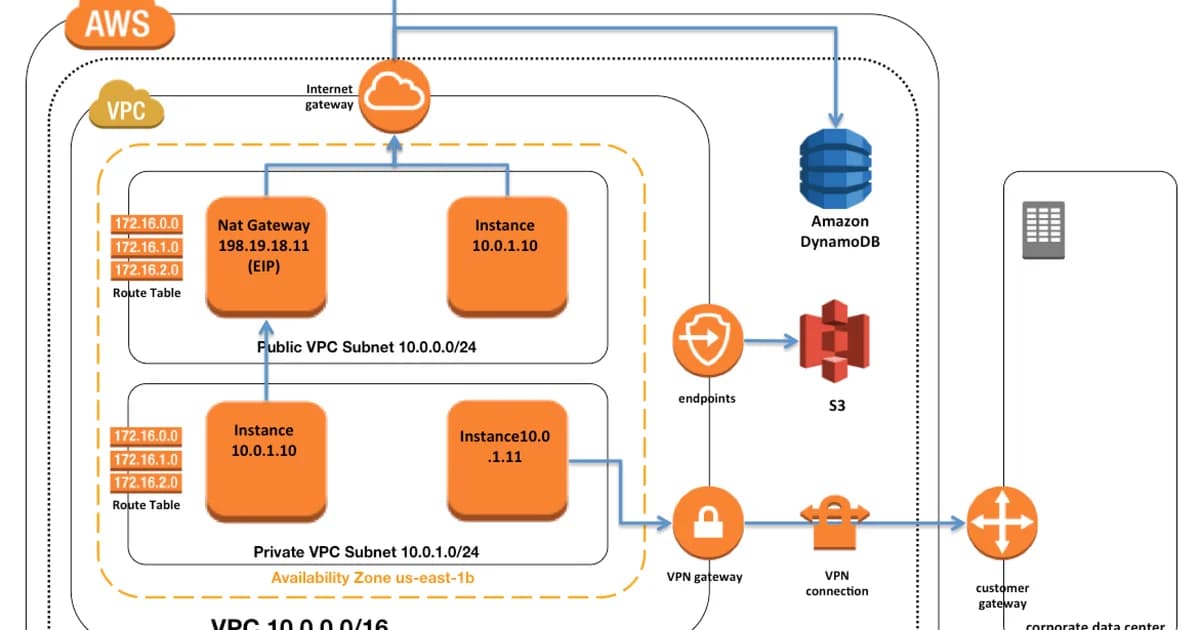
"Why Can't Staging Reach Our RDS?" The Incident That Explains a VPC
Monday standup. A backend engineer says staging can no longer connect to the RDS instance. Production is fine. The only change in the last 24 hours was a new subnet added for a Fargate service. Five people jump on a call. The answer is in the route table.
When the new subnet was created, it defaulted to the main route table -- which had no route to the NAT Gateway. The Fargate tasks in the new subnet could not pull Docker images, and the staging application, which the AWS scheduler had placed in the same subnet, failed to reach RDS because it could not pull secrets from Secrets Manager without outbound connectivity. A one-line aws ec2 associate-route-table fixed it in thirty seconds once we spotted it. Finding it took forty minutes because no one on the team had a complete mental model of the VPC components.
That is the common case. A Virtual Private Cloud is a stack of six primitives -- CIDR block, subnets, route tables, gateways, security groups, NACLs -- and every cloud outage I have debugged in a VPC comes down to one of them being slightly wrong. This guide walks each primitive with enough detail that when the route table is the problem you can say "it is the route table" in thirty seconds, not forty minutes. The examples use AWS; GCP VPC networks and Azure VNets behave similarly, with specific differences called out in the cross-cloud comparison below.
VPC Components: How They Fit Together
Step 1: Choose Your CIDR Block
When you create a VPC, you assign it a CIDR block -- an IP address range. For example, 10.0.0.0/16 gives you 65,536 IP addresses. Pick a range from RFC 1918 private space:
10.0.0.0/8-- largest block, most flexibility172.16.0.0/12-- commonly used in enterprises192.168.0.0/16-- familiar from home networks, but small
Watch out: If you ever need VPC peering or VPN connections to other networks, overlapping CIDR blocks will block you. Plan your IP ranges across all environments from the start. Changing a VPC CIDR later is painful.
Step 2: Create Subnets
Subnets divide your VPC's IP range into smaller segments, each tied to a specific Availability Zone. You'll typically create two types:
- Public subnets -- have a route to an Internet Gateway. Resources here can get public IPs and be reached from the internet.
- Private subnets -- no direct route to the internet. Resources here can only be reached from within the VPC or through a NAT gateway.
VPC: 10.0.0.0/16
  Public Subnet A:  10.0.1.0/24  (AZ us-east-1a)
  Public Subnet B:  10.0.2.0/24  (AZ us-east-1b)
  Private Subnet A: 10.0.10.0/24 (AZ us-east-1a)
  Private Subnet B: 10.0.20.0/24 (AZ us-east-1b)
Step 3: Configure Route Tables
Each subnet is associated with a route table that determines where traffic goes. A public subnet's route table includes a route like 0.0.0.0/0 -> igw-xxxxx (Internet Gateway). A private subnet routes 0.0.0.0/0 -> nat-xxxxx (NAT Gateway) or has no default route at all.
Step 4: Attach Gateways
Gateways connect your VPC to the outside world. The two you'll use most:
| Gateway | Direction | Use Case |
|---|---|---|
| Internet Gateway (IGW) | Bidirectional | Public-facing resources (ALBs, bastion hosts) |
| NAT Gateway | Outbound only | Private resources that need to pull updates, call APIs |
NAT Gateways are expensive -- roughly $0.045/hour plus data processing fees. For dev environments, a NAT instance (a small EC2 running NAT) can save money, though it sacrifices availability.
For reference: a Virtual Private Cloud (VPC) is a logically isolated virtual network within a cloud provider's infrastructure -- your own data centre built in software. You control the IP address range, subnets, route tables, and network gateways. AWS calls them VPCs; Google Cloud calls them VPC networks; Azure calls them VNets. The primitives and trade-offs translate across all three.
Security Groups vs NACLs
VPCs give you two layers of firewall. Most teams only use one. Here's how they differ:
| Feature | Security Groups | Network ACLs |
|---|---|---|
| Level | Instance (ENI) | Subnet |
| State | Stateful (return traffic auto-allowed) | Stateless (must explicitly allow return traffic) |
| Rules | Allow only | Allow and Deny |
| Evaluation | All rules evaluated together | Rules evaluated in order by number |
| Default | Deny all inbound, allow all outbound | Allow all inbound and outbound |
In practice, security groups do 95% of the work. NACLs are useful as a coarse-grained backup -- for example, blocking an entire IP range at the subnet level during an attack.
Pro tip: Security groups can reference other security groups. Instead of allowing
10.0.10.0/24on port 5432 for your database, allow the application tier's security group ID. This way, if your subnets change, the rules still work.
VPC Peering and Transit Gateway
When you need two VPCs to communicate -- say, a production VPC and a shared-services VPC -- you have two options:
VPC Peering
A direct connection between two VPCs. Traffic stays on the cloud provider's backbone, never touching the public internet. It's free (no hourly charge, just standard data transfer). The limitation: peering is not transitive. If VPC A peers with VPC B, and VPC B peers with VPC C, A cannot reach C through B.
Transit Gateway
A hub-and-spoke model. All VPCs connect to a central Transit Gateway, and any VPC can route to any other. This scales much better -- instead of N*(N-1)/2 peering connections, you need N. Transit Gateway costs $0.05/hour plus data processing, so it's overkill for two VPCs but essential when you have five or more.
Cross-Cloud Comparison
| Concept | AWS | GCP | Azure |
|---|---|---|---|
| Virtual network | VPC | VPC Network | VNet |
| Subnet scope | Per-AZ | Per-region | Per-VNet (any region) |
| Internet gateway | IGW (explicit) | Implicit (via routes) | Implicit |
| NAT | NAT Gateway | Cloud NAT | NAT Gateway |
| Firewall | Security Groups + NACLs | Firewall Rules | NSGs + ASGs |
| Peering | VPC Peering | VPC Network Peering | VNet Peering |
GCP's biggest difference: subnets are regional, not zonal. A single subnet spans all zones in a region. This simplifies design but means you can't use subnet boundaries to separate AZs.
Pricing and Cost Considerations
VPCs themselves are free. What costs money:
- NAT Gateway: ~$32/month per gateway + $0.045/GB processed. Multi-AZ setups need one per AZ.
- VPC Peering data transfer: $0.01/GB across AZs, free within the same AZ.
- Transit Gateway: $0.05/hour (~$36/month) + $0.02/GB processed.
- VPN connections: $0.05/hour per connection.
- Elastic IPs: Free when attached to a running instance. $0.005/hour when idle (AWS now charges for all public IPv4).
Pro tip: NAT Gateway data processing charges are the silent budget killer. A fleet of instances pulling Docker images, OS updates, and API calls through NAT can easily run up hundreds of dollars per month. Use VPC endpoints for S3 and DynamoDB -- they're free and bypass NAT entirely.
Failure Modes: What Actually Breaks in a VPC
The happy-path VPC diagram in every architecture deck hides the real failure patterns. These are the ones that page on-call.
Subnet IP Exhaustion
A /24 gives you 251 usable IPs (AWS reserves 5 per subnet). A Kubernetes cluster with the AWS VPC CNI allocates one IP per pod; on a single m5.xlarge that is up to 58 pods, so three nodes and you are out. The cluster autoscaler stops scheduling new pods and the error message blames the control plane. Always size subnets for pod density, not node density. /20 (4091 IPs) is the minimum for any production EKS subnet.
NAT Gateway Bandwidth Cliff
A NAT Gateway is rated at 45 Gbps peak. A single cross-region S3 restore of a large dataset saturated it for 8 minutes; every other service in the VPC trying to reach the internet through the NAT stalled. The fix is VPC endpoints for S3 (gateway, free) and DynamoDB so large-object traffic skips the NAT entirely.
Security Group Rule Limit
AWS caps a security group at 60 rules per SG and 15 SGs per ENI. A service with 80 IP-based allow-lists hits the limit mid-deploy. The fix is to reference other security groups by ID instead of CIDR, which collapses N rules into 1. It is the single most under-used feature of the security-group model.
Peering Connection Route Tables Not Updated
VPC peering creates the pipe, but traffic does not flow until both route tables have an entry for the peer CIDR. I have seen peerings sit in active state for weeks with no traffic because nobody updated the route tables. The peering dashboard says "connected" -- it is lying by omission.
Designing a Production VPC: The Checklist
If you are building a VPC you will run for three years, make these decisions on day one rather than retrofitting them on day 400.
- Allocate a
/16and carve up to/20subnets: three AZs, two tiers (public, private), gives you six subnets of 4091 usable IPs each. That is enough for real Kubernetes workloads without re-IPing later. - Non-overlapping CIDRs across every environment: production in
10.0.0.0/16, staging in10.1.0.0/16, corporate in10.2.0.0/16. The day you need to peer anything, you will thank yourself. - One NAT Gateway per AZ: single-NAT saves $60/month and costs you the whole AZ during a failure. Always pay the three NAT tax in production.
- VPC endpoints for S3, DynamoDB, ECR, CloudWatch Logs, SSM: the gateway endpoints (S3, DynamoDB) are free. The interface endpoints ($0.01/hour per AZ) pay for themselves in reduced NAT data-processing within a month on any cluster that pulls images.
- VPC Flow Logs to CloudWatch or S3: you will one day need to answer "what reached out to that IP at 03:14?" and flow logs are the only answer. Cost is negligible at most sizes; retention 30-90 days.
- Default-deny NACLs on private subnets: belt-and-braces defence in depth. NACLs do not replace security groups; they provide a subnet-level backstop during incident response when you need to block an IP range instantly.
Frequently Asked Questions
Can I change a VPC's CIDR block after creation?
You can add secondary CIDR blocks to an existing VPC, but you can't change the primary one. AWS supports up to five CIDR blocks per VPC. If your original range is too small, add a secondary range and create new subnets in it. Migration is manual -- you'll need to move resources to the new subnets.
What happens if two peered VPCs have overlapping CIDRs?
The peering connection will fail. AWS rejects peering requests when the CIDR blocks overlap. This is the most common reason teams get stuck when trying to connect VPCs that were created independently. The only fix is to recreate one of the VPCs with a non-overlapping range.
Do I need a NAT Gateway in every Availability Zone?
For production, yes. If you have one NAT Gateway in AZ-a and AZ-a goes down, all private subnets in AZ-b lose outbound internet access. Each AZ should have its own NAT Gateway for high availability, though this doubles or triples your NAT costs.
How is a VPC different from a traditional VLAN?
A VLAN is a Layer 2 construct -- it segments broadcast domains on physical switches. A VPC is a Layer 3 overlay network built in software. VPCs provide routing, firewalling, and gateway management that would require separate appliances in a traditional data center. VPCs also scale elastically without physical hardware changes.
Should I use one VPC per environment or one VPC for everything?
Use separate VPCs for production and non-production. This provides hard network boundaries -- a misconfigured security group in staging can't accidentally expose production databases. Within non-production, one VPC shared by dev and staging is usually fine, separated by subnets and security groups.
What are VPC endpoints and when should I use them?
VPC endpoints let resources in private subnets access AWS services (S3, DynamoDB, SQS) without going through a NAT Gateway or the public internet. Gateway endpoints (S3, DynamoDB) are free. Interface endpoints cost $0.01/hour per AZ. Use them whenever your private resources talk to AWS services frequently.
Design Your VPC Intentionally
The default VPC is fine for experiments. For anything that matters, design your VPC from scratch. Plan CIDR blocks across all environments. Use public subnets only for load balancers and bastion hosts. Put everything else in private subnets. Use security group references instead of IP ranges. Add VPC endpoints for S3 and DynamoDB from day one. These decisions are easy to make upfront and painful to change later.
Written by
Abhishek Patel
Infrastructure engineer with 10+ years building production systems on AWS, GCP, and bare metal. Writes practical guides on cloud architecture, containers, networking, and Linux for developers who want to understand how things actually work under the hood.
Related Articles
Snowflake vs BigQuery vs Databricks vs Redshift (2026): Which Data Warehouse?
Snowflake wins on concurrency, BigQuery on serverless simplicity, Databricks on ML, Redshift on AWS depth. Real 2026 pricing, TPC-DS benchmarks, and a clear decision matrix.
16 min read
AI/ML EngineeringRunPod vs Vast.ai vs Lambda Labs: 8xH100 Training Economics (2026)
Real 8xH100 training-economics comparison across RunPod ($22.32/hr Secure Cloud), Vast.ai (spot $12.16/hr floor), and Lambda Labs (reserved $14.80/hr). MFU benchmarks, break-even math for spot vs reserved, interruption rates, and which provider wins per job shape.
16 min read
CloudRender vs Railway vs Fly.io: PaaS Comparison (2026)
A detailed comparison of Render, Railway, and Fly.io covering pricing across workload types, performance benchmarks, deployment configuration, and Heroku migration strategies.
12 min read
Enjoyed this article?
Get more like this in your inbox. No spam, unsubscribe anytime.