CI/CD Pipeline Explained: From Code to Production (Step-by-Step)
A beginner-to-advanced guide explaining CI/CD pipelines, tools involved, automation strategies, and real-world workflows.
Infrastructure engineer with 10+ years building production systems on AWS, GCP,…
Elite Teams Deploy 973x More Often -- And Fail 3x Less
Seven years of the DORA Accelerate State of DevOps reports have converged on an uncomfortable pattern. The top 11% of software organisations -- what DORA calls "Elite" performers -- do not ship fewer bugs because they write better code. They ship fewer bugs because they have eliminated the parts of the release process where humans make mistakes. The numbers are the argument for CI/CD pipelines, not the other way round:
- 973x deployment frequency. Elite teams deploy to production on-demand -- often multiple times per day per service. Low performers deploy monthly at best. Same engineers, same languages, same codebases -- the gap is the pipeline.
- 6,570x faster lead time for changes. The time from "code committed" to "code running in production" is under an hour for Elite teams and over six months for the bottom tier. That is not a rounding error -- it is the difference between responding to a customer bug the same afternoon and remembering to ship it in Q3.
- Change failure rate drops from 46-60% to 0-15%. Fewer than one in six deploys causes an incident for Elite teams. For Low performers it is closer to one in two. The pipeline is not what catches all of those bugs -- it is what enforces the tests, reviews, and canaries that do.
- Mean time to restore: under an hour vs over a week. When Elite teams do break production, automation gets them out of it in minutes. Low performers spend days recovering, often because "rollback" means coordinating a human release process in reverse.
- Elite performers are 2x more likely to exceed commercial goals. The DORA correlations with business outcomes -- revenue growth, customer satisfaction, market share -- are strongest in the Elite tier. Deployment frequency predicts quarterly revenue better than almost any other engineering KPI.
Every one of those metrics is load-bearing on the same piece of infrastructure: an automated pipeline that builds every commit, tests every change, deploys every green build, and rolls back every regression without a human in the loop at 4 PM on a Friday. If you are still SSH-ing into servers, running a bash script from your laptop, or merging to main without a green build, you are not just cutting corners -- you are mathematically unable to reach the top DORA tier, because the numbers that define "Elite" assume the pipeline already exists.
The rest of this guide is what that pipeline actually looks like: the seven stages from trigger to production, a complete GitHub Actions example, a comparison of the mainstream tools with real 2026 pricing, the security pitfalls that turn your CI server into an attack surface, and the optimisations that get you from 30-minute pipelines to sub-10-minute ones.
CI, CD, and Continuous Deployment -- Three Distinct Things
Three acronyms, three scopes, one bucket in most people's heads. Pull them apart before you design anything. CI (Continuous Integration) automatically builds and tests every code change. CD (Continuous Delivery) automatically prepares releases for deployment. Continuous Deployment goes further by automatically deploying every change that passes all stages.
| Concept | What It Does | Trigger | Human Approval |
|---|---|---|---|
| Continuous Integration | Build + test on every commit/PR | Push or PR event | None required |
| Continuous Delivery | Automatically prepare a deployable artifact | Merge to main | Manual deploy trigger |
| Continuous Deployment | Automatically deploy to production | Merge to main | None -- fully automated |
Most teams start with CI, graduate to Continuous Delivery, and some eventually reach Continuous Deployment. The jump from Delivery to Deployment requires high test coverage, feature flags, and robust monitoring -- otherwise you're just automatically shipping bugs faster.
Anatomy of a Production Pipeline
Here's the stage-by-stage breakdown of a real-world pipeline. Each stage should fail fast -- put the quickest checks first.
Stage 1: Source (Trigger)
The pipeline triggers on a git event: push to a branch, PR opened, or merge to main. Configure branch protection rules to require a passing pipeline before merging. This is non-negotiable -- if developers can bypass the pipeline, they will.
Stage 2: Build
Compile the code, resolve dependencies, and produce a build artifact. For compiled languages (Go, Java, Rust), this means producing a binary. For interpreted languages (Python, Node.js), this means installing dependencies and bundling. Docker builds happen here too -- produce a tagged container image.
Stage 3: Test
Run your test suite in order of speed and coverage:
- Linting and static analysis (5-30 seconds) -- ESLint, Prettier, Ruff, golangci-lint
- Unit tests (30-120 seconds) -- isolated, fast, high coverage
- Integration tests (2-10 minutes) -- database connections, API contracts, service interactions
- End-to-end tests (5-20 minutes) -- browser automation, full workflow validation
Pro tip: Parallelize test stages. Run lint, unit tests, and security scans simultaneously. Most CI platforms support parallel jobs -- use them. A 20-minute sequential pipeline often becomes 8 minutes when parallelized properly.
Stage 4: Security Scanning
Scan dependencies for known vulnerabilities (Snyk, Trivy, Dependabot), run SAST (static application security testing) on your code, and scan container images for CVEs. Block merges on critical/high vulnerabilities. This stage catches 90% of security issues before they reach production.
Stage 5: Artifact Storage
Push the build artifact to a registry: Docker images to ECR/Docker Hub/GHCR, npm packages to npm/Artifactory, binaries to S3. Tag artifacts with the git commit SHA for traceability. Never deploy from source -- always deploy a pre-built, tested artifact.
Stage 6: Deploy to Staging
Automatically deploy to a staging environment that mirrors production. Run smoke tests against staging to verify the deployment works. This catches configuration issues, environment variable problems, and integration failures that don't show up in CI tests.
Stage 7: Deploy to Production
For Continuous Delivery, this is a manual approval step. For Continuous Deployment, it's automatic. Either way, use a deployment strategy (rolling, blue-green, or canary) to minimize risk. Monitor error rates and latency for 10-15 minutes after deploy -- automated rollback on anomaly detection is the gold standard.
GitHub Actions: A Complete Pipeline Example
name: CI/CD Pipeline
on:
  push:
    branches: [main]
  pull_request:
    branches: [main]

jobs:
  lint:
    runs-on: ubuntu-latest
    steps:
      - uses: actions/checkout@v4
      - uses: actions/setup-node@v4
        with: { node-version: 20 }
      - run: npm ci
      - run: npm run lint

  test:
    runs-on: ubuntu-latest
    services:
      postgres:
        image: postgres:16
        env:
          POSTGRES_PASSWORD: test
        ports: ['5432:5432']
    steps:
      - uses: actions/checkout@v4
      - uses: actions/setup-node@v4
        with: { node-version: 20 }
      - run: npm ci
      - run: npm test
      - run: npm run test:integration

  security:
    runs-on: ubuntu-latest
    steps:
      - uses: actions/checkout@v4
      - uses: aquasecurity/trivy-action@master
        with:
          scan-type: fs
          severity: CRITICAL,HIGH

  build-and-push:
    needs: [lint, test, security]
    if: github.ref == 'refs/heads/main'
    runs-on: ubuntu-latest
    steps:
      - uses: actions/checkout@v4
      - uses: docker/build-push-action@v5
        with:
          push: true
          tags: ghcr.io/myorg/myapp:${{ github.sha }}

  deploy-staging:
    needs: build-and-push
    runs-on: ubuntu-latest
    environment: staging
    steps:
      - run: kubectl set image deployment/myapp
              myapp=ghcr.io/myorg/myapp:${{ github.sha }}
      - run: kubectl rollout status deployment/myapp

  deploy-production:
    needs: deploy-staging
    runs-on: ubuntu-latest
    environment:
      name: production
      url: https://myapp.com
    steps:
      - run: kubectl set image deployment/myapp
              myapp=ghcr.io/myorg/myapp:${{ github.sha }}
      - run: kubectl rollout status deployment/myapp
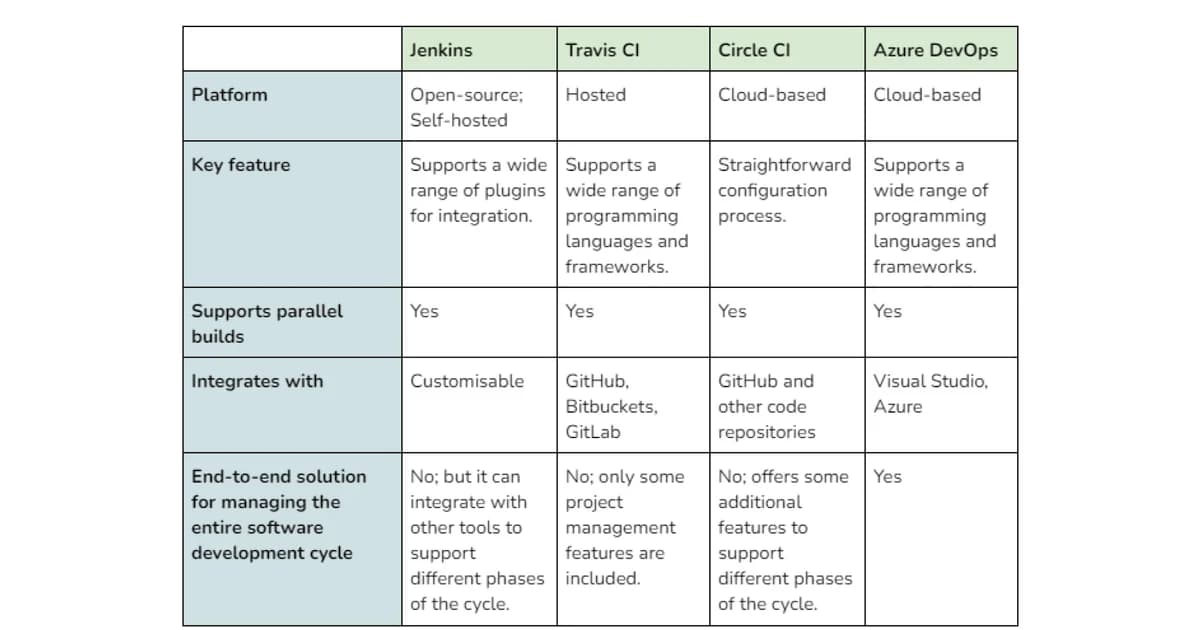
CI/CD Tools Comparison
| Tool | Type | Pricing (Team) | Best For | Learning Curve |
|---|---|---|---|---|
| GitHub Actions | Cloud-hosted | Free (2,000 min/mo), $4/user after | GitHub-native projects | Low |
| GitLab CI | Cloud or self-hosted | Free (400 min/mo), $29/user/mo | GitLab-native, self-hosted | Low-Medium |
| Jenkins | Self-hosted | Free (open source) | Complex, customizable pipelines | High |
| CircleCI | Cloud-hosted | Free (6,000 min/mo), $15/user | Fast builds, Docker-native | Low |
| AWS CodePipeline | Cloud-hosted | $1/pipeline/mo + build minutes | AWS-heavy infrastructure | Medium |
| Buildkite | Hybrid | $15/user/mo | Self-hosted agents, scale | Medium |
| Dagger | Portable engine | Free (open source) | CI-agnostic pipelines | Medium |
| Argo CD | GitOps (CD only) | Free (open source) | Kubernetes GitOps | Medium-High |
Note: Jenkins is still the most deployed CI/CD tool globally, but its market share is declining. New projects should strongly consider GitHub Actions or GitLab CI unless you need Jenkins' plugin ecosystem or have existing Jenkinsfile infrastructure. The maintenance overhead of a Jenkins server is substantial.
Pipeline Optimization: Speed Matters
A slow pipeline is a pipeline developers circumvent. Target under 10 minutes for the full CI check and under 20 minutes for deploy-to-production. Here's how:
- Cache dependencies aggressively -- cache node_modules, pip packages, Go modules, Docker layers. A cold npm install takes 45 seconds; a cached one takes 3 seconds.
- Parallelize everything possible -- lint, unit tests, security scans, and type checking can all run simultaneously.
- Use incremental builds -- tools like Turborepo, Nx, and Bazel only rebuild what changed. In a monorepo, this can reduce build times by 80%.
- Run tests selectively -- only run tests affected by changed files. Jest's
--changedSinceflag and similar tools in other frameworks enable this. - Use larger runners -- GitHub Actions' 4-core runners are 2x faster than default runners for CPU-bound builds. The cost difference is often worth the developer time saved.
- Optimize Docker builds -- multi-stage builds, proper layer ordering (dependencies before source code), and BuildKit caching can cut build times from 5 minutes to 30 seconds.
Pipeline Security: Don't Ship Your Secrets
Your CI/CD pipeline has access to production credentials, deploy keys, and API tokens. It's a high-value target.
Essential Security Practices
- Use environment-scoped secrets -- production secrets should only be accessible to the production deployment job, not to PR builds
- Never echo secrets in logs -- most CI tools mask secrets automatically, but custom scripts can leak them. Audit your logs.
- Pin action versions by SHA --
uses: actions/checkout@b4ffde65notuses: actions/checkout@v4. Tag references can be hijacked. - Restrict who can approve production deploys -- use GitHub environment protection rules or similar features
- Rotate secrets regularly -- automate rotation with tools like Vault or AWS Secrets Manager
Watch out: Pull requests from forks can access your CI environment. By default, GitHub Actions doesn't pass secrets to fork PRs, but some CI tools do. Always verify your CI tool's behavior with fork PRs. A malicious fork PR that exfiltrates secrets is a common attack vector for open-source projects.
GitOps: Declarative Deployments
GitOps extends CI/CD by making git the single source of truth for infrastructure and application state. Tools like Argo CD and Flux watch a git repository and automatically reconcile the cluster state to match the declared configuration.
Instead of kubectl apply in your pipeline, you update a YAML file in a config repo, and the GitOps controller deploys it. This gives you a complete audit trail (git history), easy rollbacks (git revert), and drift detection (the controller alerts when actual state diverges from declared state).
Metrics That Matter
Track these DORA metrics to measure your pipeline's effectiveness:
| Metric | Elite | High | Medium | Low |
|---|---|---|---|---|
| Deployment Frequency | Multiple/day | Weekly-Daily | Monthly-Weekly | Monthly+ |
| Lead Time for Changes | <1 hour | 1 day-1 week | 1 week-1 month | 1 month+ |
| Change Failure Rate | 0-15% | 16-30% | 16-30% | 46-60% |
| Time to Restore | <1 hour | <1 day | 1 day-1 week | 1 week+ |
Frequently Asked Questions
How long should a CI/CD pipeline take?
Target under 10 minutes for CI checks on pull requests and under 20 minutes for the full deploy-to-production flow. The DORA research shows elite teams have lead times under 1 hour from commit to production. If your pipeline takes 30+ minutes, developers will batch changes, reducing deploy frequency and increasing risk per deploy. Invest in caching, parallelization, and selective testing to hit the 10-minute target.
Do I need separate CI and CD tools?
Not usually. GitHub Actions, GitLab CI, and CircleCI handle both CI and CD in a single platform. The exception is Kubernetes-heavy environments where a dedicated GitOps tool like Argo CD handles the deployment side. In that case, your CI tool builds and tests, pushes an artifact, and updates a config repo -- Argo CD handles the actual deployment and reconciliation loop.
What test coverage percentage should I require?
Don't gate on a specific coverage number. 80% coverage with thoughtful tests beats 95% coverage with tests that just exercise code paths without meaningful assertions. Instead, require coverage on changed files -- if you modify a function, that function should have tests. Tools like Codecov and Coveralls can enforce diff coverage thresholds (e.g., 90% of new/changed lines must be covered).
Should I use monorepo or polyrepo CI/CD?
Monorepos simplify dependency management and cross-service changes but complicate CI -- you need tools like Turborepo or Nx to avoid rebuilding everything on every commit. Polyrepos have simpler per-repo pipelines but make cross-service changes harder (multiple PRs, coordinated deploys). Teams under 50 engineers usually benefit from a monorepo. Larger organizations often split into domain-specific repos.
How do I handle database migrations in CI/CD?
Run migrations as a separate pipeline step before deploying application code. Use tools like Flyway, Alembic, or Prisma Migrate. Always make migrations backward-compatible so the old application version works with the new schema during rolling deploys. Test migrations against a copy of production data in staging. Never run destructive migrations (dropping columns) in the same deploy as the code change -- separate them by at least one release cycle.
What's the difference between blue-green and canary deployments?
Blue-green maintains two identical environments and switches traffic instantly from old (blue) to new (green). Rollback is instant -- just switch back. Canary gradually routes a small percentage of traffic (1-5%) to the new version, monitors for errors, and slowly increases the percentage. Canary is safer for detecting subtle bugs but slower to complete. Use blue-green for simple applications and canary for high-traffic services where gradual rollout catches issues before they affect all users.
How do I handle secrets and environment variables?
Never store secrets in your repository or pipeline configuration files. Use your CI platform's built-in secret management (GitHub Encrypted Secrets, GitLab CI Variables) for pipeline secrets. For application secrets in production, use a dedicated secrets manager like HashiCorp Vault, AWS Secrets Manager, or Doppler. Inject secrets as environment variables at runtime, never bake them into container images or build artifacts.
Build Your Pipeline Incrementally
Don't try to build the perfect pipeline on day one. Start with lint and unit tests on PRs. Add integration tests once your test infrastructure is stable. Add container scanning when you move to Docker. Add staging deploys when your team is comfortable with the workflow. Add production auto-deploy when your test coverage and monitoring give you confidence.
Every stage you add reduces risk and increases velocity -- but only if it's reliable. A flaky pipeline that fails randomly is worse than no pipeline at all, because developers learn to ignore failures. Fix flakiness immediately. Your pipeline is only as trustworthy as its least reliable stage.
Written by
Abhishek Patel
Infrastructure engineer with 10+ years building production systems on AWS, GCP, and bare metal. Writes practical guides on cloud architecture, containers, networking, and Linux for developers who want to understand how things actually work under the hood.
Related Articles
Multi-Cluster Kubernetes: Argo CD ApplicationSet Patterns
When 10+ clusters or 50+ services break hand-written GitOps. ApplicationSet's four generators (cluster list, Git directory, PR, cluster decision), real production patterns (env promotion, per-tenant, multi-region failover, preview envs), and the sharp edges (template debugging, cascading mistakes, RBAC).
11 min read
CI/CDBest Feature Flag Services (2026): LaunchDarkly vs Split vs Flagsmith vs GrowthBook
LaunchDarkly, Split, Flagsmith, and GrowthBook compared on pricing, SDK coverage, experimentation stats, and self-hosting. Real 2026 quotes, honest weaknesses, and a decision matrix for mid-market, experimentation-first, and budget-sensitive teams.
15 min read
DevOpsBest DevOps Tools for Small Teams (2026)
A practical guide to DevOps tooling for 2-10 person teams covering CI/CD, infrastructure as code, monitoring, error tracking, secrets management, feature flags, and incident management with real pricing.
12 min read
Enjoyed this article?
Get more like this in your inbox. No spam, unsubscribe anytime.