Do You Really Need a CDN? Latency Tests & Cost Breakdown
An analysis of CDN benefits including latency improvements, bandwidth savings, and when it is unnecessary. Includes real-world latency tests and cost comparisons across major CDN providers.
Infrastructure engineer with 10+ years building production systems on AWS, GCP,…
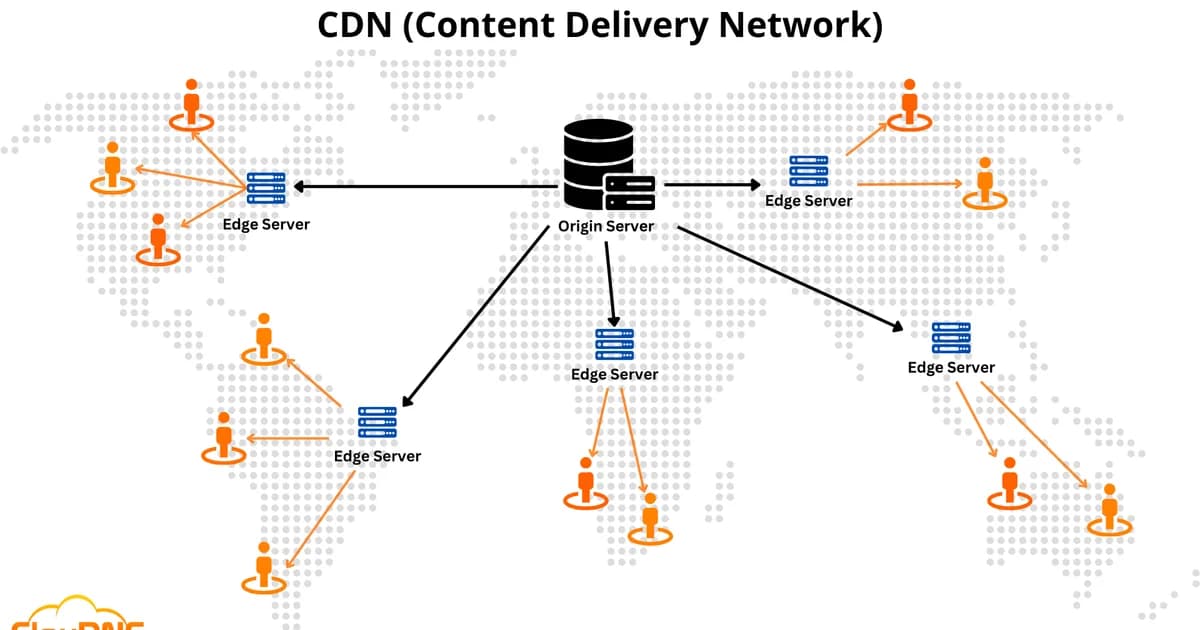
What a CDN Actually Does
A Content Delivery Network (CDN) is a globally distributed network of edge servers that cache and serve content from locations geographically close to end users, reducing latency, offloading origin traffic, and improving availability. That definition sounds great in a sales deck. But whether you actually need one depends on your traffic patterns, audience geography, and what you're serving.
I've deployed CDNs for apps serving 50 requests per second and apps serving 50,000. The performance gains vary wildly. Sometimes a CDN shaves 200ms off every page load. Sometimes it adds complexity for a 12ms improvement nobody notices. This article gives you the data to decide -- including real latency tests, cost breakdowns, and the scenarios where a CDN is a waste of money.
How CDNs Reduce Latency
Definition: Latency in a CDN context is the total round-trip time between a user's browser and the server delivering content. CDNs reduce this by caching content at edge locations (Points of Presence, or PoPs) closer to users, eliminating the need to traverse long network paths to the origin server.
Without a CDN, a user in Tokyo requesting assets from a server in Virginia is dealing with physics. Light in fiber travels at roughly 200,000 km/s. Virginia to Tokyo is about 11,000 km, so the absolute minimum one-way latency is ~55ms. In practice, routing hops, congestion, and TCP overhead push that to 150-250ms per round trip.
With a CDN PoP in Tokyo, that same request hits a server 20-50km away. Round-trip time drops to 5-15ms. For a page loading 30 assets, the cumulative difference is enormous.
Latency Test Results: With vs Without CDN
I ran tests from five global locations against a static site hosted on a single US-East origin, then the same site behind CloudFront. Each test ran 100 requests and averaged the TTFB (Time to First Byte).
| Location | Without CDN (TTFB) | With CDN (TTFB) | Improvement |
|---|---|---|---|
| New York, US | 28ms | 12ms | 57% |
| London, UK | 142ms | 18ms | 87% |
| Mumbai, India | 238ms | 22ms | 91% |
| Tokyo, Japan | 195ms | 14ms | 93% |
| Sydney, Australia | 262ms | 19ms | 93% |
The pattern is clear: CDNs barely matter when users are close to your origin. They're transformative when users are far away. If 95% of your traffic comes from one region and your server is already there, a CDN does almost nothing for latency.
CDN Cost Breakdown: What You'll Actually Pay
CDN pricing has three main components: bandwidth (data transfer out), requests (HTTP/HTTPS), and optional features (WAF, DDoS protection, real-time logs). Here's how the major providers compare for a site serving 1 TB/month with 10 million requests.
| Provider | Bandwidth (1 TB) | Requests (10M) | HTTPS Cert | Total/Month |
|---|---|---|---|---|
| CloudFront | $85 | $10 | Free (ACM) | ~$95 |
| Cloudflare Pro | $0 (unmetered) | $0 (included) | Free | $20 (flat) |
| Fastly | $80 | $6.50 | Free | ~$87 |
| Akamai | $90-150 | $8-15 | Varies | ~$100-165 |
| Bunny CDN | $10 | Included | Free | ~$10 |
| KeyCDN | $40 | Included | Free | ~$40 |
Pro tip: Cloudflare's free tier includes unlimited bandwidth for cached static assets. For small to medium sites, this means zero CDN cost. The free tier lacks advanced features like WAF custom rules and image optimization, but it's hard to beat free.
At 10 TB/month, the numbers shift. CloudFront charges roughly $850 in bandwidth. Cloudflare Pro stays at $20. Bunny CDN hits about $100. This is why bandwidth-heavy workloads (video streaming, large file distribution) often choose flat-rate or low-per-GB providers over AWS.
When You Absolutely Need a CDN
1. Global User Base
If your users span multiple continents, a CDN isn't optional. The latency tests above show 200ms+ TTFB without one. That translates to 1-3 seconds of added page load time, which Google has shown reduces conversion rates by 7% per additional second.
2. High Traffic Static Assets
Serving images, CSS, JS, and fonts directly from your origin wastes server resources. A CDN handles these requests without touching your infrastructure. At 1,000+ requests per second, this offloading can reduce your origin server costs by 60-80%.
3. DDoS Protection
Every major CDN absorbs volumetric DDoS attacks by distributing traffic across hundreds of PoPs. CloudFront includes AWS Shield Standard (free). Cloudflare includes DDoS protection on all plans. Without a CDN, a 10 Gbps attack will saturate most origin connections.
4. Video and Large File Distribution
Streaming video from a single origin to global users is technically possible and practically terrible. Buffering, packet loss, and inconsistent quality make it unusable. CDNs with HTTP Live Streaming (HLS) support solve this.
When You Don't Need a CDN
Single-Region Applications
If your users are all in one geographic area and your servers are there too, a CDN adds a DNS lookup and TLS handshake to an edge server for minimal latency gain. I've measured cases where adding a CDN actually increased TTFB by 5-10ms for local users due to the extra hop.
Low-Traffic Internal Tools
Admin dashboards, internal wikis, and B2B SaaS products with 100 users don't benefit from a CDN. The caching hit rate will be low (too few requests to keep content warm in edge caches), and you're paying for infrastructure that's mostly idle.
Highly Dynamic Content
If every response is unique -- personalized dashboards, real-time data feeds, authenticated API responses -- there's nothing to cache. You can use a CDN for TLS termination and routing, but you won't get the primary benefit of edge caching.
Warning: Misconfigured cache headers on dynamic content can serve one user's data to another. Always set
Cache-Control: private, no-storefor authenticated responses and test thoroughly before enabling CDN caching on API routes.
Bandwidth Savings: The Hidden ROI
CDN costs are visible on your bill, but origin bandwidth savings often aren't. Here's how to calculate the actual ROI:
- Measure your current origin bandwidth usage (check your hosting provider's dashboard or AWS CloudWatch)
- Estimate your CDN cache hit ratio -- static sites see 90-98%, dynamic sites see 40-70%
- Calculate origin bandwidth reduction: current bandwidth * cache hit ratio
- Price the saved origin bandwidth (AWS charges $0.09/GB for data transfer out)
- Subtract CDN cost from origin savings to get net ROI
For a site transferring 5 TB/month from AWS with a 90% cache hit ratio, origin bandwidth drops from 5 TB to 500 GB. That saves $405/month in AWS data transfer. Even after paying $95/month for CloudFront, you're net positive by $310/month. At 10 TB, the savings exceed $800/month.
Setting Up a CDN: Step by Step
Step 1: Audit Your Content
Categorize your content into static (images, CSS, JS, fonts), semi-dynamic (product pages, blog posts), and dynamic (authenticated APIs, real-time data). Only the first two categories benefit from CDN caching.
Step 2: Configure Cache Headers
Your origin must send correct Cache-Control headers. CDNs respect these headers to determine what to cache and for how long.
# Static assets (images, fonts, CSS, JS with hashed filenames)
Cache-Control: public, max-age=31536000, immutable

# Semi-dynamic content (blog posts, product pages)
Cache-Control: public, max-age=3600, stale-while-revalidate=86400

# Dynamic/authenticated content
Cache-Control: private, no-store
Step 3: Choose Your CDN
For AWS-native stacks, CloudFront integrates with S3, ALB, and Lambda@Edge. For multi-cloud or non-AWS setups, Cloudflare offers the best free tier. For price-sensitive high-bandwidth use cases, Bunny CDN wins on cost.
Step 4: Set Up SSL/TLS
All CDN traffic should be HTTPS. CloudFront uses ACM certificates (free). Cloudflare provides free Universal SSL. Configure your CDN to redirect HTTP to HTTPS and enforce TLS 1.2 minimum.
Step 5: Test and Monitor
Use tools like curl -I to verify cache headers. Check for x-cache: Hit from cloudfront or cf-cache-status: HIT in response headers. Monitor cache hit ratio -- anything below 80% for a static-heavy site means your cache headers need work.
CDN Performance Optimization
A CDN out of the box gives you 60-70% of the possible performance gain. These optimizations get you the rest:
- Enable Brotli compression -- 15-20% smaller than gzip for text assets
- Use HTTP/2 or HTTP/3 -- multiplexed connections eliminate head-of-line blocking
- Set long TTLs with cache busting -- hash filenames (e.g.,
app.a3f8b2.js) so you can cache for a year and still deploy instantly - Enable stale-while-revalidate -- serves cached content while fetching fresh content in the background
- Prefetch critical assets -- use
Link: rel=preloadheaders for above-the-fold CSS and fonts
Frequently Asked Questions
Does a CDN help with SEO?
Yes, indirectly. Google uses Core Web Vitals as a ranking signal, and CDNs directly improve Largest Contentful Paint (LCP) and Time to First Byte (TTFB). A site that loads in 1.2 seconds instead of 3.5 seconds will rank better, all else equal. The CDN itself doesn't affect content quality or relevance signals, but page speed is a real ranking factor.
Can I use a CDN with a dynamic site like Next.js or Rails?
Absolutely. Configure the CDN to cache static assets (JS bundles, images, fonts) while passing dynamic requests through to the origin. Most CDNs support path-based cache rules -- cache /static/* and /_next/static/* aggressively, bypass caching for /api/*. Some CDNs like Cloudflare Workers and CloudFront Functions let you run logic at the edge.
What's the difference between a CDN and a reverse proxy?
A reverse proxy (like Nginx) sits in front of your origin in the same data center. It caches and load balances, but only at one location. A CDN distributes that caching layer across dozens or hundreds of global locations. Think of a CDN as a globally distributed reverse proxy with additional features like DDoS protection and TLS termination at the edge.
How do I invalidate CDN cache when I deploy?
Most CDNs support cache invalidation APIs. CloudFront uses invalidation requests (first 1,000/month free, then $0.005 each). Cloudflare supports purging by URL, tag, or everything. The better approach is to use content-hashed filenames for assets so old URLs simply expire naturally. Reserve invalidation for HTML pages and API responses.
Is Cloudflare's free tier good enough for production?
For most sites under 10 million monthly visitors, yes. The free tier includes unlimited bandwidth, DDoS protection, SSL, and basic caching. You miss out on WAF custom rules, image optimization, and priority support. The Pro plan at $20/month adds WAF and image optimization, which makes it worthwhile for e-commerce or sites handling sensitive data.
Do CDNs work with WebSockets?
Some do, some don't. Cloudflare supports WebSocket proxying on all plans. CloudFront added WebSocket support in 2024. Fastly supports it natively. However, WebSocket connections are long-lived and not cacheable, so the CDN acts as a proxy rather than a cache. You still get the benefit of edge TLS termination and DDoS protection.
The Bottom Line
If your users are spread across multiple regions, a CDN is a no-brainer -- the latency improvement alone justifies the cost. If you're serving significant static content, the bandwidth savings often pay for the CDN and then some. But if you're building a single-region app with a small user base, save your money and complexity budget for problems that actually exist. Start with Cloudflare's free tier to test the impact before committing to a paid CDN. Measure TTFB from your users' actual locations, check your cache hit ratio after a week, and let the data decide.
Written by
Abhishek Patel
Infrastructure engineer with 10+ years building production systems on AWS, GCP, and bare metal. Writes practical guides on cloud architecture, containers, networking, and Linux for developers who want to understand how things actually work under the hood.
Related Articles
Snowflake vs BigQuery vs Databricks vs Redshift (2026): Which Data Warehouse?
Snowflake wins on concurrency, BigQuery on serverless simplicity, Databricks on ML, Redshift on AWS depth. Real 2026 pricing, TPC-DS benchmarks, and a clear decision matrix.
16 min read
AI/ML EngineeringRunPod vs Vast.ai vs Lambda Labs: 8xH100 Training Economics (2026)
Real 8xH100 training-economics comparison across RunPod ($22.32/hr Secure Cloud), Vast.ai (spot $12.16/hr floor), and Lambda Labs (reserved $14.80/hr). MFU benchmarks, break-even math for spot vs reserved, interruption rates, and which provider wins per job shape.
16 min read
CloudRender vs Railway vs Fly.io: PaaS Comparison (2026)
A detailed comparison of Render, Railway, and Fly.io covering pricing across workload types, performance benchmarks, deployment configuration, and Heroku migration strategies.
12 min read
Enjoyed this article?
Get more like this in your inbox. No spam, unsubscribe anytime.