RAG Explained: Building AI Applications That Know Your Data
A practical guide to building Retrieval-Augmented Generation pipelines -- from document chunking and embedding to hybrid retrieval and evaluation metrics.
Infrastructure engineer with 10+ years building production systems on AWS, GCP,…
The Chatbot That Invented a Refund Policy
An early prototype support chatbot a team I advised built was asked "what is your refund policy?" and confidently answered: "We offer a full refund within 30 days of purchase, with a restocking fee of 15 percent on opened items." The hallucination was persuasive, grammatically perfect, and completely invented. The company had no restocking fee. The real policy was 14 days, not 30. Two customers reached support quoting the bot's made-up terms; one threatened legal action.
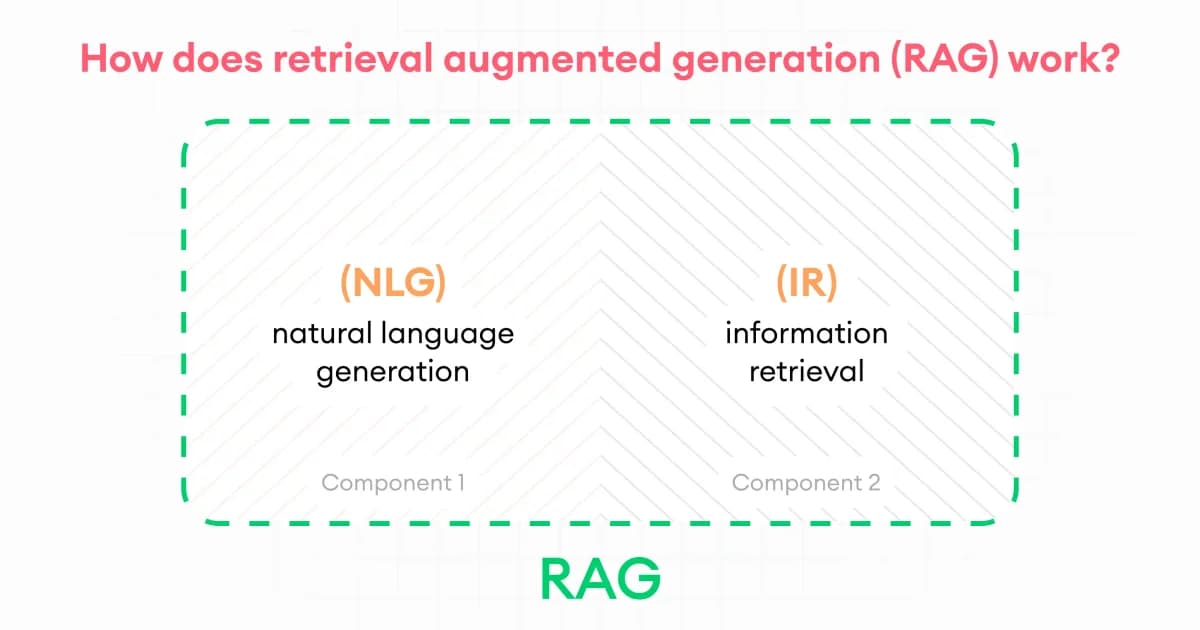
The fix was not a bigger LLM. It was not fine-tuning. It was giving the model the refund policy document as context for every refund-related question. Once the prompt included the actual policy text alongside the user's question, the bot answered correctly and refused to speculate when the context was missing. That pattern -- retrieve relevant documents, inject them into the prompt, generate with grounding -- is Retrieval-Augmented Generation (RAG), and it is the single most impactful architecture change you can make to an LLM app.
I have built RAG pipelines for internal knowledge bases, customer support, legal document search, and code question-answering. The pattern looks trivial on slides. The production reality is that chunking, retrieval, and evaluation are where every team stumbles. This guide covers all three with code, numbers, and the failure modes that cost teams weeks.
The RAG Pipeline: End to End
A RAG system has two phases: an ingestion pipeline (offline, runs ahead of time) and a query pipeline (online, runs per user request). Here's how they fit together.
Step 1: Document Ingestion
Collect your source documents -- PDFs, web pages, Markdown files, database records, Confluence pages, Slack messages. Each source needs a loader that extracts clean text. Libraries like LangChain, LlamaIndex, and Unstructured provide pre-built loaders for most formats. The quality of your extraction directly limits the quality of your answers.
Step 2: Chunking
Split documents into smaller pieces. This is where most RAG pipelines succeed or fail. Chunks need to be small enough to be specific but large enough to carry meaningful context. There are three main strategies:
| Strategy | How It Works | Best For | Typical Size |
|---|---|---|---|
| Fixed-size | Split every N tokens/characters with overlap | Quick prototypes, uniform content | 256-512 tokens |
| Semantic | Split at natural boundaries (paragraphs, sections) using embedding similarity | Long-form documents, varied structure | 200-800 tokens |
| Hierarchical | Maintain parent-child relationships (doc > section > paragraph) | Complex documents, multi-level retrieval | Multiple levels |
Pro tip: Start with fixed-size chunks of 512 tokens and 50-token overlap. This works surprisingly well for most use cases. Only move to semantic or hierarchical chunking when you've confirmed that chunk boundaries are actually causing retrieval failures.
Definition sidebar: Retrieval-Augmented Generation (RAG) is an architecture pattern where an application retrieves relevant documents from an external knowledge base at query time and injects them into the prompt sent to a large language model, producing answers grounded in specific, current, and often private data the model never saw during pre-training.
Step 3: Embedding Generation
Convert each chunk into a vector embedding -- a dense numerical representation that captures semantic meaning. Two chunks about the same topic will have similar embeddings, even if they use different words.
from openai import OpenAI

client = OpenAI()

def embed_chunks(chunks: list[str]) -> list[list[float]]:
    response = client.embeddings.create(
        model="text-embedding-3-small",
        input=chunks
    )
    return [item.embedding for item in response.data]
Popular embedding models include OpenAI's text-embedding-3-small (1536 dimensions, cheap), Cohere's embed-v3, and open-source options like BAAI/bge-large-en-v1.5 that you can self-host.
Step 4: Vector Storage
Store embeddings in a vector database alongside the original text and metadata. At query time, you'll search this store for chunks similar to the user's question. Options range from PostgreSQL with pgvector to purpose-built databases like Pinecone, Weaviate, and Qdrant.
Step 5: Retrieval
When a user asks a question, embed their query using the same embedding model, then find the most similar chunks in your vector store. This is where retrieval strategy matters enormously.
| Retrieval Type | Mechanism | Strengths | Weaknesses |
|---|---|---|---|
| Dense retrieval | Cosine similarity between query and chunk embeddings | Semantic understanding, handles synonyms | Misses exact keyword matches |
| Sparse retrieval | BM25 / TF-IDF keyword matching | Precise keyword matching, fast | No semantic understanding |
| Hybrid retrieval | Combines dense + sparse with reciprocal rank fusion | Best of both worlds | More complex to implement and tune |
Watch out: Dense retrieval alone will miss queries that use exact terminology, product names, or codes. If a user asks about "ERR-4012" and your chunks contain that error code, BM25 will find it instantly while dense retrieval might not. Always benchmark hybrid retrieval against dense-only for your specific data.
Step 6: Context Injection and Generation
Take the retrieved chunks, assemble them into a prompt with the user's question, and send it to the LLM. The prompt template matters -- you need to instruct the model to answer based on the provided context and to say "I don't know" when the context doesn't contain the answer.
def build_rag_prompt(question: str, chunks: list[str]) -> str:
    context = "\n\n---\n\n".join(chunks)
    return f"""Answer the question based ONLY on the following context.
If the context doesn't contain enough information, say "I don't have
enough information to answer that."

Context:
{context}

Question: {question}

Answer:"""
Failure Modes: What Breaks in Production
I have debugged dozens of RAG systems in production. The failures repeat with surprising consistency -- usually in the chunking or retrieval layer, not the LLM itself.
Bad Chunking Splits the Answer Across Chunks
The policy document says: "Customers may return items within 14 days. [paragraph break] Refunds are processed within 3-5 business days." With a 128-token chunker, these land in separate chunks. Retrieval surfaces one but not the other, and the model answers with half the policy. Fix: use overlapping windows (50-100 token overlap) or semantic chunking that respects sentence boundaries.
Query-Document Vocabulary Mismatch
A user asks "how do I get my money back?" but the docs say "refund policy." Dense embeddings often catch this synonym, but specialised vocabulary (product codes, internal acronyms) does not generalise well. Combine dense retrieval with BM25 and fuse the rankings -- hybrid search improved our production faithfulness scores by ~15 points.
Lost in the Middle
LLMs pay disproportionate attention to the beginning and end of their context window. The canonical paper (Liu et al, 2023) showed accuracy dropping up to 40% when the relevant chunk is in position 10 of 20. Fix: rerank and place the top 1-2 most relevant chunks at the very top of the prompt.
Context Poisoning From Over-Retrieval
Retrieving 20 chunks "to be safe" pushes irrelevant content into the context. The model dutifully cites the wrong paragraph. Counterintuitively, fewer high-quality chunks beat more lower-quality ones. Use a cross-encoder reranker (Cohere Rerank, bge-reranker-v2-m3) to cut a top-20 down to a top-3 before generation.
Stale Embeddings After Source Update
A legal team updates the contract template. The source file in S3 is new, but the embeddings in Pinecone still reflect last month's version. Every answer continues citing the old terms. Fix: store a source_hash with every vector and run a nightly reconciliation that re-embeds anything whose hash changed.
Chunk Count Explosion in Cost
5 chunks of 512 tokens each is 2,560 input tokens per query. At 100K queries/month on GPT-4o, that is ~$600/month for context alone -- before any answer tokens. Optimise the retrieval K (test 3 before 5) and use a cheaper model for tasks where 4o-mini is sufficient.
Multi-Tenant Filter Bypass
You retrieve for tenant acme but one chunk's metadata was mis-tagged. The LLM happily cites a competitor's confidential document in an answer. Always pre-filter (not post-filter) on tenant_id at the vector store level, and add a server-side assertion that every retrieved chunk's tenant_id matches the requesting user before the chunks enter the prompt.
How to Evaluate a RAG Pipeline
Direct answer: Evaluate RAG pipelines using three metrics: faithfulness (does the answer match the retrieved context?), answer relevance (does the answer address the question?), and context precision (are the retrieved chunks actually relevant?). Tools like RAGAS automate this evaluation.
Key Evaluation Metrics
| Metric | What It Measures | How to Compute |
|---|---|---|
| Faithfulness | Is the answer grounded in retrieved context? | LLM-as-judge checks each claim against context |
| Answer Relevance | Does the answer actually address the question? | Generate questions from the answer, compare to original |
| Context Precision | Are retrieved chunks relevant? | Check if top-K chunks contain ground-truth answer |
| Context Recall | Did we retrieve all relevant chunks? | Compare retrieved set to complete relevant set |
from ragas import evaluate
from ragas.metrics import faithfulness, answer_relevancy, context_precision

# Prepare evaluation dataset
eval_data = {
    "question": ["What is our refund policy?"],
    "answer": ["Our refund policy allows returns within 30 days."],
    "contexts": [["Refund Policy: Customers may return items within 30 days..."]],
    "ground_truth": ["Customers can return items within 30 days of purchase."]
}

result = evaluate(eval_data, metrics=[faithfulness, answer_relevancy, context_precision])
print(result)
RAG Pipeline Costs: What to Expect
RAG isn't free, and costs can surprise you at scale. Here's a realistic breakdown:
| Component | Cost Driver | Typical Range |
|---|---|---|
| Embedding generation | Per-token API pricing | $0.02-0.13 per 1M tokens |
| Vector storage | Vectors stored + queries/sec | $0-70/month for small-to-mid |
| LLM generation | Input + output tokens per query | $0.15-15 per 1M input tokens |
| Re-indexing | How often source data changes | Embedding cost x corpus size |
Pro tip: The single biggest cost lever is how many tokens you feed to the LLM per query. Retrieve 5 chunks of 512 tokens each, and you're sending 2,500 extra input tokens per request. At GPT-4o pricing, that's roughly $0.006 per query. At 100K queries/month, that's $600 just for context tokens. Optimize retrieval precision to reduce chunks needed.
Frequently Asked Questions
What is the difference between RAG and fine-tuning?
RAG retrieves external knowledge at query time and injects it into the prompt. Fine-tuning modifies the model's weights so it internalizes specific knowledge or behavior. RAG is better for factual, frequently-updated data. Fine-tuning is better for consistent style, format, or specialized reasoning. Many production systems combine both.
How many chunks should I retrieve per query?
Start with 3-5 chunks and measure answer quality. More chunks provide more context but increase cost and risk of confusing the model with irrelevant content. Use a reranker (like Cohere Rerank or a cross-encoder) to score and filter retrieved chunks before passing them to the LLM.
Can RAG work with images and other non-text data?
Yes. Multimodal RAG pipelines use vision models to extract descriptions from images, then embed those descriptions alongside text. You can also use multimodal embedding models like CLIP to embed images directly. This is still maturing but works well for product catalogs and documentation with diagrams.
What's the best vector database for RAG?
If you already use PostgreSQL, start with pgvector. It handles millions of vectors without adding infrastructure. Move to Pinecone, Weaviate, or Qdrant when you need sub-10ms latency at scale, advanced filtering, or features like built-in hybrid search. Most teams over-invest in the vector DB and under-invest in chunking.
How do I handle documents that change frequently?
Implement an incremental ingestion pipeline that watches for changes (via webhooks, polling, or change data capture) and re-embeds only the affected chunks. Track document versions and chunk lineage so you can invalidate stale embeddings. Most vector databases support upsert operations for this purpose.
Does RAG eliminate hallucinations completely?
No. RAG significantly reduces hallucinations by grounding the model in retrieved context, but the model can still hallucinate details not present in the chunks, misinterpret the context, or combine information from multiple chunks incorrectly. Always evaluate faithfulness and consider adding citation extraction to your pipeline.
What is hybrid search in RAG and why does it matter?
Hybrid search combines dense vector retrieval (semantic similarity) with sparse keyword retrieval (BM25). Dense retrieval understands meaning but can miss exact terms. Sparse retrieval finds exact matches but misses synonyms. Combining both with reciprocal rank fusion gives the best retrieval accuracy for most real-world queries.
Build It Incrementally
The best RAG systems I've seen were built incrementally. Start with the simplest possible pipeline -- fixed-size chunks, dense retrieval, a basic prompt template. Measure with a small evaluation dataset. Then improve one component at a time: better chunking, hybrid retrieval, reranking, prompt optimization. Each change should measurably improve your evaluation metrics. If it doesn't, revert it. RAG is an engineering discipline, not a collection of tricks.
Written by
Abhishek Patel
Infrastructure engineer with 10+ years building production systems on AWS, GCP, and bare metal. Writes practical guides on cloud architecture, containers, networking, and Linux for developers who want to understand how things actually work under the hood.
Related Articles
LLM Latency: TTFT, ITL, and Why End-User Latency Isn't What You Think
LLM latency decomposes into TTFT (time to first token, 300-1500ms), ITL (inter-token, 10-30ms), and total time. Each has different causes and fixes. Why streaming dominates UX, when Cerebras/Groq beat Claude on speed, and the optimization playbook.
11 min read
DevOpsPython uv vs pip vs Poetry vs PDM: Speed Benchmarks 2026
Real benchmarks: uv installs Django + ML stack in 8s vs pip's 90s, Poetry's 50s, PDM's 38s. Why uv is fast (Rust + parallelism + PubGrub), what pip still does that uv doesn't, migration paths, and where Poetry's ergonomics still win.
12 min read
AI/ML EngineeringSelf-Hosting LLMs from India: Providers, Latency & INR Pricing (2026)
A practical comparison of self-hosting LLMs on Indian GPU clouds including E2E Networks, Tata TIR, and Yotta Shakti Cloud, with INR pricing inclusive of 18% GST, latency tests from Mumbai, Bangalore, Chennai, and Delhi, and DPDP Act 2023 compliance notes.
15 min read
Enjoyed this article?
Get more like this in your inbox. No spam, unsubscribe anytime.