Spot Instances Explained: How to Save 90% on AWS Compute
Learn how AWS Spot Instances work, when to use them, and how to architect for interruption. Covers pricing, Spot Fleet, mixed ASGs, checkpointing, and real cost comparisons.
Infrastructure engineer with 10+ years building production systems on AWS, GCP,…
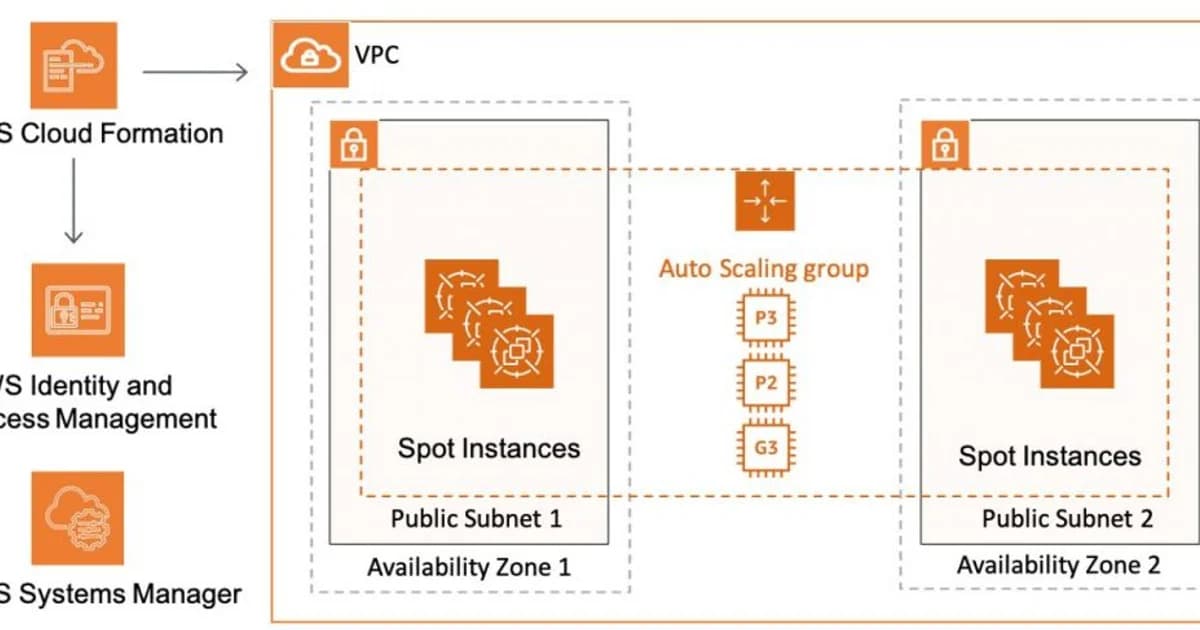
Spare Capacity at a Steep Discount
Spot Instances let you use AWS's unused EC2 capacity at up to 90% off the on-demand price. That's not a marketing exaggeration -- a c5.xlarge that costs $0.17/hour on-demand regularly runs at $0.05/hour or less on the spot market. The catch is real, though: AWS can reclaim your instance with just two minutes' notice when it needs the capacity back. That constraint shapes everything about how you use them.
I've run production batch pipelines, CI/CD systems, and stateless web tiers on spot instances for years. The savings are enormous, but only if you architect for interruption from the start. Bolting spot onto an existing architecture that assumes instances are permanent will cause outages. This guide covers how the spot market works, which workloads fit, and the specific patterns that make spot reliable.
What Are Spot Instances?
Definition: Spot Instances are spare EC2 compute capacity offered at reduced prices. AWS sets the spot price based on supply and demand in each Availability Zone. When capacity is needed elsewhere, AWS interrupts spot instances with a two-minute warning.
The spot market replaced the old bidding system in 2017. You no longer set a maximum bid price. Instead, you pay the current spot price (which fluctuates but is usually stable for days or weeks at a time) and AWS interrupts you only when capacity runs out -- not when prices rise above your bid.
How Spot Pricing Works
| Pricing Model | Discount | Commitment | Interruption Risk |
|---|---|---|---|
| On-Demand | 0% | None | None |
| Reserved Instances | 30-60% | 1 or 3 years | None |
| Savings Plans | 30-60% | 1 or 3 years | None |
| Spot Instances | 60-90% | None | High (2-min notice) |
Spot pricing varies by instance type, AZ, and time. A m5.large in us-east-1a might be $0.03/hour while the same instance in us-east-1b is $0.04/hour. The Spot Pricing History page in the EC2 console shows 90 days of price data per instance type and AZ.
Setting Up Spot Instances: Step by Step
Step 1: Choose Your Instance Types
Never rely on a single instance type. Spot capacity varies per type, and diversifying across multiple types dramatically reduces your interruption rate. If your workload needs 4 vCPUs and 8 GB RAM, consider c5.xlarge, c5a.xlarge, c5d.xlarge, m5.xlarge, and c6i.xlarge.
Step 2: Spread Across Availability Zones
Capacity shortages are usually zone-specific. Running spot instances across all AZs in a region means a shortage in one zone doesn't take out your entire fleet.
Step 3: Set Up Interruption Handling
When AWS needs capacity back, it sends a two-minute warning via:
- The instance metadata service at
http://169.254.169.254/latest/meta-data/spot/instance-action - An EventBridge event (
EC2 Spot Instance Interruption Warning) - CloudWatch Events (legacy, same data)
#!/bin/bash
# Poll for spot interruption notice
while true; do
  RESPONSE=$(curl -s -o /dev/null -w "%{http_code}" \
    http://169.254.169.254/latest/meta-data/spot/instance-action)
  if [ "$RESPONSE" -eq 200 ]; then
    echo "Spot interruption notice received. Draining..."
    # Drain connections, checkpoint state, deregister from load balancer
    /opt/scripts/graceful-shutdown.sh
    break
  fi
  sleep 5
done
Step 4: Use Spot Fleet or Mixed ASG
Don't launch individual spot instances. Use one of these managed approaches:
- Spot Fleet -- requests a target capacity across multiple instance types and AZs, automatically replacing interrupted instances
- Auto Scaling Group with mixed instances -- combines on-demand and spot in a single ASG with configurable ratios
Pro tip: Use a mixed ASG with 20-30% on-demand base capacity and 70-80% spot. This guarantees a minimum fleet size even during severe spot shortages while capturing most of the savings.
Best Workloads for Spot Instances
Batch Processing and Data Pipelines
Spark jobs, ETL pipelines, video transcoding, and machine learning training are ideal. These workloads can checkpoint progress, retry failed tasks, and tolerate variable completion times. AWS EMR natively supports spot instances for task nodes.
CI/CD Build Agents
Jenkins agents, GitHub Actions self-hosted runners, and GitLab runners are perfect for spot. Each build is independent, and a terminated build simply gets retried. Teams typically see 70-80% cost reduction on their CI infrastructure.
Stateless Web and API Tiers
If your application servers are behind a load balancer and store no local state, they can run on spot. The ALB health checks detect interrupted instances and stop routing traffic to them. The ASG replaces them automatically.
Containers (ECS and EKS)
ECS and EKS can schedule tasks and pods onto spot instances. ECS Capacity Providers handle spot natively -- they manage the ASG, handle draining, and reschedule tasks on healthy instances. EKS works with Karpenter, which provisions spot nodes dynamically based on pod requirements.
Workloads That Don't Fit
- Databases -- primary database instances need stable compute. The two-minute warning isn't enough for a clean failover.
- Long-running stateful jobs without checkpointing -- a 12-hour training run that loses all progress on interruption wastes money rather than saving it.
- Single-instance workloads -- if your architecture has a single point of failure, spot makes it worse.
Cost Comparison: Real Numbers
Here's what a 10-node compute cluster costs per month (us-east-1, c5.2xlarge):
| Strategy | Monthly Cost | Savings |
|---|---|---|
| All On-Demand | $2,448 | -- |
| All Reserved (1yr, no upfront) | $1,560 | 36% |
| All Spot (avg $0.10/hr) | $720 | 71% |
| Mixed (3 OD + 7 Spot) | $1,238 | 49% |
The mixed approach is the sweet spot for most production workloads. You get meaningful savings while maintaining a guaranteed baseline capacity.
Advanced Patterns
Checkpointing for Long Jobs
For jobs longer than a few minutes, write intermediate state to S3 or EFS at regular intervals. When an instance is interrupted, the replacement instance picks up from the last checkpoint. Apache Spark, TensorFlow, and PyTorch all support checkpoint/resume natively.
Spot Placement Score
The Spot Placement Score API rates each region and AZ from 1-10 based on likely capacity availability for your instance type mix. Query it before launching large fleets to find the best location.
Capacity-Optimized Allocation Strategy
When creating a Spot Fleet or ASG, use the capacity-optimized allocation strategy instead of lowest-price. It launches instances in the pools with the most available capacity, reducing interruption rates by 60-80% compared to cheapest-first.
Watch out: The
lowest-priceallocation strategy is tempting but dangerous. It concentrates your fleet in the cheapest pools, which are often the most contested. A single capacity change can interrupt your entire fleet at once.
Frequently Asked Questions
What happens when a spot instance is interrupted?
AWS sends a two-minute warning through the instance metadata service and EventBridge. After two minutes, the instance is stopped, terminated, or hibernated based on your configuration. You're not charged for the partial hour during which the interruption occurred. Any EBS volumes remain attached if the instance is stopped rather than terminated.
Can I get spot instances for GPU workloads?
Yes, GPU instances like p3, p4d, and g5 are available as spot, often at 60-70% discount. However, GPU spot capacity is more scarce and interruption rates are higher than general-purpose instances. Always diversify across multiple GPU instance families and AZs, and implement checkpointing for training jobs.
How do spot instances work with Auto Scaling?
Create an Auto Scaling Group with a mixed instances policy. Specify your instance types, the percentage of on-demand vs spot, and the allocation strategy. The ASG handles launching, replacing interrupted instances, and scaling based on your policies. Use capacity-optimized allocation for the lowest interruption rate.
Are spot instances available in all regions?
Spot instances are available in every AWS region, but capacity and pricing vary significantly. Newer regions often have more spare capacity and lower spot prices. The Spot Pricing History and Spot Placement Score API help you identify the best regions for your workload.
What is the difference between Spot Fleet and Spot in an ASG?
Spot Fleet is an older API that manages a fleet of spot (and optionally on-demand) instances independently. A mixed-instance ASG integrates spot into the standard Auto Scaling framework, supporting target tracking, lifecycle hooks, and integration with ALB and ECS. For new workloads, mixed ASGs are the recommended approach.
Can spot instances be used with containers?
Absolutely. ECS Capacity Providers manage spot-backed ASGs and handle task draining automatically. For EKS, Karpenter provisions spot nodes dynamically and respects pod disruption budgets during interruptions. Both approaches work well for stateless microservices and batch workloads.
Start Small, Then Scale
Don't try to move everything to spot at once. Start with a non-critical workload -- CI runners or a batch job -- and validate your interruption handling. Once you've seen it work through a few interruptions, expand to stateless web tiers with mixed ASGs. Use the capacity-optimized allocation strategy, diversify across at least five instance types and three AZs, and always maintain an on-demand baseline. The savings will show up on your next bill.
Written by
Abhishek Patel
Infrastructure engineer with 10+ years building production systems on AWS, GCP, and bare metal. Writes practical guides on cloud architecture, containers, networking, and Linux for developers who want to understand how things actually work under the hood.
Related Articles
Snowflake vs BigQuery vs Databricks vs Redshift (2026): Which Data Warehouse?
Snowflake wins on concurrency, BigQuery on serverless simplicity, Databricks on ML, Redshift on AWS depth. Real 2026 pricing, TPC-DS benchmarks, and a clear decision matrix.
16 min read
AI/ML EngineeringRunPod vs Vast.ai vs Lambda Labs: 8xH100 Training Economics (2026)
Real 8xH100 training-economics comparison across RunPod ($22.32/hr Secure Cloud), Vast.ai (spot $12.16/hr floor), and Lambda Labs (reserved $14.80/hr). MFU benchmarks, break-even math for spot vs reserved, interruption rates, and which provider wins per job shape.
16 min read
CloudRender vs Railway vs Fly.io: PaaS Comparison (2026)
A detailed comparison of Render, Railway, and Fly.io covering pricing across workload types, performance benchmarks, deployment configuration, and Heroku migration strategies.
12 min read
Enjoyed this article?
Get more like this in your inbox. No spam, unsubscribe anytime.