Canary Deployments: Gradual Rollouts That Catch Problems Early
Canary deployments route a small percentage of traffic to the new version, catching problems before they affect everyone. Learn implementation with Nginx, Argo Rollouts, Flagger, and feature flags.
Infrastructure engineer with 10+ years building production systems on AWS, GCP,…
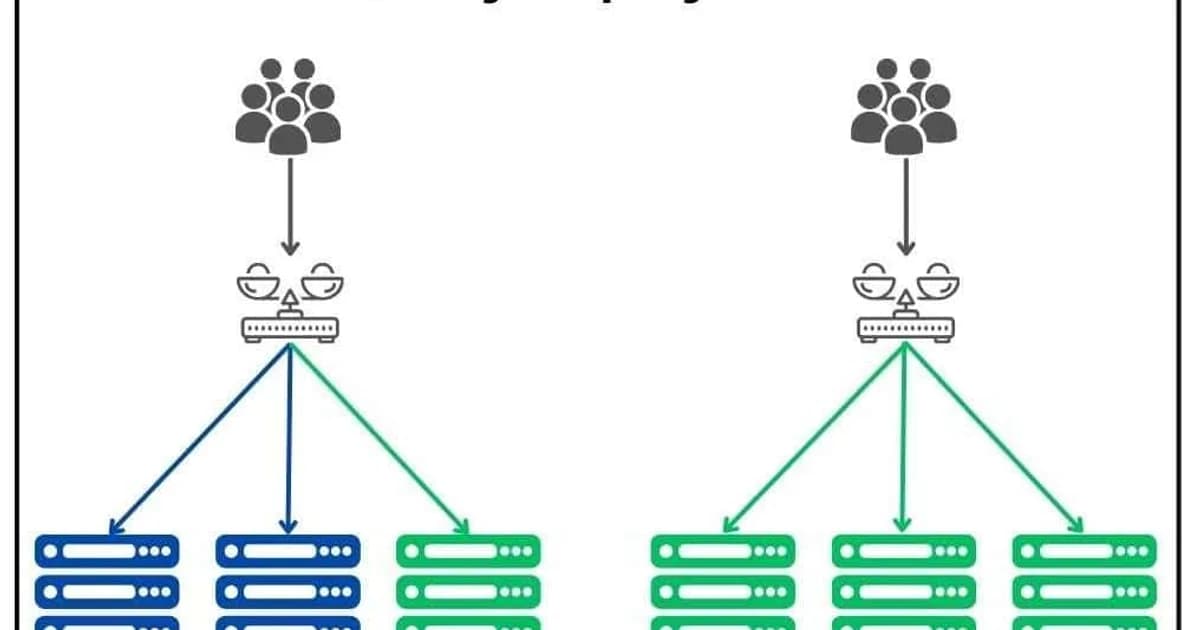
The 03:47 Rollback That Saved 94% of Our Checkout Traffic
It was 03:47 UTC on a Thursday when Flagger's auto-rollback kicked in on a payments service I was on-call for. The new release had passed 6% traffic fine. At 25% the canary's p99 checkout latency jumped from 180 ms to 2.4 seconds -- a regression in a connection-pool configuration that only manifested at moderate concurrency. Flagger saw the SLO burn, shifted traffic back to the stable version within 48 seconds, and paged me to describe what had happened, not to fix a live outage.
Here is the counterfactual: without the canary, that release would have been a blue-green swap to 100% of traffic at 03:30, locked in for 20 minutes while everyone slept. At a conservative 400 checkouts per minute, that is 8,000 failed transactions before anyone noticed. Instead, exactly 473 checkouts saw the regression -- 6% of the canary window -- and every one of them retried successfully after rollback.
That incident is why I will not ship production traffic changes without a canary anymore. This guide covers what a canary actually is, how to implement one with Nginx, Kubernetes (Argo Rollouts), and fully automated analysis (Flagger), plus the metric thresholds that make auto-rollback reliable at 3 AM.
Canary vs Blue-Green vs Rolling Update
| Aspect | Canary | Blue-Green | Rolling Update |
|---|---|---|---|
| Traffic split | Gradual (1% to 100%) | All-or-nothing switch | Instance by instance |
| Blast radius | Very small initially | All users at once | Grows with each instance |
| Rollback speed | Seconds (shift traffic back) | Seconds (switch environments) | Minutes (re-deploy old version) |
| Complexity | High (traffic splitting, metrics) | Medium (two environments) | Low (built into most orchestrators) |
| Infrastructure cost | Minimal extra (canary instances) | 2x during deploy | 1x plus rolling buffer |
Definition sidebar: A canary deployment is a progressive release strategy that shifts a small fraction of production traffic (typically 1-5 percent) to a new version, observes error and latency metrics in real time against the simultaneously-running stable version, and only promotes the new version to 100 percent of traffic if SLOs hold. The name is from canaries in coal mines -- early-warning detection with minimal blast radius.
How Canary Deployments Work: Step by Step
- Deploy the canary -- launch a small number of instances (or pods) running the new version alongside the existing fleet.
- Route initial traffic -- configure your load balancer or service mesh to send 1-5% of traffic to canary instances.
- Observe metrics -- monitor error rates, latency (p50, p95, p99), CPU/memory usage, and business metrics (conversion rates, API success rates) for 10-30 minutes.
- Promote or rollback -- if metrics are healthy, increase traffic to 25%, then 50%, then 100%. If any metric degrades, route all traffic back to the stable version.
- Scale down old version -- once the canary handles 100% of traffic, decommission the old instances.
Metrics That Matter During a Canary
The whole point of canary is early detection, which means you need to know exactly what to watch. Here are the metrics that should gate your canary promotion:
Must-Watch Metrics
- Error rate (5xx responses) -- the most obvious signal. Compare the canary's error rate to the stable version's baseline. Even a 0.5% increase warrants investigation.
- Latency percentiles (p50, p95, p99) -- averages hide problems. A p99 that doubles means 1 in 100 requests is significantly slower, which often indicates a regression in a specific code path.
- Saturation (CPU, memory, connections) -- a canary that uses 2x the memory of the stable version has a leak that'll cause an outage at full traffic.
- Business metrics -- checkout completion rate, API call success rate, user engagement. These catch functional bugs that don't manifest as errors or latency spikes.
Pro tip: Always compare canary metrics against the stable version running simultaneously, not against historical baselines. Traffic patterns change throughout the day, so a direct comparison between canary and stable at the same moment eliminates time-of-day bias.
Canary With Nginx Weighted Upstreams
The simplest canary implementation uses Nginx's weight parameter on upstream servers. No service mesh required.
upstream backend {
    # Stable version -- 95% of traffic
    server 10.0.1.10:3000 weight=95;
    server 10.0.1.11:3000 weight=95;

    # Canary -- 5% of traffic
    server 10.0.2.10:3000 weight=5;
}

server {
    listen 80;
    server_name app.example.com;

    location / {
        proxy_pass http://backend;
        proxy_set_header Host $host;
        proxy_set_header X-Real-IP $remote_addr;
    }
}
Adjust the weights and reload Nginx to change the traffic split. This is crude -- the weights are approximate, not exact percentages -- but it works for simple setups where you don't need precise traffic control.
Canary on Kubernetes With Argo Rollouts
Kubernetes doesn't support weighted traffic splitting natively (its Services distribute traffic equally across all matching pods). Argo Rollouts replaces the standard Deployment resource with a Rollout that supports canary and blue-green strategies.
apiVersion: argoproj.io/v1alpha1
kind: Rollout
metadata:
  name: myapp
spec:
  replicas: 10
  strategy:
    canary:
      steps:
      - setWeight: 5
      - pause: { duration: 10m }
      - setWeight: 25
      - pause: { duration: 10m }
      - setWeight: 50
      - pause: { duration: 10m }
      - setWeight: 100
      canaryService: myapp-canary
      stableService: myapp-stable
      trafficRouting:
        nginx:
          stableIngress: myapp-ingress
  selector:
    matchLabels:
      app: myapp
  template:
    metadata:
      labels:
        app: myapp
    spec:
      containers:
      - name: app
        image: myapp:1.1.0
        ports:
        - containerPort: 3000
This configuration deploys to 5% of traffic, waits 10 minutes, promotes to 25%, waits again, then 50%, and finally 100%. Argo Rollouts works with Nginx Ingress, AWS ALB, Istio, and other traffic managers for precise traffic splitting.
Automated Canary Analysis With Flagger
Flagger takes canary deployments further by automating the promotion decision. Instead of manual observation, Flagger queries your metrics system (Prometheus, Datadog, CloudWatch) and promotes or rolls back based on thresholds you define.
apiVersion: flagger.app/v1beta1
kind: Canary
metadata:
  name: myapp
spec:
  targetRef:
    apiVersion: apps/v1
    kind: Deployment
    name: myapp
  service:
    port: 3000
  analysis:
    interval: 1m
    threshold: 5        # max failed checks before rollback
    maxWeight: 50       # max traffic to canary
    stepWeight: 10      # increment per interval
    metrics:
    - name: request-success-rate
      thresholdRange:
        min: 99
      interval: 1m
    - name: request-duration
      thresholdRange:
        max: 500        # milliseconds
      interval: 1m
    webhooks:
    - name: smoke-test
      type: pre-rollout
      url: http://flagger-loadtester/
      metadata:
        cmd: "curl -s http://myapp-canary:3000/health"
Flagger checks the request success rate and duration every minute. If the success rate drops below 99% or latency exceeds 500ms for 5 consecutive checks, it rolls back automatically. No human intervention needed at 3 AM.
Feature Flags as a Canary Alternative
Feature flags can achieve canary-like behavior at the application layer instead of the infrastructure layer. Instead of deploying separate instances, you deploy the new code to all instances but enable it for a percentage of users via a flag.
| Aspect | Infrastructure Canary | Feature Flag Canary |
|---|---|---|
| Traffic control | Load balancer / service mesh | Application code |
| Granularity | Percentage of requests | Percentage of users (sticky) |
| Rollback | Shift traffic to old instances | Disable the flag |
| Infrastructure needed | Multiple versions running | Single version, flag service |
| Best for | Infrastructure changes, full releases | Feature-level rollouts, A/B tests |
Pro tip: Use both together. Infrastructure canary for the deployment itself (catches crashes, memory leaks, startup failures), and feature flags for new functionality within that deployment (catches business logic bugs, UX regressions). They complement each other -- they're not competing strategies.
Canary Tooling Comparison and Pricing
| Tool | Type | Cost | Best For |
|---|---|---|---|
| Argo Rollouts | K8s controller | Free (open source) | Kubernetes-native canary with manual or automated promotion |
| Flagger | K8s operator | Free (open source) | Fully automated canary with metrics-based promotion |
| Istio | Service mesh | Free (open source) | Fine-grained traffic splitting across services |
| AWS App Mesh | Managed mesh | Free (pay for compute) | AWS-native service mesh with canary support |
| LaunchDarkly | Feature flags | From $10/seat/month | Application-layer canary via percentage rollouts |
| Spinnaker | CD platform | Free (open source) | Multi-cloud canary with automated analysis (Kayenta) |
Failure Modes: What Breaks in Production Canaries
Canaries are safer than blue-green but they have their own pathologies. These are the ones that have caused false rollbacks or missed regressions on my teams.
Sticky Sessions Break Canary Math
If your load balancer uses session stickiness (cookie-based affinity), a user who hits a canary pod once continues hitting it even as you shift weights. Effective canary percentage becomes "5% of new sessions" rather than "5% of all requests." For metrics to be comparable, either disable stickiness for the canary window or bucket metrics by session-start version.
Warmup Windows That Poison Metrics
New pods take 60-180 seconds to warm JIT caches, DB connection pools, and class loaders. A canary's p99 latency in the first two minutes is almost always worse than stable, even for a correct release. Set analysisRunStartingStep to skip the first interval, or require 3 consecutive good checks before promoting.
Low-Volume Services Can't Be Canaried
At 10 requests/minute, 5% canary traffic is 30 requests per hour. That is not enough to distinguish an error-rate regression from normal variance. For low-traffic services, either extend the canary window to 24+ hours, use synthetic load during the canary, or fall back to blue-green with manual smoke tests.
Database Migration During Canary
A canary where the new version requires a DB schema change is a landmine. The stable version may error on the migrated schema, or the canary may error on the unmigrated one. Either (1) make migrations backward-compatible (expand-contract pattern) or (2) run the migration before any canary traffic shifts.
Auto-Rollback Race With Manual Deploy
Flagger can promote to 50%, detect a regression, and start rolling back -- all while a CI/CD pipeline is in the middle of the next deploy step. The result is a half-rolled-back, half-forward-rolled mess. Fix: gate the CD pipeline on the Canary resource's status.phase=Succeeded condition, not on the initial kubectl apply return code.
Frequently Asked Questions
What is a canary deployment?
A canary deployment releases a new version to a small subset of production traffic -- typically 1-5% -- while the rest continues using the stable version. Metrics are monitored during this period. If the new version performs well, traffic is gradually increased to 100%. If problems are detected, traffic is routed back to the stable version with minimal user impact.
How much traffic should a canary receive initially?
Start with 1-5% of traffic. The exact number depends on your total request volume. You need enough traffic to generate statistically significant metrics within your observation window (typically 10-30 minutes). For low-traffic services, you might need 10-20% to get meaningful data. For high-traffic services, even 1% provides thousands of data points per minute.
What metrics should I monitor during a canary deployment?
Focus on four categories: error rates (5xx responses compared to stable), latency percentiles (p50, p95, p99 -- not averages), resource saturation (CPU, memory, connection counts), and business metrics (conversion rates, API success rates). Always compare canary metrics against the simultaneously-running stable version, not historical baselines.
Can I do canary deployments without Kubernetes?
Yes. Nginx weighted upstreams, HAProxy backend weighting, AWS ALB weighted target groups, and cloud provider load balancers all support traffic splitting without Kubernetes. You can also implement canary at the application layer using feature flags, routing a percentage of users to new code paths without separate infrastructure.
What is the difference between canary and A/B testing?
Canary deployments test infrastructure and application stability -- the goal is to catch bugs and performance regressions. A/B testing measures user behavior differences between variants -- the goal is to optimize business metrics. Canary is a deployment strategy; A/B testing is a product experimentation strategy. They can use similar traffic-splitting infrastructure.
How long should a canary run before promoting to full traffic?
At minimum, long enough to process a statistically significant number of requests and cover at least one full cycle of your application's behavior patterns. For most web applications, 15-30 minutes per traffic increment is sufficient. For applications with daily or weekly patterns (batch jobs, scheduled tasks), you may need longer observation windows.
What happens to in-flight requests during a canary rollback?
In-flight requests to canary instances complete normally. The rollback only affects new requests by routing them away from canary instances. Most load balancers and service meshes support connection draining, allowing active requests to finish within a configurable timeout (typically 30-60 seconds) before canary instances are terminated.
Conclusion
Canary deployments are the safest way to ship changes to production. The initial setup cost is higher than blue-green or rolling updates -- you need traffic splitting, metrics collection, and promotion logic -- but the payoff is catching problems when they affect 5% of users instead of 100%.
If you're on Kubernetes, start with Argo Rollouts. It's a drop-in replacement for Deployments and gets you manual canary promotion immediately. Once you're comfortable, add Flagger for automated analysis. If you're not on Kubernetes, weighted load balancer targets or feature flag percentage rollouts get you 80% of the benefit with significantly less infrastructure complexity.
Written by
Abhishek Patel
Infrastructure engineer with 10+ years building production systems on AWS, GCP, and bare metal. Writes practical guides on cloud architecture, containers, networking, and Linux for developers who want to understand how things actually work under the hood.
Related Articles
Multi-Cluster Kubernetes: Argo CD ApplicationSet Patterns
When 10+ clusters or 50+ services break hand-written GitOps. ApplicationSet's four generators (cluster list, Git directory, PR, cluster decision), real production patterns (env promotion, per-tenant, multi-region failover, preview envs), and the sharp edges (template debugging, cascading mistakes, RBAC).
11 min read
AI/ML EngineeringLLM Latency: TTFT, ITL, and Why End-User Latency Isn't What You Think
LLM latency decomposes into TTFT (time to first token, 300-1500ms), ITL (inter-token, 10-30ms), and total time. Each has different causes and fixes. Why streaming dominates UX, when Cerebras/Groq beat Claude on speed, and the optimization playbook.
11 min read
DevOpsPython uv vs pip vs Poetry vs PDM: Speed Benchmarks 2026
Real benchmarks: uv installs Django + ML stack in 8s vs pip's 90s, Poetry's 50s, PDM's 38s. Why uv is fast (Rust + parallelism + PubGrub), what pip still does that uv doesn't, migration paths, and where Poetry's ergonomics still win.
12 min read
Enjoyed this article?
Get more like this in your inbox. No spam, unsubscribe anytime.