Certificate Management at Scale: Let's Encrypt, ACME, and cert-manager
Automate TLS certificates with Let's Encrypt, ACME protocol, and cert-manager in Kubernetes. Covers HTTP-01, DNS-01, wildcards, private CAs, and expiry monitoring.
Infrastructure engineer with 10+ years building production systems on AWS, GCP,…
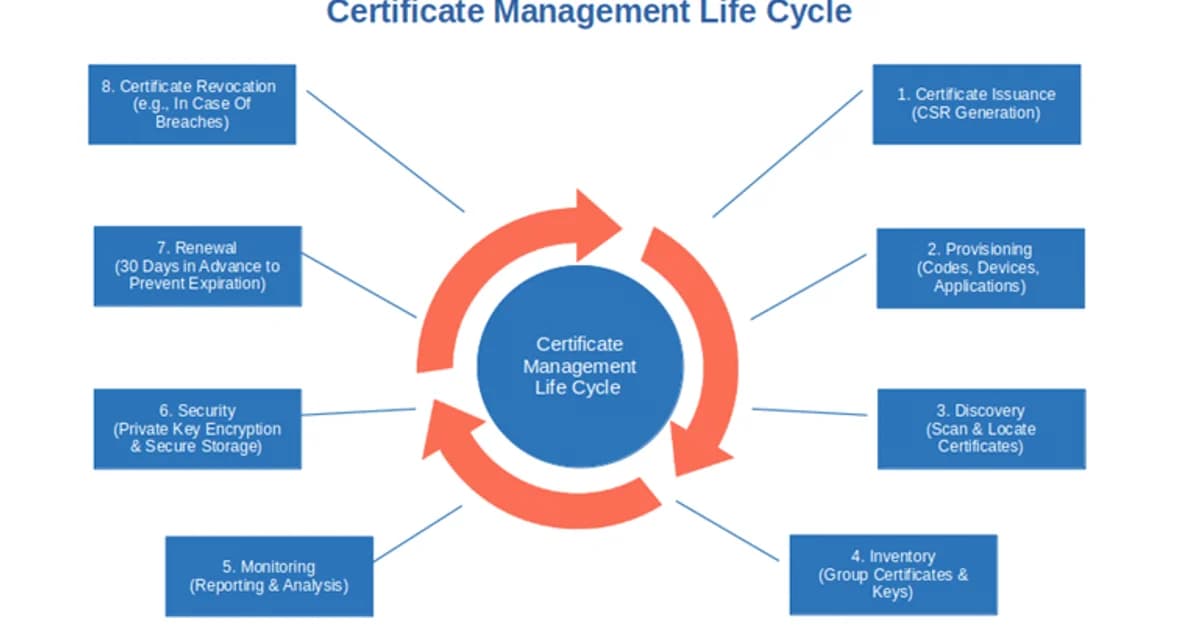
The 04:12 Page That Taught Me to Automate Certificates
At 04:12 on a Saturday morning my phone buzzed with a PagerDuty alert: api.example.com TLS handshake failures -- 100% of requests failing. The certificate had expired overnight. Not because we forgot to renew -- because the renewal cron had been silently failing for three weeks after an OS upgrade broke the Python 2 certbot binary. The monitoring alerted on handshake failures but not on the three weeks of failed renewal attempts in /var/log/letsencrypt/.
Forty-seven minutes of total outage. Seven customer escalations. One post-mortem that concluded, correctly, that certificate management is a monitoring problem pretending to be a cryptography problem. Nobody's renewal logic ever fails gracefully. It fails weeks ahead of time, in a log file nobody reads, and then the production alarm goes off when users start seeing "Your connection is not private."
The rebuild after that outage is why I will never again manage certificates without cert-manager, Prometheus alerts on certmanager_certificate_expiration_timestamp_seconds, and Let's Encrypt as the issuer. This guide covers the ACME protocol, cert-manager in Kubernetes, and the monitoring setup that actually catches silent renewal failures -- not three weeks later, but within an hour.
How ACME Domain Validation Works
Before a CA issues a certificate, it needs proof that you control the domain. ACME defines several challenge types:
HTTP-01 Challenge
- Your ACME client requests a certificate for
example.com. - The CA provides a random token.
- Your client places the token at
http://example.com/.well-known/acme-challenge/{token}. - The CA's validation servers fetch that URL from multiple network vantage points.
- If the token matches, the CA issues the certificate.
HTTP-01 is the simplest challenge type. It works for any publicly accessible web server. The limitation: it only works for port 80, can't issue wildcard certificates, and requires your server to be reachable from the internet during validation.
DNS-01 Challenge
- Your ACME client requests a certificate for
*.example.com. - The CA provides a token value.
- Your client creates a TXT record at
_acme-challenge.example.comwith the token. - The CA queries DNS for that TXT record.
- If the record matches, the CA issues the certificate.
DNS-01 is the only way to get wildcard certificates. It also works for servers that aren't publicly accessible. The trade-off: it requires programmatic access to your DNS provider's API, and DNS propagation can add latency to the validation process.
| Challenge | Wildcard Support | Requires Public Access | Complexity | Best For |
|---|---|---|---|---|
| HTTP-01 | No | Yes (port 80) | Low | Simple web servers, ingress controllers |
| DNS-01 | Yes | No | Medium | Wildcards, private infrastructure |
| TLS-ALPN-01 | No | Yes (port 443) | Medium | Environments where port 80 is blocked |
Definition sidebar: ACME (Automatic Certificate Management Environment, RFC 8555) is the protocol that automates the issuance, renewal, and revocation of TLS certificates between a client and a Certificate Authority. Let's Encrypt, ZeroSSL, Google Trust Services, Buypass, and private CAs like step-ca all implement it -- the protocol is not tied to any single CA.
cert-manager: Automated Certificates in Kubernetes
Cert-manager is the standard tool for managing TLS certificates in Kubernetes. It watches for Certificate resources and Ingress annotations, then uses ACME (or other issuers) to obtain and renew certificates automatically.
Installing cert-manager
# Install cert-manager with CRDs
kubectl apply -f https://github.com/cert-manager/cert-manager/releases/download/v1.16.0/cert-manager.yaml

# Verify the installation
kubectl get pods -n cert-manager
# cert-manager, cert-manager-cainjector, cert-manager-webhook should all be Running
Setting Up a Let's Encrypt Issuer
apiVersion: cert-manager.io/v1
kind: ClusterIssuer
metadata:
  name: letsencrypt-prod
spec:
  acme:
    server: https://acme-v02.api.letsencrypt.org/directory
    email: admin@example.com
    privateKeySecretRef:
      name: letsencrypt-prod-key
    solvers:
      - http01:
          ingress:
            ingressClassName: nginx
Pro tip: Always test with the Let's Encrypt staging server first (
https://acme-staging-v02.api.letsencrypt.org/directory). The staging server has generous rate limits and issues untrusted certificates for testing. The production server has strict rate limits -- 50 certificates per registered domain per week -- that can lock you out during debugging.
Requesting a Certificate
There are two ways to get certificates with cert-manager:
Option 1: Certificate resource
apiVersion: cert-manager.io/v1
kind: Certificate
metadata:
  name: example-com-tls
  namespace: production
spec:
  secretName: example-com-tls-secret
  issuerRef:
    name: letsencrypt-prod
    kind: ClusterIssuer
  dnsNames:
    - example.com
    - www.example.com
Option 2: Ingress annotation (simpler)
apiVersion: networking.k8s.io/v1
kind: Ingress
metadata:
  name: example-ingress
  annotations:
    cert-manager.io/cluster-issuer: letsencrypt-prod
spec:
  ingressClassName: nginx
  tls:
    - hosts:
        - example.com
        - www.example.com
      secretName: example-com-tls-secret
  rules:
    - host: example.com
      http:
        paths:
          - path: /
            pathType: Prefix
            backend:
              service:
                name: web-app
                port:
                  number: 80
Cert-manager sees the annotation, creates a Certificate resource automatically, completes the ACME challenge, and stores the certificate in the specified Secret. When the certificate is 30 days from expiry, cert-manager renews it automatically.
DNS-01 for Wildcards with cert-manager
apiVersion: cert-manager.io/v1
kind: ClusterIssuer
metadata:
  name: letsencrypt-dns
spec:
  acme:
    server: https://acme-v02.api.letsencrypt.org/directory
    email: admin@example.com
    privateKeySecretRef:
      name: letsencrypt-dns-key
    solvers:
      - dns01:
          cloudflare:
            apiTokenSecretRef:
              name: cloudflare-api-token
              key: api-token
Cert-manager supports DNS providers including Cloudflare, Route53, Google Cloud DNS, Azure DNS, and DigitalOcean. For unsupported providers, use a webhook solver.
Certificate Transparency Logs
Every publicly trusted certificate is logged in Certificate Transparency (CT) logs -- append-only, cryptographically verifiable ledgers. This means:
- You can monitor CT logs to detect unauthorized certificates issued for your domains.
- Anyone can see what certificates exist for your domain (subdomains are visible).
- Misissued certificates are detectable and attributable to the issuing CA.
Use tools like crt.sh or SSLMate's Certspotter to monitor certificates for your domains. If someone obtains a certificate for your domain without authorization, CT logs are how you'll find out.
Private CAs and Internal Certificates
Not every certificate needs to be publicly trusted. Internal services, development environments, and mTLS setups use private CAs. Options include:
| Tool | Type | Cost | Best For |
|---|---|---|---|
| step-ca (Smallstep) | Private ACME CA (OSS) | Free / commercial support | Internal ACME automation, short-lived certs |
| HashiCorp Vault PKI | Certificate engine | Free (OSS) / Enterprise | Dynamic certificates, Vault integration |
| AWS Private CA | Managed private CA | $400/mo per CA | AWS-native, compliance requirements |
| cfssl (Cloudflare) | PKI toolkit (OSS) | Free | Simple CA operations, signing |
| EJBCA | Enterprise CA (OSS/commercial) | Free / commercial | Full PKI lifecycle, compliance |
Watch out: AWS Private CA costs $400/month per CA. That's fine for enterprises, but it's shocking for startups. step-ca or Vault PKI gives you the same functionality at infrastructure cost only. Evaluate whether you need a managed service or can run your own.
Monitoring Certificate Expiry
Automated renewal should handle certificate rotation, but monitoring is your safety net. Here's a Prometheus-based approach:
# Prometheus rule to alert on certificates expiring within 14 days
groups:
  - name: certificate-expiry
    rules:
      - alert: CertificateExpiringSoon
        expr: |
          (certmanager_certificate_expiration_timestamp_seconds - time()) / 86400 < 14
        for: 1h
        labels:
          severity: warning
        annotations:
          summary: "Certificate {{ $labels.name }} expires in {{ $value | humanizeDuration }}"
          description: "Certificate in namespace {{ $labels.namespace }} is expiring soon. Check cert-manager logs for renewal issues."
Cert-manager exports Prometheus metrics out of the box. Key metrics to monitor:
certmanager_certificate_expiration_timestamp_seconds-- When each certificate expires.certmanager_certificate_ready_status-- Whether each certificate is in a Ready state.certmanager_certificate_renewal_timestamp_seconds-- When the last renewal occurred.
Failure Modes: What Actually Causes Cert Outages
Expired certificates are the symptom. The root causes cluster into a small number of patterns I have seen on three different production rebuilds.
Renewal Silently Broken After OS Upgrade
The classic. apt upgrade deprecates the Python version certbot relies on, or a systemd unit path changes, and the renewal cron fails every night for weeks. Fix: monitor the expiry timestamp directly, never trust "the cron must have run." Alert when days-to-expiry drops below 21.
Wildcard and Apex Issued Separately
Teams issue example.com and *.example.com as two different certificates. The wildcard covers api.example.com but not example.com itself, and when only the apex expires, half the site breaks while the wildcard still works. Issue them together in one certificate with multiple SANs.
Challenge Records Left Behind
DNS-01 leaves _acme-challenge.example.com TXT records after validation. If your DNS provider has low TTLs, stale records accumulate and eventually Let's Encrypt rejects validation because the old tokens conflict with the new one. cert-manager cleans up automatically; manual certbot users often do not.
OCSP Stapling Timeouts
OCSP responses expire every 7 days. If your load balancer staples OCSP responses and the OCSP responder is unreachable for a few hours, some clients will start rejecting your certificate as "unable to verify." Fix: run cfssl or an OCSP cache in front of the CA's responder, or disable stapling if you are not sure.
90-Day Window Misalignment
Certificates issued via ACME are 90 days; cert-manager renews at 60 days (30-day safety window). If your pipeline rebuilds container images with a baked-in cert, the image's cert may be 50 days old on first deploy and expire within 40. Never bake certificates into images -- always mount them from a Secret that cert-manager manages.
Common Pitfalls
Let's Encrypt Rate Limits
Production rate limits are strict: 50 certificates per registered domain per week, 5 duplicate certificates per week, 300 new orders per account per 3 hours. Test with the staging server. Use wildcard certificates to reduce the number of issuances. Cache and reuse certificates across deployments.
DNS Propagation Delays
DNS-01 challenges can fail if the TXT record hasn't propagated to all of Let's Encrypt's validation servers. cert-manager has a dns01RecursiveNameservers option to specify nameservers for propagation checks. Set propagation timeouts generously.
Ingress Controller Restart Loops
If cert-manager can't complete the ACME challenge (e.g., the ingress controller isn't routing /.well-known/acme-challenge/ correctly), the Certificate resource enters a failed state. Check the CertificateRequest, Order, and Challenge resources for debugging:
kubectl describe certificate example-com-tls -n production
kubectl describe order -n production
kubectl describe challenge -n production
Frequently Asked Questions
How long are Let's Encrypt certificates valid?
Let's Encrypt certificates are valid for 90 days. This short validity period encourages automation and limits the impact of key compromise. cert-manager renews certificates when they're 30 days from expiry by default, giving you a 60-day window of automatic operation before manual intervention is needed.
Can I get wildcard certificates with Let's Encrypt?
Yes, but only through DNS-01 validation. HTTP-01 cannot validate wildcard domains because there's no specific URL path for *.example.com. You need programmatic access to your DNS provider's API. cert-manager supports DNS-01 solvers for all major providers.
What happens if cert-manager fails to renew a certificate?
The existing certificate continues to work until it expires. cert-manager retries renewal with exponential backoff. You should have Prometheus alerts on certmanager_certificate_expiration_timestamp_seconds to catch renewal failures with at least 14 days of lead time. Check Certificate, Order, and Challenge resources for error details.
Should I use HTTP-01 or DNS-01 validation?
Use HTTP-01 if your server is publicly accessible and you don't need wildcards -- it's simpler to set up. Use DNS-01 if you need wildcard certificates, your server isn't publicly accessible, or port 80 is blocked. DNS-01 requires more setup (DNS provider API credentials) but is more flexible.
How do I handle certificates for internal services?
Internal services don't need publicly trusted certificates. Run a private CA using step-ca or Vault PKI. cert-manager can use these as issuers, giving you the same automated lifecycle management. Distribute your private CA's root certificate to all clients that need to trust these internal certificates.
What are Certificate Transparency logs?
CT logs are public, append-only ledgers that record every publicly trusted certificate. They allow domain owners to detect unauthorized certificates, browsers to verify that certificates have been logged, and researchers to audit CA behavior. Monitor CT logs for your domains using crt.sh or Certspotter to catch misissued certificates.
How much does automated certificate management cost?
Let's Encrypt and cert-manager are both free. Your costs are infrastructure (running cert-manager in Kubernetes) and DNS provider API access (which is typically included in your DNS hosting). The main paid option is AWS Private CA at $400/month for private certificates. For most public-facing services, the total cost of automated certificate management is effectively zero.
Automate Everything, Trust Nothing Manual
Certificate management is a solved problem in 2026. Let's Encrypt provides free certificates. ACME automates the validation and issuance process. cert-manager integrates this into Kubernetes with zero ongoing manual effort. The only remaining job is monitoring -- set up Prometheus alerts on expiry timestamps and renewal status, and you'll catch problems weeks before they become outages. If you're still manually renewing certificates, the next outage is just a matter of time.
Written by
Abhishek Patel
Infrastructure engineer with 10+ years building production systems on AWS, GCP, and bare metal. Writes practical guides on cloud architecture, containers, networking, and Linux for developers who want to understand how things actually work under the hood.
Related Articles
Multi-Cluster Kubernetes: Argo CD ApplicationSet Patterns
When 10+ clusters or 50+ services break hand-written GitOps. ApplicationSet's four generators (cluster list, Git directory, PR, cluster decision), real production patterns (env promotion, per-tenant, multi-region failover, preview envs), and the sharp edges (template debugging, cascading mistakes, RBAC).
11 min read
SecurityBest Vulnerability Scanners for Containers (2026): Snyk vs Trivy vs Grype vs Aqua
Benchmarked comparison of Snyk, Trivy, Grype, and Aqua against 100 production images. Real 2026 pricing, false-positive rates, scan times, and a decision matrix for picking the right scanner.
15 min read
ContainersKubernetes GPU Scheduling: DRA, KAI Scheduler, MIG
Dynamic Resource Allocation replaced device plugins for GPU claims in Kubernetes 1.34. KAI Scheduler adds gang scheduling and queues. MIG slices H100s into 7 isolated tenants. Full production setup with the NVIDIA GPU Operator, topology-aware training, and when to use MIG vs MPS vs time-slicing.
17 min read
Enjoyed this article?
Get more like this in your inbox. No spam, unsubscribe anytime.