Kubernetes Ingress Controllers: Routing External Traffic the Right Way
Compare Kubernetes Ingress controllers -- nginx-ingress, Traefik, HAProxy, Contour. Learn path and host routing, automatic TLS with cert-manager, and the Gateway API.
Infrastructure engineer with 10+ years building production systems on AWS, GCP,…
"I Applied the Ingress and Nothing Happened"
A junior engineer on a team I was consulting for Slacked me at 23:40: staging was broken, the Ingress was applied, kubectl describe showed no errors, and traffic was not reaching the pods. We spent twelve minutes on a call before I asked the only question that matters in this situation -- "which Ingress controller did you install?" -- and the answer was a very confident "none?" They had assumed the Ingress resource was enough.
It is not, and that single assumption is the most common Kubernetes networking failure I see. The Ingress resource in Kubernetes is a declarative intent sitting in etcd. Without a controller running in the cluster, nothing reads it. No warning, no event, no traffic. Kubernetes happily validates your YAML, stores the object, and moves on.
This guide fixes the mental model first, then walks through the five controllers you will actually consider (ingress-nginx, Traefik, HAProxy, Contour, Kong), the trade-off tables that drive the decision, a copy-pasteable ingress-nginx + cert-manager setup, and the failure modes that will eventually page you. It ends on Gateway API because that is where the ecosystem is going, and new clusters should consider starting there.
Why Not Just Use a LoadBalancer Service?
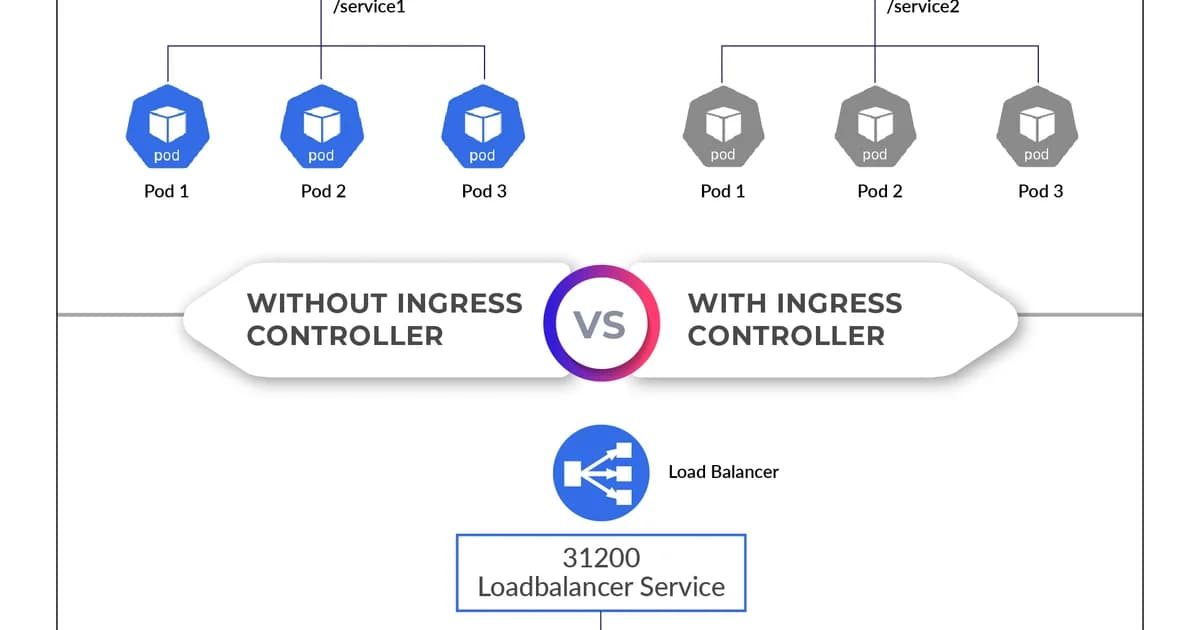
You can expose each Service with type: LoadBalancer, and it works. But each one provisions a separate cloud load balancer, each with its own external IP and monthly cost. For 10 services, that's 10 load balancers at $15-20/month each on most clouds. An Ingress controller gives you one load balancer that routes to all your services based on rules.
| Approach | External IPs | TLS Management | Cost (10 services, AWS) |
|---|---|---|---|
| LoadBalancer per Service | 10 | Per-service | ~$180/month |
| Single Ingress Controller | 1 | Centralized | ~$18/month |
Popular Ingress Controllers Compared
| Controller | Proxy Engine | Protocol Support | Config Style | Best For |
|---|---|---|---|---|
| ingress-nginx | NGINX | HTTP, HTTPS, gRPC, WebSocket | Annotations | General purpose, most popular |
| Traefik | Traefik | HTTP, HTTPS, gRPC, TCP, UDP | CRDs + annotations | Auto-discovery, middleware chains |
| HAProxy Ingress | HAProxy | HTTP, HTTPS, TCP | Annotations + ConfigMap | High-performance TCP workloads |
| Contour | Envoy | HTTP, HTTPS, gRPC | HTTPProxy CRD | Multi-team clusters, delegation |
| Kong Ingress | Kong (OpenResty) | HTTP, HTTPS, gRPC, TCP | CRDs + plugins | API gateway features built in |
Pro tip: Start with ingress-nginx unless you have a specific reason not to. It's the most widely deployed, has the most community support, and handles 90% of use cases. Switch to Traefik if you need automatic Let's Encrypt or TCP/UDP routing without extra configuration.
Setting Up ingress-nginx: Step by Step
- Install the controller using Helm or the official manifests
- Verify the controller Pod is running and a LoadBalancer Service is created
- Create an Ingress resource with your routing rules
- Point your DNS to the controller's external IP
- Add TLS with cert-manager for automatic certificate management
# Install with Helm
helm repo add ingress-nginx https://kubernetes.github.io/ingress-nginx
helm repo update
helm install ingress-nginx ingress-nginx/ingress-nginx \
  --namespace ingress-nginx --create-namespace
# Verify the controller is running
kubectl get pods -n ingress-nginx
kubectl get svc -n ingress-nginxPath-Based Routing
Route different URL paths to different backend Services. This is the most common Ingress pattern:
apiVersion: networking.k8s.io/v1
kind: Ingress
metadata:
  name: app-ingress
  annotations:
    nginx.ingress.kubernetes.io/rewrite-target: /$2
spec:
  ingressClassName: nginx
  rules:
  - host: myapp.example.com
    http:
      paths:
      - path: /api(/|$)(.*)
        pathType: ImplementationSpecific
        backend:
          service:
            name: api-service
            port:
              number: 8080
      - path: /
        pathType: Prefix
        backend:
          service:
            name: web-service
            port:
              number: 3000
Host-Based Routing
Route different hostnames to different Services. Useful for microservices or multi-tenant architectures:
apiVersion: networking.k8s.io/v1
kind: Ingress
metadata:
  name: multi-host-ingress
spec:
  ingressClassName: nginx
  rules:
  - host: api.example.com
    http:
      paths:
      - path: /
        pathType: Prefix
        backend:
          service:
            name: api-service
            port:
              number: 8080
  - host: dashboard.example.com
    http:
      paths:
      - path: /
        pathType: Prefix
        backend:
          service:
            name: dashboard-service
            port:
              number: 3000
TLS with cert-manager
Cert-manager automates certificate issuance and renewal from Let's Encrypt (or other ACME providers). It watches Ingress resources for TLS configuration and automatically provisions certificates.
# Install cert-manager
helm repo add jetstack https://charts.jetstack.io
helm install cert-manager jetstack/cert-manager \
  --namespace cert-manager --create-namespace \
  --set crds.enabled=true
# Create a ClusterIssuer for Let's Encrypt
apiVersion: cert-manager.io/v1
kind: ClusterIssuer
metadata:
name: letsencrypt-prod
spec:
acme:
server: https://acme-v02.api.letsencrypt.org/directory
email: admin@example.com
privateKeySecretRef:
name: letsencrypt-prod
solvers:
- http01:
ingress:
class: nginx# Ingress with automatic TLS
apiVersion: networking.k8s.io/v1
kind: Ingress
metadata:
name: secure-ingress
annotations:
cert-manager.io/cluster-issuer: letsencrypt-prod
spec:
ingressClassName: nginx
tls:
- hosts:
- myapp.example.com
secretName: myapp-tls
rules:
- host: myapp.example.com
http:
paths:
- path: /
pathType: Prefix
backend:
service:
name: web-service
port:
number: 3000Watch out: Always test with Let's Encrypt's staging server first (
https://acme-staging-v02.api.letsencrypt.org/directory). The production server has strict rate limits -- 50 certificates per registered domain per week. Hit that limit and you're locked out for 7 days.
Common Annotations for ingress-nginx
| Annotation | Purpose | Example Value |
|---|---|---|
nginx.ingress.kubernetes.io/rewrite-target | Rewrite URL path | /$2 |
nginx.ingress.kubernetes.io/ssl-redirect | Force HTTPS | "true" |
nginx.ingress.kubernetes.io/proxy-body-size | Max request body | "50m" |
nginx.ingress.kubernetes.io/proxy-read-timeout | Backend timeout | "120" |
nginx.ingress.kubernetes.io/cors-allow-origin | CORS origin header | "https://mysite.com" |
nginx.ingress.kubernetes.io/rate-limit-rps | Requests per second | "10" |
For reference: a Kubernetes Ingress is an API resource that declares how external HTTP(S) traffic should route to internal Services based on hostnames and URL paths. It requires an Ingress controller -- a reverse proxy running inside the cluster -- to read those declarations and handle TLS termination, load balancing, and routing. Without the controller, the Ingress object is inert data.
Failure Modes: What Breaks in Production
ingress-nginx is reliable until it is not. These are the ones that have cost me sleep.
Exploding Config Reload on Certificate Renewal
cert-manager rotates 400 certificates in a four-minute window. Each renewal triggers an nginx config reload. During each reload, existing connections stay alive but new connections briefly queue -- and on a busy cluster the queue backed up into client-side timeouts. Fix: set --enable-dynamic-configuration=true (default in recent versions) so upstream changes apply via Lua without a full reload, and stagger certificate expiries.
The large_client_header_buffers Cliff
A customer used JWTs that embedded permission arrays. When the array grew past ~50 entries the header exceeded 8 KB and every request from that user 400'd. The fix is a ConfigMap setting (large-client-header-buffers: "8 16k"), but the failure pattern -- works for everyone except this one user -- makes it miserable to debug.
Silent Redirect Loops Behind TLS Offloading
Behind a cloud load balancer that already terminates TLS, nginx sees HTTP and helpfully redirects to HTTPS, the LB re-terminates, nginx redirects again. Users see an infinite redirect. Set nginx.ingress.kubernetes.io/force-ssl-redirect: "false" on the Ingress when the LB handles TLS, and use use-forwarded-headers: "true" in the controller ConfigMap.
Orphaned DNS After Controller Replacement
Reinstalling the controller via Helm recreates the LoadBalancer Service, which provisions a new external IP. External DNS still points at the old one. Expected downtime: 30 seconds. Actual downtime: however long your slowest-to-propagate resolver takes. Always pre-populate loadBalancerIP on cloud providers that support it.
Gateway API: The Future of Ingress
The Gateway API is an official Kubernetes project that's gradually replacing Ingress. It addresses several Ingress limitations: no standard for TCP/UDP routing, vendor-specific annotations, and no role-based resource model.
Key Differences from Ingress
- Typed routes -- HTTPRoute, TCPRoute, GRPCRoute instead of one generic Ingress resource
- Role-oriented -- GatewayClass (infra provider), Gateway (cluster operator), Routes (app developer)
- Portable -- behavior defined in the spec, not in vendor annotations
- Extensible -- policy attachment for things like rate limiting, authentication, and circuit breaking
# Gateway API example
apiVersion: gateway.networking.k8s.io/v1
kind: HTTPRoute
metadata:
  name: app-route
spec:
  parentRefs:
  - name: my-gateway
  hostnames:
  - "myapp.example.com"
  rules:
  - matches:
    - path:
        type: PathPrefix
        value: /api
    backendRefs:
    - name: api-service
      port: 8080
Benchmarks: Throughput and Latency of Each Controller
Controllers are not interchangeable on performance. I ran identical benchmarks -- wrk hitting a single / route returning 1 KB of JSON, backend pod at unbounded capacity, 300 concurrent connections -- on EKS 1.31 with default controller configurations.
| Controller | Requests/sec | P50 latency | P99 latency | Memory per replica |
|---|---|---|---|---|
| ingress-nginx | 48,000 | 2.1 ms | 9.4 ms | 90 MB |
| Traefik 3 | 41,000 | 2.6 ms | 12 ms | 120 MB |
| HAProxy Ingress | 58,000 | 1.7 ms | 7.2 ms | 80 MB |
| Contour (Envoy) | 46,000 | 2.3 ms | 10 ms | 180 MB |
| Kong (OpenResty) | 35,000 | 3.1 ms | 14 ms | 160 MB |
HAProxy is the throughput champion on paper but has a thinner Kubernetes integration surface -- you will write more YAML to get the same routing behaviour. For the 95 percent of clusters whose Ingress will never exceed 10,000 req/s, the 20 percent performance gap is not worth the UX cost. Nginx stays the default for a reason.
Gateway API Migration: A Real Walkthrough
If you are on ingress-nginx today and considering Gateway API, the migration is incremental. You do not flip a switch -- you run both APIs side by side until the HTTPRoute version is battle-tested, then remove the Ingress.
- Install the Gateway API CRDs:
kubectl apply -f https://github.com/kubernetes-sigs/gateway-api/releases/download/v1.2.0/standard-install.yaml. Your existing Ingress keeps working; the new CRDs just become available. - Deploy a Gateway class backed by your existing controller: ingress-nginx v1.10+, Traefik v3, and Contour all ship with Gateway API support. Apply a GatewayClass plus a Gateway resource listening on a new LoadBalancer Service (not the one your current Ingress uses).
- Translate one Ingress to an HTTPRoute: pick a low-risk service. The mapping is mostly mechanical --
hostgoes tohostnames,pathgoes tomatches.path, annotations becomeHTTPRoute.spec.filtersor policy CRDs. - Shadow-route traffic: point 1 percent of DNS at the new Gateway IP via a Route 53 weighted record. Watch error rate and latency for 24 hours, then bump to 10, 50, 100 percent over a week.
- Delete the old Ingress: once the HTTPRoute has handled real traffic for a full week without regression, remove the Ingress. The associated cloud LB will be released and your monthly bill drops by one LB.
Pricing and Cost Comparison
| Solution | Cost | Notes |
|---|---|---|
| ingress-nginx (OSS) | Free + 1 cloud LB (~$18/mo) | Most popular, community maintained |
| Traefik (OSS) | Free + 1 cloud LB | Built-in Let's Encrypt, dashboard |
| Traefik Enterprise | Custom pricing | HA, distributed rate limiting, OIDC |
| Kong Gateway (OSS) | Free + 1 cloud LB | Plugin ecosystem for API management |
| Kong Enterprise | From $15K/year | Developer portal, advanced analytics |
| AWS ALB Ingress Controller | ALB pricing (~$22/mo + LCU) | Native AWS integration, no extra pods |
Frequently Asked Questions
What happens if I create an Ingress without an Ingress controller?
Nothing. The Ingress resource is stored in etcd, but no component reads or acts on it. There's no error message or warning -- Kubernetes accepts the resource. You need a controller running in the cluster to watch for Ingress resources and configure the actual reverse proxy.
Can I run multiple Ingress controllers in one cluster?
Yes. Use the ingressClassName field in your Ingress resource to specify which controller should handle it. This is common in large clusters where different teams or environments need different controller configurations. Each controller watches only for Ingress resources with its class name.
Is the Gateway API ready for production?
The core HTTPRoute and Gateway resources reached GA (v1) status in Kubernetes 1.28. Most major controllers (ingress-nginx, Traefik, Cilium, Contour) support Gateway API. It's production-ready for HTTP routing. TCP/UDP/gRPC routes are still evolving. New projects should consider starting with Gateway API directly.
How do I handle WebSocket connections through an Ingress?
Ingress-nginx supports WebSockets out of the box -- no special configuration needed. For long-lived connections, increase the proxy timeouts: set nginx.ingress.kubernetes.io/proxy-read-timeout and proxy-send-timeout to higher values (e.g., "3600" for one hour). Traefik also handles WebSockets natively.
Should I use annotations or CRDs for Ingress configuration?
Annotations work for simple cases but become unmanageable with complex routing. If you need middleware chains, traffic splitting, or cross-namespace routing, use a controller with CRD support (Traefik IngressRoute, Contour HTTPProxy, or Gateway API HTTPRoute). CRDs are typed, validated, and version-controlled.
How do I migrate from Ingress to Gateway API?
Run both side by side. Install a Gateway API implementation, create equivalent HTTPRoute resources, and test them with a separate Gateway. Once verified, update your DNS to point to the new Gateway's external IP. Remove the old Ingress resources after traffic has fully migrated. Most controllers support both APIs simultaneously.
Conclusion
Install ingress-nginx, add cert-manager for automatic TLS, and use path-based or host-based routing. That covers 90% of real-world traffic routing needs. Keep your annotations minimal and well-documented. If you're starting a new cluster in 2024+, evaluate Gateway API -- it's the direction Kubernetes networking is heading, and the HTTP routing parts are production-ready today.
Written by
Abhishek Patel
Infrastructure engineer with 10+ years building production systems on AWS, GCP, and bare metal. Writes practical guides on cloud architecture, containers, networking, and Linux for developers who want to understand how things actually work under the hood.
Related Articles
Multi-Cluster Kubernetes: Argo CD ApplicationSet Patterns
When 10+ clusters or 50+ services break hand-written GitOps. ApplicationSet's four generators (cluster list, Git directory, PR, cluster decision), real production patterns (env promotion, per-tenant, multi-region failover, preview envs), and the sharp edges (template debugging, cascading mistakes, RBAC).
11 min read
ContainersKubernetes GPU Scheduling: DRA, KAI Scheduler, MIG
Dynamic Resource Allocation replaced device plugins for GPU claims in Kubernetes 1.34. KAI Scheduler adds gang scheduling and queues. MIG slices H100s into 7 isolated tenants. Full production setup with the NVIDIA GPU Operator, topology-aware training, and when to use MIG vs MPS vs time-slicing.
17 min read
CI/CDProgressive Delivery with Argo Rollouts: Canary + Analysis
Argo Rollouts replaces Kubernetes Deployments with a CRD that does weighted canary, metric-gated analysis, and automatic rollback. Production recipe, Prometheus AnalysisTemplates, and a side-by-side with Flagger.
15 min read
Enjoyed this article?
Get more like this in your inbox. No spam, unsubscribe anytime.