How eBPF Is Changing Observability
eBPF enables kernel-level observability without application code changes. Learn how Cilium, Pixie, Falco, and bpftrace use eBPF for network monitoring, security, profiling, and tracing in production Kubernetes environments.
Infrastructure engineer with 10+ years building production systems on AWS, GCP,…
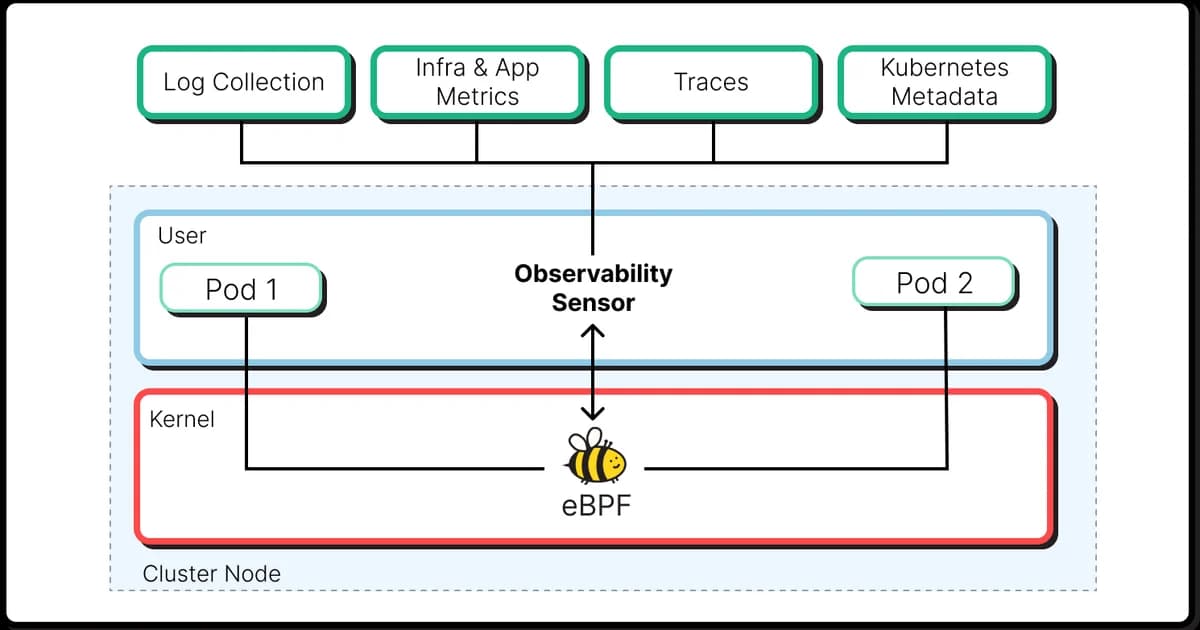
The Numbers That Made eBPF a Default, Not a Curiosity
A few data points that made the decision for most platform teams in the last two years:
- 80%+ of new CNCF-submitted observability projects since 2023 list eBPF as a primary collection mechanism -- Cilium graduated, Tetragon and Pixie went mainstream, Parca and Pyroscope built whole-fleet continuous profilers on it. If you started shopping for an observability tool in 2025, eBPF was almost unavoidable in the shortlist.
- Netflix, Meta, and Google run eBPF on every production host. Netflix's FlowLogs, Meta's Katran load balancer, and Google's internal network telemetry all sit on eBPF hooks -- not as experiments, as the load-bearing collection layer for millions of machines.
- 40-60% lower latency overhead than sidecar proxies for L7 service-mesh observability, per Cilium's published benchmarks replicated by Isovalent customers. On high-QPS services, swapping an Envoy sidecar for eBPF-backed Hubble typically reclaims 5-15% CPU per pod.
- 1-3% CPU for always-on network flow monitoring at line rate. That is roughly the overhead of having your observability on, not off. Traditional packet capture with
tcpdumpon a hot interface routinely costs 10x that and drops packets under load. - Every Linux distribution shipped in the last four years has the verifier and JIT enabled by default. EBPF is not a kernel patch you have to argue for -- it is the same piece of infrastructure that already filters every packet through the Linux bridge your containers sit on.
Put together, those numbers describe a technology that stopped being optional. If you are building an observability stack in 2026 and ignoring eBPF, you are leaving a category of data -- network flows, syscall-level traces, kernel latency, runtime security events -- either uncollected or collected the expensive way. This guide is about what eBPF actually buys you, which tools are production-ready vs still maturing, and where it still doesn't replace what OpenTelemetry does at the application layer.
A Thirty-Second Recap of What eBPF Is
eBPF (extended Berkeley Packet Filter) lets you run small, sandboxed programs inside the Linux kernel without patching kernel source or loading a kernel module. You compile restricted C to eBPF bytecode, the kernel's verifier statically proves it cannot crash, loop forever, or read random memory, and then the JIT compiles it to native machine code. The program attaches to a hook -- a kprobe, tracepoint, XDP ingress point, cgroup hook, or socket filter -- and runs there every time the kernel hits that hook. It reads and aggregates data into BPF maps (hash tables, ring buffers, per-CPU arrays) that user-space tools read without stopping the program.
The original BPF from 1992 was a packet-filter DSL for tcpdump. eBPF turned it into a general-purpose in-kernel virtual machine. Think of it as a safe extension language for the kernel -- the same way V8 lets browsers run untrusted JavaScript -- and the rest of this article follows naturally.
How eBPF Works
Understanding eBPF's architecture explains both its power and its constraints.
The eBPF Execution Pipeline
- Write the program. eBPF programs are typically written in restricted C and compiled to eBPF bytecode using LLVM/Clang. Higher-level frameworks like libbpf, BCC, and bpftrace abstract this.
- Verify. The kernel's eBPF verifier statically analyzes the bytecode to guarantee safety: no infinite loops, no out-of-bounds memory access, no unsafe kernel pointer dereferences. If verification fails, the program is rejected.
- JIT compile. Verified bytecode is compiled to native machine code (x86, ARM) for near-native execution speed.
- Attach to a hook. The program attaches to a kernel hook point: kprobes (kernel function entry/exit), tracepoints (predefined stable hooks), XDP (network packet ingress), cgroup hooks, and more.
- Communicate via BPF maps. eBPF programs share data with user-space applications through BPF maps -- key-value stores that live in kernel memory. Maps can be hash tables, arrays, ring buffers, or per-CPU structures.
// Simplified eBPF program: count TCP connections by destination port
#include
#include

struct {
    __uint(type, BPF_MAP_TYPE_HASH);
    __uint(max_entries, 1024);
    __type(key, __u16);    // destination port
    __type(value, __u64);  // connection count
} tcp_connections SEC(".maps");

SEC("kprobe/tcp_v4_connect")
int trace_connect(struct pt_regs *ctx) {
    struct sock *sk = (struct sock *)PT_REGS_PARM1(ctx);
    __u16 dport;
    bpf_probe_read_kernel(&dport, sizeof(dport), &sk->__sk_common.skc_dport);
    dport = __builtin_bswap16(dport);

    __u64 *count = bpf_map_lookup_elem(&tcp_connections, &dport);
    if (count) {
        __sync_fetch_and_add(count, 1);
    } else {
        __u64 init = 1;
        bpf_map_update_elem(&tcp_connections, &dport, &init, BPF_ANY);
    }
    return 0;
}
Watch out: eBPF programs run in kernel context. While the verifier prevents crashes, poorly written programs can still cause performance degradation if they execute on a hot path (like every network packet). Always benchmark eBPF programs under production-like load before deploying.
eBPF for Observability: The Major Tools
You don't need to write raw eBPF programs to benefit from this technology. Several mature projects wrap eBPF into user-friendly observability tools.
Cilium: Network Observability
Cilium is a CNCF graduated project that uses eBPF for Kubernetes networking, security, and observability. Its observability component, Hubble, gives you:
- Layer 3/4 and Layer 7 network flow visibility without sidecars
- DNS query monitoring (who is resolving what, and how long it takes)
- HTTP, gRPC, and Kafka protocol-aware metrics
- Network policy enforcement and audit logging
- Service-to-service latency maps without any application instrumentation
# Install Cilium with Hubble observability on Kubernetes
cilium install --set hubble.enabled=true \
  --set hubble.relay.enabled=true \
  --set hubble.ui.enabled=true

# View real-time network flows
hubble observe --namespace production --protocol http

# Get HTTP status code breakdown per service
hubble observe --namespace production --protocol http -o json | \
  jq '{src: .source.labels["app"], dst: .destination.labels["app"], status: .l7.http.code}'
The key advantage over traditional service meshes (like Istio with Envoy sidecars) is performance. eBPF operates at the kernel level, so there's no proxy hop. Cilium claims 40-60% lower latency overhead compared to sidecar-based approaches for L7 observability.
Pixie: Auto-Telemetry and Profiling
Pixie (now part of New Relic) uses eBPF to capture full-body HTTP requests and responses, database queries, and application profiles -- all without code changes. It stores telemetry data locally on each node (no data leaves the cluster by default), which is a strong selling point for security-conscious teams.
- Auto-instrumented HTTP, MySQL, PostgreSQL, Cassandra, Redis, and Kafka traces
- Continuous CPU profiling with flamegraphs
- Full request/response body capture for debugging
- PxL scripting language for custom queries
# PxL script: show slowest HTTP endpoints
import px

df = px.DataFrame('http_events', start_time='-5m')
df = df[df['resp_status'] >= 200]
df.latency_ms = df['resp_latency'] / 1000000  # ns to ms
df = df.groupby(['req_path', 'req_method']).agg(
    p99_latency=('latency_ms', px.quantiles, 0.99),
    count=('latency_ms', px.count),
    error_rate=('resp_status', lambda x: px.mean(x >= 500)),
)
df = df[df['count'] > 10]
px.display(df.sort('p99_latency', ascending=False).head(20))
Falco: Security Observability
Falco, a CNCF incubating project, uses eBPF to detect anomalous behavior at runtime: unexpected process execution, unusual network connections, file access violations, privilege escalation attempts. It's observability focused on security rather than performance.
# Falco rule: detect shell spawned in a container
- rule: Terminal shell in container
  desc: Detect a shell being spawned in a container
  condition: >
    spawned_process and container and
    proc.name in (bash, sh, zsh, dash) and
    not proc.pname in (cron, supervisord)
  output: >
    Shell spawned in container
    (user=%user.name container=%container.name shell=%proc.name
     parent=%proc.pname image=%container.image.repository)
  priority: WARNING
  tags: [container, shell, mitre_execution]
bpftrace: Ad-Hoc Kernel Tracing
Bpftrace is the "awk for eBPF" -- a high-level tracing language for quick, one-liner investigations. It's not a production observability tool, but it's invaluable for debugging specific kernel-level issues.
# Count system calls by process
bpftrace -e 'tracepoint:raw_syscalls:sys_enter { @[comm] = count(); }'

# Histogram of read() latencies
bpftrace -e 'kprobe:vfs_read { @start[tid] = nsecs; }
  kretprobe:vfs_read /@start[tid]/ {
    @us = hist((nsecs - @start[tid]) / 1000);
    delete(@start[tid]);
  }'

# Trace DNS queries
bpftrace -e 'tracepoint:net:net_dev_xmit /args->len > 0/ { @bytes[comm] = sum(args->len); }'
Mature vs. Evolving Areas
EBPF observability isn't uniformly mature. Here's an honest assessment:
| Area | Maturity | Key Tools | Notes |
|---|---|---|---|
| Network observability | Production-ready | Cilium/Hubble | L3/4 and L7 flow visibility is solid. Used by major cloud providers. |
| Security monitoring | Production-ready | Falco, Tetragon | Runtime threat detection is well-established. |
| Continuous profiling | Maturing | Pixie, Pyroscope, Parca | CPU profiling works well. Memory and off-CPU profiling are improving. |
| Application tracing | Maturing | Pixie, Odigos | Auto-instrumented traces from eBPF work for common protocols but lack the context depth of SDK-based tracing. |
| Kernel debugging | Production-ready | bpftrace, BCC | The go-to toolset for kernel and system-level debugging. |
| Log collection | Early | Experimental projects | eBPF-based log collection is not a significant use case yet. |
Pro tip: eBPF-based tracing and OTel-based tracing are complementary, not competing. Use eBPF for infrastructure-level visibility (network flows, system calls, kernel events) and OTel for application-level visibility (business logic, custom spans, cross-service context). Together they cover the full stack.
Skills Required for eBPF Observability
Using eBPF tools like Cilium or Falco doesn't require deep eBPF knowledge -- they abstract it away. But building custom eBPF programs or debugging eBPF-based tools requires specific skills:
- Linux kernel internals. Understanding system calls, the network stack, process scheduling, and memory management is essential. You don't need to read kernel source daily, but you need to know the major subsystems.
- C programming. eBPF programs are written in restricted C. You need to be comfortable with pointers, structures, and low-level memory operations.
- BPF toolchain. libbpf, CO-RE (Compile Once, Run Everywhere), BTF (BPF Type Format), and the verifier each have their own quirks and error messages.
- Performance analysis. Brendan Gregg's work on performance analysis methodologies (USE method, flame graphs, latency heat maps) is foundational. His "BPF Performance Tools" book is the definitive reference.
For most teams, the right approach is to deploy packaged eBPF tools (Cilium, Falco, Pixie) and learn bpftrace for ad-hoc debugging. Writing custom eBPF programs is a specialist skill that most organizations only need for edge cases.
eBPF Tool and Platform Costs
| Tool | License | Monthly Cost | Notes |
|---|---|---|---|
| Cilium + Hubble | Apache 2.0 | $0 + infrastructure | Free. Isovalent (now Cisco) offers enterprise support. |
| Falco | Apache 2.0 | $0 + infrastructure | Free. Sysdig offers managed Falco and additional features. |
| Pixie | Apache 2.0 | $0 self-hosted | Now part of New Relic. Self-hosted is free. Cloud version included with New Relic. |
| Isovalent Enterprise | Commercial | Contact sales | Enterprise Cilium with Tetragon, advanced network policies, and support. |
| Groundcover | Commercial | $20-30/node | eBPF-based APM. Full traces, metrics, logs without code changes. |
| Odigos | Open source + Enterprise | $0 open source | Auto-instruments applications with eBPF and generates OTel traces. |
The open-source eBPF ecosystem is strong. For most teams, Cilium + Falco covers network and security observability for free. Add Pixie or Groundcover if you want application-level auto-instrumentation without touching code.
Frequently Asked Questions
Does eBPF work on all operating systems?
EBPF is a Linux kernel feature. It requires Linux kernel 4.x or later, with most advanced features requiring 5.x+. It does not run on Windows or macOS natively. However, most eBPF observability tools target Kubernetes environments running Linux nodes, so this isn't a practical limitation for server-side workloads. Windows eBPF support is an active Microsoft project but is not yet mature.
What is the performance overhead of eBPF programs?
Well-written eBPF programs add microsecond-level overhead per event. For network observability with Cilium, typical overhead is 1-3% of CPU on network-heavy workloads. For tracing with kprobes, overhead depends on the frequency of the hook point -- tracing every system call on a busy system can add 5-10% CPU. Production deployments routinely run eBPF tools with negligible user-visible impact.
Can eBPF replace OpenTelemetry?
No. eBPF excels at infrastructure-level observability -- network flows, system calls, kernel events -- without code changes. But it can't capture application-level context like business transaction IDs, user IDs, or custom span attributes. OpenTelemetry provides that application-level richness. The best approach is using both: eBPF for the infrastructure layer, OTel for the application layer.
Is eBPF safe? Can it crash the kernel?
The eBPF verifier guarantees memory safety and termination before any program runs in the kernel. A verified program cannot crash the kernel, access arbitrary memory, or loop infinitely. However, it can consume CPU resources on hot paths. The verifier has had bugs in the past that led to security vulnerabilities, but these are patched quickly. In practice, eBPF is considered safe for production use and is enabled by default in all major Linux distributions.
What kernel version do I need for eBPF observability tools?
Most tools require Linux 5.4+ for full functionality. Cilium supports 4.19+ but recommends 5.10+. Falco works with 4.14+ using kernel modules as a fallback. For the best experience with CO-RE (Compile Once, Run Everywhere) and BTF support, use kernel 5.8 or later. All major cloud provider managed Kubernetes services (EKS, GKE, AKS) ship kernels that support eBPF.
How does eBPF compare to sidecar proxies for service mesh observability?
Sidecar proxies (like Envoy in Istio) intercept traffic in user space, adding latency per request. eBPF operates in kernel space, avoiding the extra network hop. Cilium reports 40-60% lower latency overhead compared to sidecar approaches for L7 observability. Sidecars offer richer L7 features (retries, circuit breaking, traffic splitting), but for pure observability, eBPF is more efficient.
Conclusion
EBPF is the most significant shift in observability technology since distributed tracing. It enables telemetry collection at the kernel level with near-zero overhead and zero application code changes. For network observability and security monitoring, eBPF tools like Cilium and Falco are production-ready today. For application tracing and profiling, the technology is maturing rapidly.
The practical advice: start with Cilium for network visibility in Kubernetes. Add Falco for runtime security monitoring. Use bpftrace for ad-hoc debugging when you need to understand kernel-level behavior. And don't view eBPF as a replacement for OpenTelemetry -- view it as the missing layer that OTel doesn't cover. Together, they give you observability from kernel syscalls to business transactions, covering the entire stack.
Written by
Abhishek Patel
Infrastructure engineer with 10+ years building production systems on AWS, GCP, and bare metal. Writes practical guides on cloud architecture, containers, networking, and Linux for developers who want to understand how things actually work under the hood.
Related Articles
Multi-Cluster Kubernetes: Argo CD ApplicationSet Patterns
When 10+ clusters or 50+ services break hand-written GitOps. ApplicationSet's four generators (cluster list, Git directory, PR, cluster decision), real production patterns (env promotion, per-tenant, multi-region failover, preview envs), and the sharp edges (template debugging, cascading mistakes, RBAC).
11 min read
ObservabilityAIOps in 2026: AI-Driven Monitoring & Incident Response
AIOps in 2026 cuts alert noise 70-95% and Sev-2 MTTR 20-40% when layered on disciplined alerting. Landscape review of Dynatrace Davis, Datadog Watchdog, PagerDuty AIOps, BigPanda, and 6 more — with honest failure modes.
16 min read
ObservabilityBest Log Management Tools (2026): Splunk vs Datadog Logs vs Loki vs SigNoz
Benchmarked comparison of Splunk, Datadog Logs, Grafana Loki, and SigNoz on a 1.2 TB/day pipeline. Real 2026 pricing, query performance, and a cost-per-GB decision matrix.
15 min read
Enjoyed this article?
Get more like this in your inbox. No spam, unsubscribe anytime.