IAM Roles vs Policies: AWS Permissions Without the Headache
Understand AWS IAM roles, policies, users, and groups. Learn how the policy evaluation engine works, when to use identity-based vs resource-based policies, and how to implement least privilege.
Infrastructure engineer with 10+ years building production systems on AWS, GCP,…
The Bug That Taught Me How IAM Actually Works
A deploy pipeline for a side project started failing one Tuesday afternoon with AccessDenied: User is not authorized to perform: s3:PutObject. The policy attached to the CI role granted s3:*. The bucket policy allowed the role's ARN. Every review said the permissions were correct. The pipeline had worked the day before. Nothing in CloudTrail pointed to a change on our side.
After two hours of aws iam simulate-principal-policy runs, the culprit turned out to be a Service Control Policy (SCP) at the AWS Organizations root that someone had tightened overnight: aws:PrincipalTag/CostCenter was now required on every s3:Put* call. Our CI role had no such tag. The SCP's explicit deny overrode both the identity policy and the bucket policy. A layer I did not own was vetoing a layer I did.
That incident is the whole reason this article exists. IAM is not a single permission system -- it is six of them layered on top of each other, evaluated in a strict order, and every layer can deny a request the previous one allowed. Once you learn the order, AccessDenied stops feeling random and starts feeling like a debugger stack trace.
The Six-Layer Evaluation Chain (Memorise This)
Every AWS API call you make is evaluated against up to six layers before AWS decides to allow or deny it. Skip any one of these in your mental model and you will spend afternoons staring at denied requests that look allowed.
- Explicit Deny (anywhere) -- one Deny in any layer wins. There is no "but my Allow is bigger" override.
- Service Control Policies (SCPs) -- AWS Organizations guardrails. Ceilings, not grants. If the SCP has no matching Allow, every member account is denied even if their local policies say yes.
- Resource Control Policies (RCPs) and VPC Endpoint Policies -- additional network- or resource-level constraints introduced in 2024. Frequently missed when debugging.
- Permission Boundaries -- the maximum set of permissions a principal may use, independent of what its policies grant.
- Session Policies -- inline policies attached when calling
AssumeRole,GetFederationToken, or via IAM Identity Center. Easy to forget because they live in the STS call, not the role. - Identity-based and Resource-based Policies -- the part most docs actually show you. An Allow here only matters if none of layers 1-5 deny.
Write this down, tape it to your monitor, and stop pasting AdministratorAccess onto broken workloads before checking the chain. Roughly 80 percent of the "impossible" IAM tickets I have seen were layers 2, 3, or 5.
IAM Building Blocks: Step by Step
Definition sidebar: AWS IAM (Identity and Access Management) is the authorisation service that evaluates every API call against attached policies, SCPs, boundaries, session policies, and resource policies before allowing it. It is free, regional in scope for some resources (Identity Center), and global for users, groups, and roles.
Step 1: Understand Principals
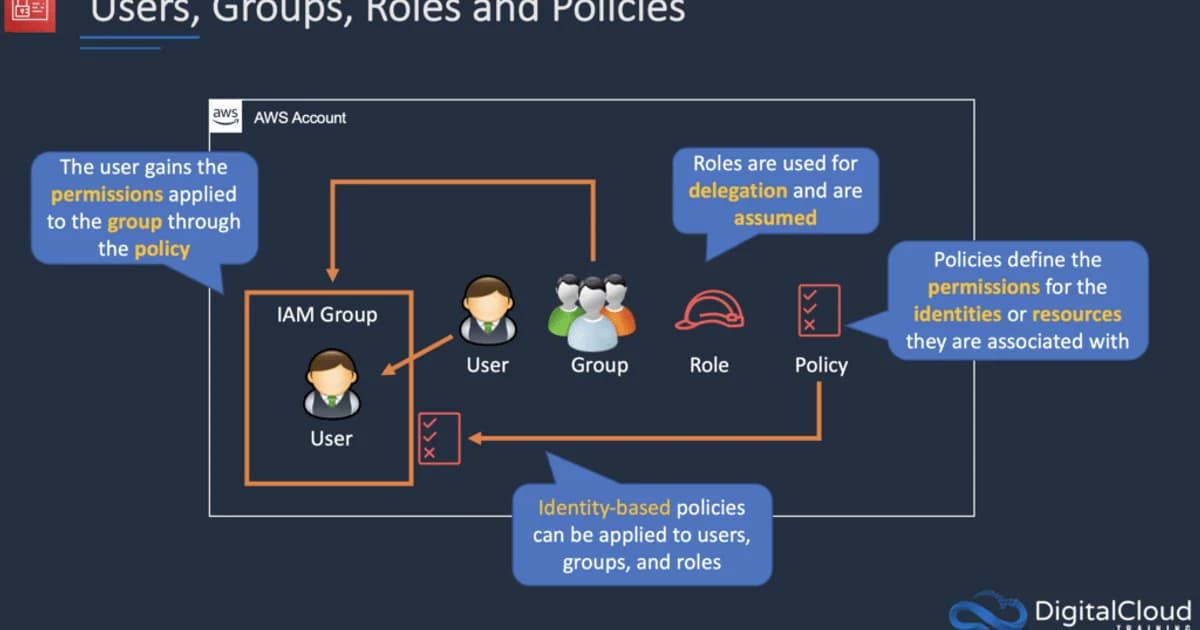
A principal is an entity that can make API calls. In AWS, principals are:
- IAM Users -- long-lived credentials (access key + secret key) tied to a person or service
- IAM Roles -- temporary credentials assumed by users, services, or other AWS accounts
- AWS Services -- EC2 instances, Lambda functions, ECS tasks that assume roles
- Federated Users -- identities from external providers (Okta, Google Workspace) mapped to roles
Step 2: Create Policies
A policy is a JSON document that defines permissions. Every policy has the same structure:
{
  "Version": "2012-10-17",
  "Statement": [
    {
      "Effect": "Allow",
      "Action": "s3:GetObject",
      "Resource": "arn:aws:s3:::my-bucket/*"
    }
  ]
}
Each statement specifies an Effect (Allow or Deny), the Actions permitted, and the Resources they apply to. You can add Conditions for fine-grained control -- restricting by IP, time, MFA status, tags, or dozens of other context keys.
Step 3: Attach Policies to Principals
Policies don't do anything on their own. You attach them to users, groups, or roles. A single principal can have up to 10 managed policies attached, plus inline policies (which are embedded directly in the principal's configuration).
Step 4: Use Roles Instead of Access Keys
This is the single most important IAM practice. Roles provide temporary credentials that rotate automatically. Access keys are permanent until you rotate them manually -- and nobody does. Every EC2 instance, Lambda function, and ECS task should use a role, never hardcoded keys.
Pro tip: Run
aws iam generate-credential-reportregularly. It shows every IAM user, when their access keys were last used, and whether MFA is enabled. Any access key older than 90 days is a security risk.
Roles vs Policies: The Core Distinction
| Concept | Role | Policy |
|---|---|---|
| What it is | An identity that can be assumed | A document defining permissions |
| Credentials | Temporary (STS tokens, 1-12 hours) | N/A -- policies don't have credentials |
| Attachment | Has policies attached to it | Attached to users, groups, or roles |
| Trust | Has a trust policy defining who can assume it | No trust concept |
| Use case | EC2 instance profiles, cross-account access, Lambda execution | Defining what actions are allowed on what resources |
Think of it this way: a role is a hat you put on. A policy is the list of things you're allowed to do while wearing that hat. A single role can have multiple policies, and a single policy can be attached to multiple roles.
Identity-Based vs Resource-Based Policies
AWS has two categories of policies, and mixing them up causes most permission bugs:
Identity-Based Policies
Attached to IAM users, groups, or roles. They say "this principal can do X on resource Y."
{
  "Effect": "Allow",
  "Action": "s3:GetObject",
  "Resource": "arn:aws:s3:::my-bucket/*"
}
Resource-Based Policies
Attached directly to a resource (S3 bucket policy, SQS queue policy, KMS key policy). They say "principal X can do Y on this resource." The key difference: resource-based policies have a Principal field.
{
  "Effect": "Allow",
  "Principal": { "AWS": "arn:aws:iam::123456789012:role/AppRole" },
  "Action": "s3:GetObject",
  "Resource": "arn:aws:s3:::my-bucket/*"
}
For cross-account access, resource-based policies are essential. An identity-based policy in Account A can grant access to a bucket in Account B, but only if Account B's bucket policy also allows it. Both sides must agree.
How the Policy Evaluation Engine Works
AWS evaluates permissions in a specific order. Understanding this order eliminates 90% of IAM debugging pain:
- Explicit Deny -- if any policy says Deny, the request is denied. Period. Deny always wins.
- Service Control Policies (SCPs) -- organization-level guardrails. If the SCP doesn't allow it, it's denied.
- Permission Boundaries -- the maximum permissions an entity can have. If the boundary doesn't include the action, it's denied.
- Identity-Based Policies -- the policies attached to the user/role making the request.
- Resource-Based Policies -- if the resource has a policy that explicitly allows the principal, access is granted (even without an identity-based allow for same-account access).
- Implicit Deny -- if nothing explicitly allows it, the request is denied.
Watch out: The most common IAM mistake is not understanding implicit deny. If you create a role with no policies attached, it can't do anything -- not because there's a deny rule, but because there's no allow rule. Everything starts as denied.
EC2 Instance Profiles and Service Roles
An instance profile is a container for an IAM role that lets EC2 instances assume that role. When you "attach a role to an EC2 instance," you're actually creating an instance profile and associating it with the instance. The EC2 metadata service at 169.254.169.254 then provides temporary credentials to any process running on the instance.
# From inside an EC2 instance
curl http://169.254.169.254/latest/meta-data/iam/security-credentials/MyRole
# Returns temporary AccessKeyId, SecretAccessKey, and Token
Lambda, ECS, and other services have their own mechanism for role assumption, but the concept is identical: the service assumes the role, gets temporary credentials, and uses them for API calls.
Cross-Account Access Pattern
The standard pattern for cross-account access:
- In Account B (the target), create a role with a trust policy allowing Account A to assume it
- In Account A (the source), grant the user or role permission to call
sts:AssumeRoleon Account B's role - The source principal calls
AssumeRole, gets temporary credentials, and uses them to access Account B's resources
{
  "Version": "2012-10-17",
  "Statement": [
    {
      "Effect": "Allow",
      "Principal": { "AWS": "arn:aws:iam::111111111111:root" },
      "Action": "sts:AssumeRole",
      "Condition": { "StringEquals": { "sts:ExternalId": "unique-id-here" } }
    }
  ]
}
Failure Modes: What Breaks in Production
Real-world IAM fails in patterns that the console's green tick does not surface. These are the ones that have cost me hours.
NotAction and NotResource Foot-Guns
NotAction with Effect: Allow means "allow everything except these actions." That is almost never what you want on a principal -- it silently grants every future AWS service AWS launches. Restrict NotAction to Deny statements only.
Trust Policy ExternalId Missing
A cross-account role without an sts:ExternalId condition is vulnerable to the confused deputy attack. A third-party SaaS with permission to assume roles in many customer accounts can be tricked into acting on your resources. Always enforce an ExternalId unique per customer.
Inline Session Policies Over-Constrain
When a role is assumed with a session policy, the effective permissions are the intersection of the role's identity policies and the session policy. Automation tools sometimes attach a session policy with "Resource": "*" stripped down to a specific ARN -- unaware that this silently disables other unrelated permissions for the duration of the session.
Permissions Boundary Without Enforcement
Setting a permissions boundary on a role does nothing if your developers can attach policies without the boundary being required. Use an SCP to enforce iam:CreateRole only when iam:PermissionsBoundary is set to your approved boundary ARN.
Cross-Region CloudTrail Blind Spots
A single-region CloudTrail trail will miss API calls in other regions. An attacker with assumed credentials can call s3:ListBuckets in eu-north-1 and never appear in your us-east-1 trail. Always enable multi-region trails and set IsOrganizationTrail=true if you use AWS Organizations.
Debugging "Access Denied" Like a Senior Engineer
The single most valuable IAM skill is diagnosing denial errors quickly. Here is the playbook I use.
- Read the error message literally. AWS now includes the exact reason: "explicit deny in a service control policy," "permissions boundary does not allow this action," or "no resource-based policy allows this action." Skip steps 2-5 if the message already tells you.
- Run the Policy Simulator with the exact principal ARN, action, and resource. Include any condition context keys (source IP, MFA, tags) that apply to the real call.
- Check CloudTrail for the denied event. Look at
userIdentity(was the right role assumed?),requestParameters(is the resource ARN what you expect?), and anyerrorCode/errorMessagefields. - Walk the six-layer chain in order. Most "impossible" denials land at SCP or permissions boundary, not the identity policy you were about to rewrite.
- Use
aws iam get-context-keys-for-principal-policyto see what condition keys are required but missing in the request context.
# Simulate the exact failing call
aws iam simulate-principal-policy \
  --policy-source-arn arn:aws:iam::111111111111:role/CIBuildRole \
  --action-names s3:PutObject \
  --resource-arns arn:aws:s3:::artifacts-prod/builds/abc.zip \
  --context-entries ContextKeyName=aws:PrincipalTag/CostCenter,ContextKeyValues=engineering,ContextKeyType=string
The simulator output shows which statement -- in which policy -- made the decision. It is the closest thing AWS gives you to a stack trace.
Tools and Pricing
IAM itself is free -- no charge for users, groups, roles, or policies. The tools that help you manage IAM effectively:
- IAM Access Analyzer -- free, finds resources shared outside your account and generates least-privilege policies from CloudTrail logs
- AWS Organizations + SCPs -- free, but requires organizational setup
- CloudTrail -- first trail is free, additional trails $2.00 per 100,000 management events
- Third-party tools -- Bridgecrew (now Prisma Cloud), Ermetic, and IAM Pulse offer policy analysis starting around $500/month for small teams
Frequently Asked Questions
What is the difference between an IAM role and an IAM user?
An IAM user has permanent long-lived credentials (password and/or access keys) tied to a single identity. An IAM role has no permanent credentials -- it issues temporary security tokens when assumed. Roles are preferred because temporary credentials automatically expire and don't need manual rotation.
When should I use inline policies vs managed policies?
Use managed policies for reusable permissions that apply to multiple principals. Use inline policies only for permissions that are tightly coupled to a single principal and should be deleted when that principal is deleted. AWS recommends managed policies for almost everything because they're easier to audit and reuse.
How do I debug "Access Denied" errors in AWS?
Start with CloudTrail -- find the denied API call and check the error code. Then use IAM Policy Simulator to test the principal's effective permissions. Check for explicit denies in SCPs, permission boundaries, and resource-based policies. Nine times out of ten, it's a missing resource ARN or a condition key mismatch.
What is a permission boundary?
A permission boundary is a managed policy that sets the maximum permissions an IAM entity can have. Even if an identity-based policy grants s3:*, if the permission boundary only allows s3:GetObject, the entity can only read objects. Boundaries are useful for delegated administration -- letting developers create roles without exceeding predefined limits.
Should I use AWS SSO or IAM users for human access?
Use AWS IAM Identity Center (formerly AWS SSO) for all human access. It integrates with your existing identity provider, provides temporary credentials, and eliminates the need for IAM users entirely. IAM users should only exist for legacy service accounts that can't use roles, and even those should be migrated.
How many policies can I attach to a single role?
You can attach up to 10 managed policies to a single IAM role. You can also add inline policies, but the total size of all policies (managed + inline) attached to a role cannot exceed 10,240 characters. If you hit this limit, consolidate your policies or use fewer, broader statements.
Build Permissions Intentionally
Start every role with zero permissions and add only what's needed. Use IAM Access Analyzer to generate policies from actual CloudTrail usage. Never use * in the Resource field for production roles. Set up SCPs to prevent the most dangerous actions (leaving a region unrestricted, creating IAM users with console access) at the organization level. IAM isn't glamorous, but getting it right is the difference between a secure AWS account and a breach headline.
Written by
Abhishek Patel
Infrastructure engineer with 10+ years building production systems on AWS, GCP, and bare metal. Writes practical guides on cloud architecture, containers, networking, and Linux for developers who want to understand how things actually work under the hood.
Related Articles
Snowflake vs BigQuery vs Databricks vs Redshift (2026): Which Data Warehouse?
Snowflake wins on concurrency, BigQuery on serverless simplicity, Databricks on ML, Redshift on AWS depth. Real 2026 pricing, TPC-DS benchmarks, and a clear decision matrix.
16 min read
AI/ML EngineeringRunPod vs Vast.ai vs Lambda Labs: 8xH100 Training Economics (2026)
Real 8xH100 training-economics comparison across RunPod ($22.32/hr Secure Cloud), Vast.ai (spot $12.16/hr floor), and Lambda Labs (reserved $14.80/hr). MFU benchmarks, break-even math for spot vs reserved, interruption rates, and which provider wins per job shape.
16 min read
CloudRender vs Railway vs Fly.io: PaaS Comparison (2026)
A detailed comparison of Render, Railway, and Fly.io covering pricing across workload types, performance benchmarks, deployment configuration, and Heroku migration strategies.
12 min read
Enjoyed this article?
Get more like this in your inbox. No spam, unsubscribe anytime.