Multi-Region Architecture: Most Apps Don't Need It (2026)
Learn when multi-region architecture is worth the complexity and how to implement active-passive and active-active patterns with database replication, global routing, and failover testing.
Infrastructure engineer with 10+ years building production systems on AWS, GCP,…
Pick the Row That Matches You
Multi-region is the biggest lever in cloud architecture and also the biggest trap. Before reading the rest of this guide, match your situation to one of the rows below. If you are not in rows three through five, stop here and keep your single-region multi-AZ deployment -- you do not need multi-region and nothing in this article will save you money or improve your uptime.
| Situation | Recommendation | Why |
|---|---|---|
| Under 10,000 users, single continent | Single-region multi-AZ | 99.99% availability, one billing entity, zero cross-region ops |
| Global users, stateless read-heavy API | Single region + CDN | A CDN handles 80%+ of global latency concerns for free |
| Enterprise contracts with 99.99%+ SLA | Active-passive 2 regions | Adds region-level DR without the hardest consistency problems |
| Regulated data (GDPR, HIPAA, PCI residency) | Partitioned multi-region | Each region owns its tenants; no cross-region replication of regulated data |
| Truly global real-time app (chat, trading, games) | Active-active with global DB | Sub-100ms writes anywhere require CockroachDB, Spanner, or Aurora DSQL |
| "Our CEO read an article on LinkedIn" | Single-region multi-AZ | Availability is an SLO problem, not a marketing problem |
If you are still reading, you fell into rows three, four, or five, which means you have a real business driver for going multi-region. The rest of this guide is the architectural patterns, the data-layer trade-offs, the actual monthly cost, and the failover test cadence that separates "multi-region on paper" from "multi-region that survives a regional outage." I have helped teams succeed on both sides and I have talked as many teams out of multi-region as into it. The cheapest way to do multi-region well is to first be honest about whether you need it.
Active-Passive vs Active-Active
Before committing to multi-region, be honest about which of these applies to you:
- Regulatory data residency -- GDPR, data sovereignty laws, or contractual obligations require data to stay in specific geographic regions. This is the most unambiguous reason.
- Sub-100ms latency globally -- your users are spread across continents and need consistently low latency. A CDN handles static assets, but dynamic API calls still hit the origin region.
- SLA above 99.99% -- single-region multi-AZ gives you roughly 99.99% availability. If your SLA demands more, multi-region is the path.
- Region-level DR -- your business can't tolerate the hours-long recovery time of a full region outage.
If none of these apply, single-region multi-AZ is simpler, cheaper, and sufficient for most workloads.
Active-Passive vs Active-Active: The Two Architectures
| Pattern | Active-Passive | Active-Active |
|---|---|---|
| Traffic routing | All traffic to primary region; secondary is standby | Traffic routed to nearest or healthiest region |
| Data replication | Async replication to secondary | Bidirectional replication or conflict resolution |
| Failover time | Minutes (DNS TTL + health check interval) | Seconds (automatic via global load balancer) |
| Cost | 1.3-1.5x single region (standby resources) | 2x+ single region (full capacity everywhere) |
| Complexity | Moderate | Very high |
| Data consistency | Eventual (acceptable RPO in minutes) | Conflict resolution required |
Active-Passive in Practice
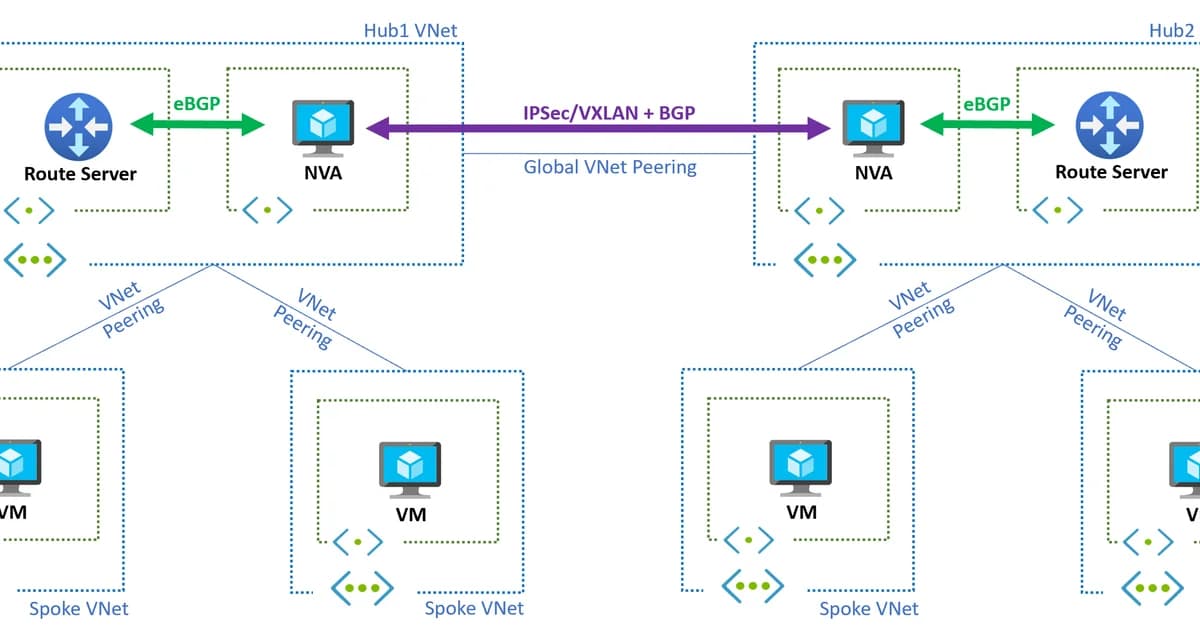
The primary region handles all traffic. The secondary region has infrastructure deployed but running at minimal capacity (or scaled to zero). Data replicates asynchronously from primary to secondary. When the primary fails, DNS failover routes traffic to the secondary, which scales up to handle the full load.
This is the pragmatic choice for most teams. You get region-level disaster recovery without solving the hardest distributed systems problems. The trade-off: failover takes minutes, and you'll lose whatever data hasn't replicated yet (your RPO might be 5-30 seconds).
Active-Active in Practice
Both regions handle live traffic simultaneously. A global load balancer (AWS Global Accelerator, Cloudflare, or Route 53 latency-based routing) sends each user to the nearest region. Both regions need full compute and database capacity running at all times.
The hard part is data. If a user in Europe writes data to the EU region and another user reads from the US region milliseconds later, they might see stale data. You need either:
- Partitioned data -- each region owns its data, no cross-region writes (simplest)
- Conflict-free replicated data types (CRDTs) -- data structures that merge without conflicts
- Last-writer-wins -- accept that concurrent writes to the same record will lose data
- Consensus protocols -- global databases like CockroachDB or Spanner that handle it at the database level
Building Multi-Region: Step by Step
Step 1: Deploy Identical Infrastructure
Use Infrastructure as Code (Terraform, CDK, Pulumi) to deploy the same stack to multiple regions. Parameterize region-specific values. Every resource that exists in the primary region should have a counterpart in the secondary -- VPCs, subnets, load balancers, compute, and caches.
Step 2: Set Up Database Replication
This is where most of the complexity lives:
- Amazon Aurora Global Database -- replicates across up to five secondary regions with typically under 1 second of lag. Supports managed failover.
- DynamoDB Global Tables -- active-active multi-region replication with last-writer-wins conflict resolution. Replication lag is usually under 1 second.
- PostgreSQL with logical replication -- more manual setup, but works across any cloud. Tools like pglogical or native logical replication handle it.
- CockroachDB / Google Spanner -- globally distributed databases with strong consistency. Higher latency per write, but no replication lag to manage.
Step 3: Configure Global Traffic Routing
Route users to the right region:
- Route 53 latency-based routing -- routes to the region with lowest latency, with health checks for automatic failover
- AWS Global Accelerator -- anycast IPs that route to the nearest healthy endpoint, with instant failover (no DNS TTL delay)
- Cloudflare Load Balancing -- global traffic management with health checks, geo-steering, and automatic failover
Step 4: Handle Stateful Services
Sessions, caches, and queues need cross-region strategies:
- Store sessions in DynamoDB Global Tables or an external session store
- Run Redis/ElastiCache independently per region (accept cold caches after failover)
- Use SQS per region with cross-region event forwarding via EventBridge
Step 5: Test Failover Regularly
A multi-region setup you've never tested is a multi-region setup that won't work. Schedule quarterly failover drills. Use chaos engineering tools (AWS Fault Injection Simulator, Gremlin) to simulate region failures. Measure RTO and RPO against your targets.
Watch out: DNS-based failover depends on TTL expiration. If your DNS TTL is 300 seconds, some clients won't switch to the secondary region for up to 5 minutes. Use low TTLs (60 seconds) for failover records, and consider Global Accelerator if you need faster cutover.
For reference: multi-region architecture deploys application infrastructure across two or more geographically separated cloud regions. It provides resilience against region-level failures, reduces latency for distributed users, and enables compliance with data sovereignty requirements. The trade-offs -- operational overhead, data consistency complexity, cross-region transfer cost -- are significant enough that most workloads should default to single-region multi-AZ.
Failure Modes: What Breaks During a Real Regional Event
The playbook on paper is always cleaner than the actual failover. These are the things that go wrong when you finally have to cut over.
Replication Lag Was Not What You Thought
Aurora Global Database documents "typically under 1 second" replication lag. In a real us-east-1 incident I watched lag spike to 38 seconds as the primary region's network deteriorated before the full outage. That 38 seconds of unreplicated writes became 38 seconds of lost orders. Always instrument actual replica lag and alert on the derivative, not the absolute.
DNS Clients That Ignore TTL
Route 53 TTL is set to 60 seconds. A Java HTTP client somewhere in your stack caches DNS for the JVM lifetime. Failover completes in 5 minutes for 95 percent of traffic and is still broken two hours later for the 5 percent that hit this one client. AWS Global Accelerator sidesteps the whole problem by using anycast IPs instead of DNS.
Split-Brain During Partial Partitions
Active-active with last-writer-wins is fine when one region is fully down. It is terrifying when the two regions can still reach the database but not each other, because both think they are primary. You either need a consensus layer (Spanner, CockroachDB) or a strict partitioning rule (a user's writes only ever go to one region).
Forgotten Singleton Resources
One cron job in us-east-1 runs a nightly billing reconciliation. During a us-east-1 failover, nobody remembers that it was only deployed there. Three days later an invoice reconciliation is missing. Audit your scheduled jobs -- every one should be either idempotent and duplicated across regions, or explicitly leader-elected.
Cost Implications
Multi-region is expensive. Here's a realistic breakdown for a mid-size application:
| Cost Category | Single-Region Multi-AZ | Active-Passive (2 regions) | Active-Active (2 regions) |
|---|---|---|---|
| Compute | $5,000/mo | $6,500/mo | $10,000/mo |
| Database | $2,000/mo | $3,500/mo | $5,000/mo |
| Data transfer | $200/mo | $800/mo | $1,500/mo |
| Global routing | $0 | $100/mo | $200/mo |
| Total | $7,200/mo | $10,900/mo | $16,700/mo |
Cross-region data transfer is the hidden cost. AWS charges $0.02/GB for inter-region data transfer. Database replication, cache warming, and log shipping add up quickly. Budget for at least 50% more than single-region for active-passive and 100% more for active-active.
Pro tip: For active-passive, keep the secondary region's compute scaled down or in a warm standby state (smaller instances, fewer nodes). Auto Scaling can bring it to full capacity within minutes during failover, saving you from running full duplicate capacity 24/7.
Frequently Asked Questions
What is the difference between multi-AZ and multi-region?
Multi-AZ deploys across multiple Availability Zones within a single region. AZs are connected by low-latency links and are designed for independent failure. Multi-region deploys across geographically separated regions, providing protection against region-wide outages but with higher latency between regions and more complex data replication.
How do I handle database writes in active-active multi-region?
You have four main options: partition data by region so each region owns its writes, use a globally distributed database like CockroachDB or Spanner, implement last-writer-wins conflict resolution with DynamoDB Global Tables, or use CRDTs for eventually consistent merge operations. The right choice depends on your consistency requirements.
What RPO and RTO should I target for multi-region?
Active-passive typically achieves an RPO of 5-30 seconds (async replication lag) and an RTO of 5-15 minutes (DNS failover plus scaling). Active-active achieves near-zero RPO and sub-minute RTO since the secondary region is already handling traffic. Define your targets based on business impact, not technical ambition.
Is multi-region necessary for a startup?
Almost never. A well-architected single-region multi-AZ deployment on AWS provides 99.99% availability, which is more than sufficient for most startups. Multi-region makes sense when you have paying enterprise customers with strict SLAs, regulatory requirements, or a truly global user base that needs low latency everywhere.
How do I test multi-region failover?
Schedule regular failover drills -- at minimum quarterly. Use AWS Fault Injection Simulator or Gremlin to simulate region failures in a controlled way. Measure actual RTO and RPO during drills and compare against targets. Start with off-peak failover tests before attempting peak-traffic scenarios.
Which AWS services support multi-region natively?
Key services with built-in multi-region support include Aurora Global Database, DynamoDB Global Tables, S3 Cross-Region Replication, Route 53, Global Accelerator, CloudFront, and EventBridge Global Endpoints. RDS (non-Aurora) supports cross-region read replicas but lacks automated failover. ECS and EKS require separate clusters per region.
Default to Single-Region
Multi-region is a powerful capability, but it's not a default architecture decision. Start with single-region multi-AZ, which handles most availability requirements with far less complexity. When a clear business driver -- regulatory compliance, global latency, or an SLA above 99.99% -- pushes you toward multi-region, start with active-passive. Graduate to active-active only when you've solved the data consistency problem for your specific use case. The teams that do multi-region well are the ones that approached it incrementally, not the ones that tried to build it all at once.
Written by
Abhishek Patel
Infrastructure engineer with 10+ years building production systems on AWS, GCP, and bare metal. Writes practical guides on cloud architecture, containers, networking, and Linux for developers who want to understand how things actually work under the hood.
Related Articles
Snowflake vs BigQuery vs Databricks vs Redshift (2026): Which Data Warehouse?
Snowflake wins on concurrency, BigQuery on serverless simplicity, Databricks on ML, Redshift on AWS depth. Real 2026 pricing, TPC-DS benchmarks, and a clear decision matrix.
16 min read
AI/ML EngineeringRunPod vs Vast.ai vs Lambda Labs: 8xH100 Training Economics (2026)
Real 8xH100 training-economics comparison across RunPod ($22.32/hr Secure Cloud), Vast.ai (spot $12.16/hr floor), and Lambda Labs (reserved $14.80/hr). MFU benchmarks, break-even math for spot vs reserved, interruption rates, and which provider wins per job shape.
16 min read
CloudRender vs Railway vs Fly.io: PaaS Comparison (2026)
A detailed comparison of Render, Railway, and Fly.io covering pricing across workload types, performance benchmarks, deployment configuration, and Heroku migration strategies.
12 min read
Enjoyed this article?
Get more like this in your inbox. No spam, unsubscribe anytime.