Load Balancing Algorithms: Round Robin, Least Connections, and More
A practical guide to load balancing algorithms -- round robin, least connections, IP hash, consistent hashing, and power of two choices -- with nginx and HAProxy configurations.
Infrastructure engineer with 10+ years building production systems on AWS, GCP,…
3:47 AM: One Node at 95% CPU, Three Idling at 20%
The pager read "checkout API p99 1.8 s, error rate 4%." I pulled up the dashboard expecting traffic to be up. It was not -- requests per second were exactly where they had been all week. What was not flat was the per-instance CPU panel: app-03 was pegged at 95 percent, and app-01, app-02, app-04 were coasting between 18 and 24. A load balancer with four healthy backends was routing traffic like it had one.
Everyone's first instinct is "add more servers." I was half a minute from filing a capacity-bump ticket when I noticed the nginx config on the edge LB: a plain upstream block, no directive, default weighted round robin. Our four app nodes were not identical -- app-03 happened to be the one that kept long-lived SSE connections open for the inventory widget, so every new round-robin request stacked on top of a thread pool that was already saturated. Round robin does not know that. Round robin does not know anything except "whose turn is it next."
The fix was one line. Add least_conn; to the upstream block, reload nginx, and within 45 seconds the per-instance CPU graphs converged to a tight 55-65 percent band. No new hardware, no code change, no rollback. Just a different algorithm making a smarter choice per request.
This guide covers the six load-balancing algorithms you will actually encounter -- round robin, weighted round robin, least connections, IP hash, consistent hashing, and power-of-two-choices -- with the nginx and HAProxy configs to enable each, the failure modes I have hit in production, and a cost-and-feature table at the end comparing the big managed load balancers.
Layer 4 vs Layer 7: Know What Your Load Balancer Can See
Before picking an algorithm, it matters where your load balancer sits in the stack. Layer 4 load balancers (AWS NLB, IPVS, HAProxy in TCP mode) route on TCP/UDP five-tuple: source IP, source port, destination IP, destination port, protocol. They are fast -- no packet inspection, no TLS termination -- and a single NLB can sustain millions of connections per second. But they cannot see URL paths, headers, or cookies, so algorithms like consistent-hash-by-URI are off the table.
Layer 7 load balancers (AWS ALB, Nginx, Envoy, Traefik) terminate TCP, parse the HTTP request, and can route on anything they can parse -- path, Host header, cookies, even gRPC service names. The processing cost is higher, but every algorithm in the rest of this article is available to you, and you can mix them (path-based routing to one pool, consistent hash to another) inside the same virtual host.
Round Robin
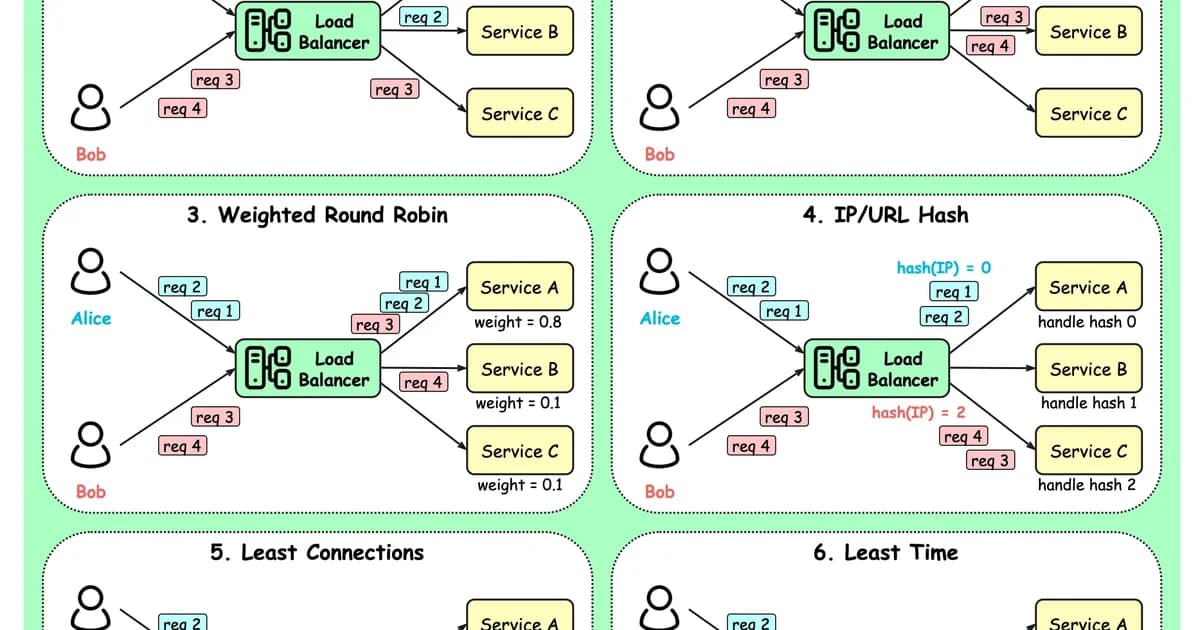
The simplest algorithm: requests go to servers in order, cycling through the list. Server A, Server B, Server C, Server A, Server B, Server C.
# nginx default - round robin
upstream backend {
    server 10.0.0.1:8080;
    server 10.0.0.2:8080;
    server 10.0.0.3:8080;
}
When Round Robin Works
- All servers have identical hardware and capacity.
- Requests are roughly uniform in cost (similar processing time).
- No session affinity requirements.
- Stateless application servers.
When Round Robin Breaks
If Server A is a 4-core machine and Server B is an 8-core machine, round robin sends them equal traffic. Server A saturates while Server B coasts. Similarly, if some requests take 10ms and others take 5 seconds, round robin can stack expensive requests on one server by bad luck.
Weighted Round Robin
Assign each server a weight proportional to its capacity. A server with weight 3 gets three times as many requests as a server with weight 1.
upstream backend {
    server 10.0.0.1:8080 weight=3;  # 8-core, 32GB
    server 10.0.0.2:8080 weight=1;  # 4-core, 16GB
    server 10.0.0.3:8080 weight=2;  # 4-core, 32GB
}
This handles heterogeneous hardware but still assumes requests are uniform in cost. You're manually tuning weights, which means re-tuning whenever you change server specs.
Least Connections
Route each new request to the server with the fewest active connections. This naturally adapts to differences in both server capacity and request cost -- faster servers complete requests sooner and accumulate fewer active connections.
upstream backend {
    least_conn;
    server 10.0.0.1:8080;
    server 10.0.0.2:8080;
    server 10.0.0.3:8080;
}
Why Least Connections Is Often the Best Default
- It adapts to servers of different speeds without manual weight tuning.
- It handles variable request durations -- servers processing slow requests naturally receive fewer new ones.
- It responds to real-time load, not a preconfigured assumption about capacity.
- It gracefully handles a slow server (e.g., garbage collection pause) by routing traffic away from it while it's stalled.
Pro tip: If you're unsure which algorithm to use, start with least connections. It handles more edge cases than round robin with zero additional configuration. Switch to something more specialized only when you have a specific reason.
IP Hash
Compute a hash of the client's IP address and use it to consistently route that client to the same server. This provides session affinity (sticky sessions) without cookies or application-level session stores.
upstream backend {
    ip_hash;
    server 10.0.0.1:8080;
    server 10.0.0.2:8080;
    server 10.0.0.3:8080;
}
IP Hash Trade-offs
- Pro: Clients consistently hit the same server, enabling server-local caches and in-memory sessions.
- Con: Corporate NATs and shared IPs can funnel thousands of users to one server. A large office behind a single NAT IP creates a hot spot.
- Con: Adding or removing servers rehashes most clients to different servers, invalidating their sessions and caches.
Consistent Hashing
A more sophisticated version of IP hash that minimizes redistribution when servers are added or removed. Servers are placed on a hash ring, and each request is mapped to the nearest server on the ring. When a server is added, only a fraction (roughly 1/n) of requests move.
Consistent hashing is essential for caching layers. If you're load-balancing across Memcached or Redis instances, you want the same keys to hit the same servers. Regular hashing redistributes nearly all keys when a server changes; consistent hashing moves only the minimum necessary.
# nginx Plus or third-party module
upstream cache_backend {
    hash $request_uri consistent;
    server 10.0.0.1:11211;
    server 10.0.0.2:11211;
    server 10.0.0.3:11211;
}
Random with Two Choices (Power of Two)
Pick two servers at random, then send the request to whichever has fewer active connections. This surprisingly simple algorithm produces near-optimal load distribution with minimal overhead.
The math behind it is compelling: random selection alone creates an O(log n) maximum load imbalance. Random with two choices reduces it to O(log log n) -- an exponential improvement from a trivial change. This is known as the "power of two choices" principle.
Pro tip: Random with two choices is excellent for large-scale distributed systems where maintaining a global connection count is expensive. Each load balancer only needs to probe two servers, not track the state of all of them. It's used in Envoy proxy and several cloud-native service meshes.
Algorithm Comparison
| Algorithm | Best For | Weakness | State Needed |
|---|---|---|---|
| Round Robin | Identical servers, uniform requests | Ignores server capacity and load | Counter only |
| Weighted Round Robin | Heterogeneous hardware | Manual tuning, ignores request cost | Counter + weights |
| Least Connections | Variable request durations | Requires connection tracking | Active connection counts |
| IP Hash | Session affinity | NAT hot spots, rehashing on changes | None (stateless hash) |
| Consistent Hashing | Caching layers | More complex implementation | Hash ring |
| Random Two Choices | Large distributed systems | Slightly less optimal than least-conn | Two random probes |
Health Checks
No algorithm matters if you're routing to dead servers. Health checks come in two flavors:
Passive Health Checks
The load balancer monitors responses from normal traffic. If a server returns errors or times out, it's marked unhealthy after a threshold. nginx does this by default:
upstream backend {
    server 10.0.0.1:8080 max_fails=3 fail_timeout=30s;
    server 10.0.0.2:8080 max_fails=3 fail_timeout=30s;
}
After 3 failures within 30 seconds, the server is removed from rotation for 30 seconds.
Active Health Checks
The load balancer sends periodic probe requests to a health endpoint. This detects failures before real traffic hits them. Active checks are available in nginx Plus, HAProxy, and cloud load balancers:
# HAProxy active health check
backend app_servers
    option httpchk GET /health
    http-check expect status 200
    server app1 10.0.0.1:8080 check inter 5s fall 3 rise 2
    server app2 10.0.0.2:8080 check inter 5s fall 3 rise 2
Load Balancer Cost Comparison
| Solution | Type | Algorithms | Cost |
|---|---|---|---|
| nginx (open source) | Self-hosted | Round robin, weighted, least conn, IP hash | Free |
| nginx Plus | Self-hosted | All above + least time, consistent hash, active checks | $2,500/year |
| HAProxy | Self-hosted | Round robin, least conn, source hash, URI hash, random | Free / Enterprise from $1,995/yr |
| AWS ALB | Managed | Round robin, least outstanding requests | $0.0225/hr + $0.008/LCU-hr |
| AWS NLB | Managed | Flow hash (5-tuple) | $0.0225/hr + $0.006/NLCU-hr |
| Cloudflare LB | Managed | Round robin, weighted, least conn, geo | $5/mo + $0.50/500k DNS queries |
| GCP Cloud LB | Managed | Round robin, least conn, consistent hash | $0.025/hr + $0.008/GB |
Frequently Asked Questions
What is the default load balancing algorithm in nginx?
Nginx defaults to weighted round robin. Without explicit weights, all servers have weight 1, making it plain round robin. This is fine for identical servers handling uniform traffic. If your servers differ in capacity or your requests vary significantly in processing time, switch to least_conn for better distribution without manual tuning.
When should I use sticky sessions instead of stateless load balancing?
Sticky sessions (via IP hash or cookie-based affinity) make sense when migrating legacy applications that store session state in server memory. For new applications, avoid sticky sessions entirely. Store session data in Redis or a database, keep your application servers stateless, and use least connections. Sticky sessions create hot spots and complicate deployments since you can't drain servers cleanly.
What is the difference between Layer 4 and Layer 7 load balancing?
Layer 4 load balancers route based on TCP/UDP information: source IP, destination IP, and port numbers. They're fast because they don't inspect packet contents. Layer 7 load balancers understand HTTP and can route based on URL path, headers, cookies, or request body. Layer 7 is more flexible but adds processing overhead. Use Layer 4 for raw throughput (databases, TCP services) and Layer 7 for HTTP applications where you need content-based routing.
How does consistent hashing help with caching?
Consistent hashing maps cache keys to servers on a hash ring so the same key always goes to the same server. Without it, adding or removing a cache server redistributes most keys, causing a cache stampede as every server refills its cache simultaneously. With consistent hashing, only 1/n of keys move when a server changes. This is critical for Memcached clusters and CDN origin shields.
Can I combine multiple load balancing algorithms?
Yes. A common pattern is geographic routing at the DNS or global load balancer level (route users to the nearest region) combined with least connections within each region. Another pattern: consistent hashing for cacheable requests (same URL hits same server) with least connections for API endpoints. HAProxy and Envoy support complex routing rules that mix algorithms based on request attributes.
How many backend servers before load balancing matters?
Load balancing matters from 2 servers onward -- that's the point where you need traffic distribution and failover. The algorithm choice becomes more critical as you scale. At 2-5 servers, the difference between round robin and least connections is minor. At 20+ servers with heterogeneous hardware, the algorithm meaningfully affects tail latency and resource utilization. Health checks matter at any scale.
What is the power of two choices?
The power of two choices is a load balancing strategy where you pick two servers at random and route to the less loaded one. Despite its simplicity, it achieves near-optimal distribution. Mathematically, pure random selection creates O(log n) maximum imbalance, while two random choices reduces it to O(log log n). Envoy proxy uses this algorithm by default for its outlier detection mechanism.
Conclusion
Start with least connections unless you have a specific reason not to -- it handles heterogeneous servers and variable request costs without configuration. Use consistent hashing when caching is involved. Use IP hash only as a stopgap for session affinity while you migrate to externalized session storage. Configure health checks regardless of algorithm -- routing to unhealthy servers negates any algorithmic advantage. And run load tests before production to verify your algorithm choice actually distributes load the way you expect.
Written by
Abhishek Patel
Infrastructure engineer with 10+ years building production systems on AWS, GCP, and bare metal. Writes practical guides on cloud architecture, containers, networking, and Linux for developers who want to understand how things actually work under the hood.
Related Articles
CDN Latency from India: Cloudflare vs Bunny vs Fastly Measured
Real RTT measurements from 8 Indian cities (Mumbai, Bangalore, Delhi, Chennai, Hyderabad, Kolkata, Pune, Ahmedabad) across BSNL, Jio, Airtel, Tata to 5 CDNs over 7 days. Cloudflare leads p50 from every city; the Singapore detour problem; IPv6 vs IPv4 gaps on Jio.
9 min read
NetworkingMacvlan and IPvlan in Docker: When to Use Each
Macvlan gives containers unique MACs (each looks like a physical machine); IPvlan shares the host MAC. Real use cases (legacy apps, hardware licensing, multi-tenant), gotchas (host can't reach containers, AWS blocks them), and configuration recipes.
12 min read
NetworkingNginx vs Apache vs Caddy: Which Web Server Is Best?
A performance and usability comparison of popular web servers including benchmarks, configuration complexity, and real-world usage.
9 min read
Enjoyed this article?
Get more like this in your inbox. No spam, unsubscribe anytime.