WebSockets vs SSE vs Long Polling: When to Use Each
A practical comparison of WebSockets, Server-Sent Events, and long polling with code examples, use case mapping, scaling strategies, and a clear decision framework.
Infrastructure engineer with 10+ years building production systems on AWS, GCP,…
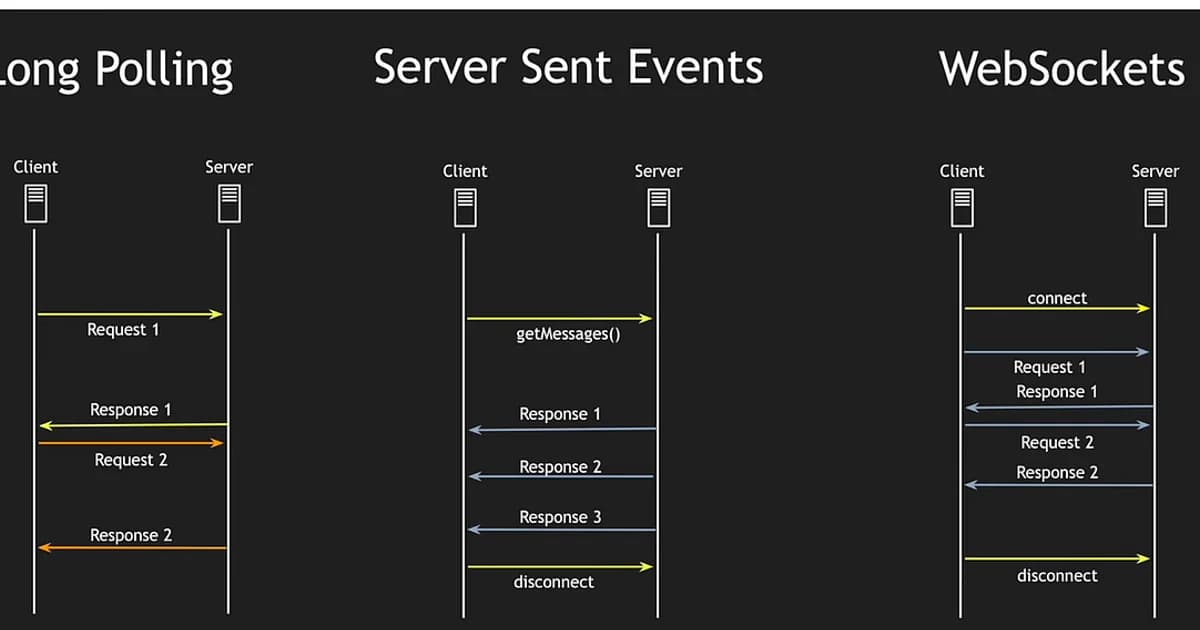
Find the Row That Matches Your Feature
WebSockets, Server-Sent Events, and long polling all push data from server to client, but they earn their place in very different architectures. The common mistake is to read a "WebSockets for everything" blog post and reach for the most powerful option for a feature that would be cheaper, simpler, and more reliable on SSE or long polling. Find the row below that matches the feature you are building, and the rest of the article drills into each option with code, wire formats, and scaling notes.
| If you are building... | Pick | Why in one line |
|---|---|---|
| Chat, collaborative editing, multiplayer game | WebSockets | Full duplex, low-latency, both sides talk whenever |
| Live dashboard, notification feed, stock ticker, log tail | SSE | Server-to-client only, auto-reconnects, plain HTTP |
| LLM/AI streaming tokens to the browser | SSE | Native EventSource handles partial tokens cleanly |
| Feature that must work through hostile corporate proxies | Long polling | Standard HTTP request-response, no upgrade dance |
| Mobile web client on flaky network | SSE (with long-polling fallback) | Resume via Last-Event-ID, cheap to fall back |
| Order status, payment webhooks you poll yourself anyway | Long polling | No persistent connection state to manage |
| High-frequency sensor or IoT telemetry (>100 msgs/sec per client) | WebSockets | Binary frames, no HTTP header overhead per message |
Three details this table hides. First, SSE used to be penalized by the browser six-connection-per-domain limit; over HTTP/2 that limit is gone because streams multiplex onto one TCP connection. Second, WebSockets are the only option that lets the client stream binary frames to the server without base64 encoding -- matters for voice, video, and file upload progress. Third, long polling is not a legacy curiosity -- it is the most compatible fallback and the default transport for Socket.IO before upgrade negotiation completes. The sections below cover each option in detail, starting with the one people underestimate most.
Long Polling: Still the Most Compatible Option
Long polling works like this: the client opens a normal HTTP GET, the server deliberately does not respond until it has data (or a timeout elapses), and the instant the response comes back the client opens the next request. It is the oldest trick in the book for simulating server push over request-response HTTP, and the reason it still matters is that it works through every proxy, WAF, and corporate firewall ever shipped -- they all understand plain HTTP.
// Client-side long polling
async function poll() {
  try {
    const response = await fetch('/api/events?since=lastEventId');
    const data = await response.json();
    handleEvents(data);
  } catch (error) {
    await new Promise(resolve => setTimeout(resolve, 3000));
  }
  poll(); // Immediately reconnect
}
poll();
// Server-side (Express)
app.get('/api/events', async (req, res) => {
const since = req.query.since;
const timeout = setTimeout(() => {
res.json({ events: [], lastEventId: since });
}, 30000); // 30s timeout
const events = await waitForEvents(since, 30000);
clearTimeout(timeout);
res.json({ events, lastEventId: events.at(-1)?.id ?? since });
});Long Polling Trade-offs
- Pro: Works through every proxy, firewall, and load balancer. Zero browser compatibility concerns.
- Pro: Uses standard HTTP -- no special server support needed.
- Con: Each "push" consumes a full HTTP request-response cycle with headers, cookies, and all the overhead.
- Con: Holding connections open ties up server threads/connections. At 10,000 concurrent users, you have 10,000 pending HTTP requests.
- Con: Latency gap between server getting data and client receiving it depends on timing. If data arrives right after the client disconnects to reconnect, there's a delay.
What Is Server-Sent Events (SSE)?
Definition: Server-Sent Events (SSE) is a browser API and protocol where the server pushes events to the client over a single, long-lived HTTP connection. The server sends text-based event streams using a simple format. SSE is unidirectional (server to client only), auto-reconnects on failure, and works over standard HTTP.
SSE uses the EventSource API in the browser and a simple text protocol on the server. The server sends events as plain text lines, each prefixed with data:, separated by blank lines. It's stupidly simple, and that's its greatest strength.
// Client-side SSE
const source = new EventSource('/api/stream');

source.addEventListener('message', (event) => {
  const data = JSON.parse(event.data);
  handleUpdate(data);
});

source.addEventListener('error', () => {
  console.log('Connection lost, auto-reconnecting...');
  // EventSource reconnects automatically
});
// Server-side (Express)
app.get('/api/stream', (req, res) => {
res.writeHead(200, {
'Content-Type': 'text/event-stream',
'Cache-Control': 'no-cache',
'Connection': 'keep-alive',
});
const sendEvent = (data) => {
res.write('data: ' + JSON.stringify(data) + '\n\n');
};
// Subscribe to your event source
const unsubscribe = eventBus.subscribe(sendEvent);
req.on('close', () => {
unsubscribe();
});
});SSE Protocol Format
The wire format is remarkably simple:
event: priceUpdate
data: {"symbol": "AAPL", "price": 178.52}
id: 1234

event: priceUpdate
data: {"symbol": "GOOG", "price": 141.80}
id: 1235
The id field enables automatic resume. If the connection drops, the browser reconnects and sends a Last-Event-ID header so the server can replay missed events.
What Are WebSockets?
Definition: WebSocket is a protocol (RFC 6455) providing full-duplex, bidirectional communication over a single TCP connection. After an HTTP upgrade handshake, the connection switches to a binary frame-based protocol where both client and server can send messages independently at any time without the overhead of HTTP headers per message.
WebSockets start as an HTTP request with an Upgrade header. If the server agrees, the connection switches from HTTP to the WebSocket protocol -- a fundamentally different, lower-overhead framing protocol. From that point, both sides can send messages whenever they want.
// Client-side WebSocket
const ws = new WebSocket('wss://example.com/ws');

ws.onopen = () => {
  ws.send(JSON.stringify({ type: 'subscribe', channel: 'prices' }));
};

ws.onmessage = (event) => {
  const data = JSON.parse(event.data);
  handleUpdate(data);
};

ws.onclose = () => {
  // Must implement reconnection logic yourself
  setTimeout(() => connect(), 3000);
};
// Server-side (Node.js with ws library)
import { WebSocketServer } from 'ws';
const wss = new WebSocketServer({ port: 8080 });
wss.on('connection', (ws) => {
ws.on('message', (message) => {
const parsed = JSON.parse(message);
if (parsed.type === 'subscribe') {
subscribeToChannel(ws, parsed.channel);
}
});
ws.on('close', () => {
cleanupConnection(ws);
});
});WebSockets vs SSE vs Long Polling: Head-to-Head
| Feature | Long Polling | SSE | WebSockets |
|---|---|---|---|
| Direction | Client-initiated (simulated push) | Server to client only | Full duplex (bidirectional) |
| Protocol | Standard HTTP | HTTP with text/event-stream | WebSocket protocol (after HTTP upgrade) |
| Connection overhead | New request per update | Single persistent HTTP connection | Single persistent TCP connection |
| Auto-reconnect | Manual implementation | Built into EventSource API | Manual implementation |
| Resume support | Manual (track last event) | Built-in via Last-Event-ID | Manual implementation |
| Binary data | Possible (base64 encoded) | Text only | Native binary frame support |
| Browser support | Universal | All modern browsers | All modern browsers |
| Proxy/LB compatibility | Excellent | Good (some proxies buffer) | Requires WebSocket-aware proxy |
| Max connections (browser) | 6 per domain (HTTP/1.1) | 6 per domain (HTTP/1.1) | No HTTP limit (separate protocol) |
| Complexity | Low | Low | Medium-High |
Use Case Decision Framework
Here's how I decide which technology to use for a given feature:
- Does the client need to send frequent messages to the server? If yes, use WebSockets. SSE and long polling require separate HTTP requests for client-to-server communication.
- Is it server-to-client updates only? If yes, use SSE. It's simpler, auto-reconnects, has built-in resume, and works with standard HTTP infrastructure.
- Do you need it to work through aggressive corporate proxies? If yes, long polling is your safest bet. Some proxies buffer SSE or don't support WebSocket upgrades.
- Is this a chat or collaborative editing feature? WebSockets. The bidirectional, low-latency nature is essential.
- Is this a dashboard, feed, or notification system? SSE. The server pushes updates; the client just renders them.
Pro tip: SSE over HTTP/2 solves the 6-connection browser limit because HTTP/2 multiplexes streams over a single TCP connection. If your users are on modern browsers (they are), this removes SSE's biggest practical limitation.
Scaling Considerations
Long Polling at Scale
Each pending request holds a connection. With thread-per-connection servers (like traditional PHP or Java servlet containers), this scales poorly. Async runtimes (Node.js, Go, Rust) handle it better since pending requests don't block threads. You'll still hit connection limits on load balancers and reverse proxies.
SSE at Scale
One persistent connection per client. The connection count is identical to WebSockets, but SSE is easier to load-balance because it's plain HTTP. You can use any HTTP load balancer with sticky sessions or connection-aware routing. Redis Pub/Sub or NATS behind your servers lets any instance push events to any connected client.
WebSockets at Scale
WebSocket connections are stateful -- you need to know which server holds which client's connection. This requires either sticky sessions on your load balancer or a pub/sub backbone (Redis, NATS, Kafka) that broadcasts events to all server instances. Load balancers must support WebSocket upgrades. Health checks are more complex because the connection is long-lived.
Service and Library Recommendations
| Solution | Type | Best For | Pricing |
|---|---|---|---|
| Socket.IO | Library | WebSockets with fallback | Free (open source) |
| Ably | Managed service | Pub/sub with presence and history | Free tier / $29+/mo |
| Pusher | Managed service | Real-time channels for web/mobile | Free tier / $49+/mo |
| AWS AppSync | Managed service | GraphQL subscriptions | $2/million connections |
| Centrifugo | Self-hosted | Real-time messaging server | Free (open source) |
Watch out: Managed real-time services charge per message and per connection. A chat app with 10,000 concurrent users sending 5 messages/minute generates 72 million messages/day. Run the numbers before committing to a managed service -- self-hosting Centrifugo or a custom WebSocket server is often cheaper at scale.
Frequently Asked Questions
Should I use WebSockets or SSE for a notification system?
SSE. Notifications are server-to-client only, which is exactly what SSE is designed for. You get auto-reconnection and resume for free. WebSockets add unnecessary complexity when the client doesn't need to send real-time messages back. The client can use standard HTTP POST requests for any actions triggered by notifications.
Does Socket.IO use WebSockets?
Socket.IO uses WebSockets as its primary transport but starts with long polling and upgrades to WebSockets if available. It also adds features on top: automatic reconnection, room-based broadcasting, acknowledgments, and binary support. The downside is Socket.IO uses a custom protocol, so you can't connect with a plain WebSocket client -- both sides must use the Socket.IO library.
Can SSE handle thousands of concurrent connections?
Yes, with the right server architecture. Node.js, Go, and Rust handle SSE connections efficiently because they don't dedicate a thread per connection. A single Node.js process can handle 10,000+ SSE connections comfortably. The bottleneck is usually the load balancer's connection limit or memory, not the SSE protocol itself.
Why not just use WebSockets for everything?
WebSockets add complexity: custom reconnection logic, message acknowledgment if you need it, connection state management, WebSocket-aware load balancers, and a different debugging model (you can't just curl a WebSocket endpoint). If your use case is server-to-client updates, SSE gives you 90% of the benefit with 30% of the complexity. Use the simplest tool that solves your problem.
Does long polling still make sense in 2025?
Rarely for new projects. SSE has universal browser support now, and WebSockets have been supported everywhere for over a decade. Long polling still makes sense when you're dealing with extremely restrictive network environments (some corporate proxies) or building on infrastructure that doesn't support persistent connections. It's also a reasonable fallback strategy.
How do I handle authentication with WebSockets?
The WebSocket handshake is an HTTP request, so you can include cookies or an authorization header. For token-based auth, send the token as a query parameter during the handshake or send it as the first WebSocket message after connection. Don't put JWTs in query strings in production since they end up in server logs. Use a short-lived ticket exchanged via your REST API instead.
Can I use SSE with HTTP/2?
Yes, and you should. HTTP/2 multiplexes multiple streams over a single TCP connection, which eliminates the browser's 6-connection-per-domain limit for SSE. This means you can open multiple SSE connections to different endpoints without starving your other HTTP requests. Most modern deployments serve SSE over HTTP/2 by default.
Conclusion
Default to SSE for server-to-client updates -- it's simpler, reconnects automatically, and works with existing HTTP infrastructure. Reach for WebSockets only when you need bidirectional communication with low latency (chat, collaborative editing, multiplayer games). Long polling is a fallback for hostile network environments, not a first choice. Whatever you pick, plan your scaling strategy around a pub/sub backbone early. Retrofitting real-time architecture onto a system that wasn't designed for it is far more painful than getting it right from the start.
Written by
Abhishek Patel
Infrastructure engineer with 10+ years building production systems on AWS, GCP, and bare metal. Writes practical guides on cloud architecture, containers, networking, and Linux for developers who want to understand how things actually work under the hood.
Related Articles
SQLite at the Edge: When libSQL Beats Postgres
SQLite at the edge via libSQL embedded replicas and Cloudflare D1 delivers 2-5ms reads worldwide versus 20-100ms for Postgres read replicas. Real benchmarks, pricing comparisons, production failure modes, and a decision framework for when edge SQLite wins and when Postgres-with-replicas is still the right call.
15 min read
DevOpsWebContainers and StackBlitz: Browser-Native Dev Environments in 2026
Real Node.js compiled to WebAssembly running inside the browser tab. What works (Next.js dev, npm install, SQLite via WASM), what doesn't (native modules, Postgres, Python), and the use cases that actually changed in 2026: docs, interviews, AI agent sandboxes, SDK onboarding.
12 min read
AI/ML EngineeringClaude Agent SDK: Build Custom AI Agents
Build production Claude agents in TypeScript or Python with the official Agent SDK. Tool-use loop, MCP integration, extended thinking, guardrails, and observability — end-to-end tutorial in under 45 minutes.
16 min read
Enjoyed this article?
Get more like this in your inbox. No spam, unsubscribe anytime.