GitHub Actions Deep Dive: Writing Reusable Workflows
Go beyond basic GitHub Actions: composite actions, reusable workflows, secret passing, dependency caching, matrix builds, and permission lockdown patterns you can apply immediately.
Infrastructure engineer with 10+ years building production systems on AWS, GCP,…
Beyond the Starter Template
Most GitHub Actions workflows start the same way: copy a YAML snippet from the docs, tweak the Node version, add npm test, and call it done. That works for a single repo. It falls apart the moment you have five repos running near-identical pipelines with slight variations, each drifting in its own direction.
GitHub Actions has built-in mechanisms for reuse — composite actions and reusable workflows — but the documentation buries the practical patterns under specification details. This guide covers the patterns that actually matter: how to write workflows that are DRY, fast, and locked down with minimal token scope.
Composite Actions vs Reusable Workflows
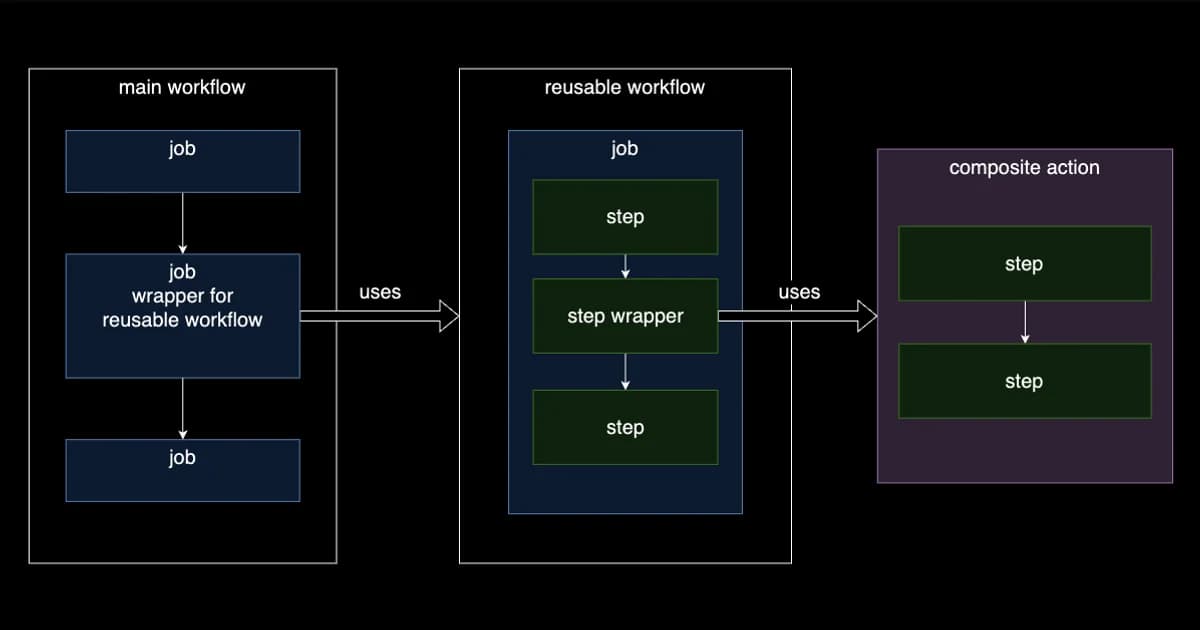
GitHub gives you two distinct reuse mechanisms, and picking the wrong one leads to awkward workarounds. Here's the real difference:
| Feature | Composite Action | Reusable Workflow |
|---|---|---|
| Scope | A single step inside a job | An entire job (or set of jobs) |
| Defined in | action.yml in a repo or subdirectory | A .yml file under .github/workflows/ |
| Can contain | Multiple run steps and action calls | Full jobs with runners, services, matrices |
| Secrets access | Inherits from calling job | Must be explicitly passed or use secrets: inherit |
| Runner | Runs on the caller's runner | Specifies its own runner |
| Outputs | Step-level outputs | Job-level outputs |
| Best for | Shared setup steps, lint/format checks | Entire CI/CD pipelines, deploy workflows |
Definition: A composite action bundles multiple steps into a single reusable action that runs within the caller's job. A reusable workflow is a complete workflow file that runs as a separate job, triggered by
workflow_callfrom another workflow.
When to Use Each
Use a composite action when you're extracting a handful of steps that multiple jobs share — setting up a language runtime, installing dependencies, running linters. The action runs inside the caller's job, on the caller's runner, with access to the same filesystem.
Use a reusable workflow when you're standardizing an entire pipeline across repos — a full CI job, a deployment pipeline, a release workflow. It runs as its own job with its own runner, so it's fully isolated.
Writing a Composite Action
A composite action lives in an action.yml file. Here's a practical one that sets up Node.js with pnpm and caches dependencies:
# .github/actions/setup-node-pnpm/action.yml
name: 'Setup Node + pnpm'
description: 'Install Node.js and pnpm with dependency caching'
inputs:
  node-version:
    description: 'Node.js version'
    required: false
    default: '20'
runs:
  using: 'composite'
  steps:
    - uses: pnpm/action-setup@v4
      with:
        version: 9
    - uses: actions/setup-node@v4
      with:
        node-version: ${{ inputs.node-version }}
        cache: 'pnpm'
    - run: pnpm install --frozen-lockfile
      shell: bash
Now every job that needs Node + pnpm uses a single step instead of three:
jobs:
  test:
    runs-on: ubuntu-latest
    steps:
      - uses: actions/checkout@v4
      - uses: ./.github/actions/setup-node-pnpm
        with:
          node-version: '22'
      - run: pnpm test
Pro tip: Put composite actions in the same repo under
.github/actions/for repo-specific actions, or in a dedicated shared repo (e.g.,org/actions) and reference them withuses: org/actions/setup-node-pnpm@v1. Tag releases with semver so consumers can pin versions.
Writing a Reusable Workflow
A reusable workflow is a regular workflow file that uses workflow_call as its trigger. Here's a full CI workflow designed to be called from any repo in your org:
# .github/workflows/ci-reusable.yml (in your shared repo)
name: CI Pipeline
on:
  workflow_call:
    inputs:
      node-version:
        type: string
        default: '20'
      run-e2e:
        type: boolean
        default: false
    secrets:
      CODECOV_TOKEN:
        required: false

jobs:
  lint-and-test:
    runs-on: ubuntu-latest
    permissions:
      contents: read
    steps:
      - uses: actions/checkout@v4
      - uses: pnpm/action-setup@v4
        with:
          version: 9
      - uses: actions/setup-node@v4
        with:
          node-version: ${{ inputs.node-version }}
          cache: 'pnpm'
      - run: pnpm install --frozen-lockfile
      - run: pnpm lint
      - run: pnpm test -- --coverage
      - if: secrets.CODECOV_TOKEN != ''
        uses: codecov/codecov-action@v4
        with:
          token: ${{ secrets.CODECOV_TOKEN }}

  e2e:
    if: inputs.run-e2e
    runs-on: ubuntu-latest
    permissions:
      contents: read
    steps:
      - uses: actions/checkout@v4
      - uses: pnpm/action-setup@v4
        with:
          version: 9
      - uses: actions/setup-node@v4
        with:
          node-version: ${{ inputs.node-version }}
          cache: 'pnpm'
      - run: pnpm install --frozen-lockfile
      - run: pnpm exec playwright install --with-deps
      - run: pnpm e2e
A caller workflow references it with uses:
# .github/workflows/ci.yml (in any repo)
name: CI
on:
  push:
    branches: [main]
  pull_request:

jobs:
  ci:
    uses: org/shared-workflows/.github/workflows/ci-reusable.yml@v1
    with:
      node-version: '22'
      run-e2e: true
    secrets:
      CODECOV_TOKEN: ${{ secrets.CODECOV_TOKEN }}
Passing Secrets Safely
Secrets handling is where reusable workflows get tricky. You have three options:
Option 1: Explicit Secret Passing
The caller lists each secret individually. Most verbose, most visible, most secure.
jobs:
  deploy:
    uses: org/workflows/.github/workflows/deploy.yml@v1
    secrets:
      AWS_ACCESS_KEY_ID: ${{ secrets.AWS_ACCESS_KEY_ID }}
      AWS_SECRET_ACCESS_KEY: ${{ secrets.AWS_SECRET_ACCESS_KEY }}
Option 2: Inherit All Secrets
Pass every secret the caller has access to. Convenient but gives the reusable workflow access to secrets it might not need.
jobs:
  deploy:
    uses: org/workflows/.github/workflows/deploy.yml@v1
    secrets: inherit
Option 3: Environment Secrets
Use GitHub Environments to scope secrets. The reusable workflow references an environment, and only secrets configured in that environment are available. This is the cleanest approach for deployment workflows that need different credentials per environment (staging vs production).
Watch out:
secrets: inheritpasses all repository and organization secrets to the callee. If the reusable workflow is in a different repo and you don't fully trust it, always use explicit secret passing instead. Treat secrets like function arguments, not global variables.
Caching Dependencies the Right Way
Slow CI usually means slow dependency installation. The actions/cache action stores files between runs so you don't download the internet on every push.
Built-in Cache with setup-node
The simplest approach: actions/setup-node has a built-in cache parameter that handles the cache key and restore automatically.
- uses: actions/setup-node@v4
  with:
    node-version: '20'
    cache: 'pnpm'  # also supports npm, yarn
Manual Cache for Custom Paths
For more control or when caching things beyond package managers (build artifacts, Playwright browsers, Docker layers):
- uses: actions/cache@v4
  with:
    path: |
      ~/.cache/ms-playwright
      node_modules/.cache
    key: ${{ runner.os }}-playwright-${{ hashFiles('pnpm-lock.yaml') }}
    restore-keys: |
      ${{ runner.os }}-playwright-
The key is an exact match — if the lockfile changes, the cache misses. The restore-keys provides a prefix fallback so you get a partial cache hit (old browsers) rather than a cold start. GitHub provides 10 GB of cache storage per repo, evicting the least recently used entries when you exceed the limit.
Matrix Builds: Test Across Versions Fast
Matrix builds run the same job across multiple configurations in parallel. Here's a matrix that tests across Node versions and operating systems:
jobs:
  test:
    runs-on: ${{ matrix.os }}
    strategy:
      fail-fast: false
      matrix:
        os: [ubuntu-latest, macos-latest, windows-latest]
        node-version: [18, 20, 22]
        exclude:
          - os: macos-latest
            node-version: 18  # skip old Node on macOS
    steps:
      - uses: actions/checkout@v4
      - uses: actions/setup-node@v4
        with:
          node-version: ${{ matrix.node-version }}
      - run: npm ci
      - run: npm test
Pro tip: Set
fail-fast: falsein matrix builds. The default (true) cancels all running jobs the moment one fails, which means you only see the first failure. Withfail-fast: false, you get the full picture of what's broken across all configurations in a single run.
Locking Down Permissions
By default, the GITHUB_TOKEN in a workflow has broad read-write access to your repository. Most workflows don't need anywhere near that much scope.
Set Restrictive Defaults at the Workflow Level
permissions:
  contents: read  # default for all jobs in this workflow

jobs:
  test:
    runs-on: ubuntu-latest
    # inherits contents: read
    steps:
      - uses: actions/checkout@v4
      - run: npm test

  deploy:
    runs-on: ubuntu-latest
    permissions:
      contents: read
      deployments: write     # only this job gets deployment scope
      id-token: write        # for OIDC-based cloud auth
    steps:
      - uses: actions/checkout@v4
      - run: deploy.sh
Permission Cheat Sheet
| Task | Minimum Permission |
|---|---|
| Check out code | contents: read |
| Push commits / create tags | contents: write |
| Comment on PRs | pull-requests: write |
| Create deployments | deployments: write |
| Push to GHCR (container registry) | packages: write |
| OIDC token for cloud providers | id-token: write |
| Read org/repo secrets | Automatic (no explicit permission) |
Watch out: If you set
permissionsat the workflow level, any permission you don't list is set tonone. This is actually what you want for security, but it trips people up when a step suddenly fails with a 403 because it needs a permission you didn't declare.
CI/CD Platform Pricing Comparison
GitHub Actions is generous for open source, but the costs add up for private repos with heavy usage:
| Platform | Free Tier | Paid (per minute) | Standout Feature |
|---|---|---|---|
| GitHub Actions | 2,000 min/month (free repos unlimited) | $0.008 (Linux), $0.016 (Windows) | Native GitHub integration, largest marketplace |
| GitLab CI | 400 min/month | $0.005 (Linux) | Built-in container registry, Auto DevOps |
| CircleCI | 6,000 min/month | $0.006 (Linux) | Docker layer caching, resource classes |
| AWS CodeBuild | 100 min/month | $0.005 (small Linux) | Deep AWS integration, custom compute |
Pro tip: GitHub Actions charges per minute, rounded up to the nearest minute. A job that takes 61 seconds costs 2 minutes. Optimizing cache hits and parallelization directly reduces your bill. Larger runners (4x, 8x CPU) cost more per minute but often finish faster, reducing total cost.
Frequently Asked Questions
What is the difference between a composite action and a reusable workflow?
A composite action bundles multiple steps into a single reusable step that runs inside the caller's job on the caller's runner. A reusable workflow is a complete workflow that runs as its own separate job with its own runner. Use composite actions for shared setup steps; use reusable workflows for standardizing entire pipelines across repos.
How do I pass secrets to a reusable workflow?
Three ways: explicitly list each secret in the caller's secrets: block (most secure), use secrets: inherit to pass all secrets (convenient but over-permissioned), or use GitHub Environments to scope secrets per deployment target. For cross-repo reusable workflows, always prefer explicit passing over inherit.
How much cache storage does GitHub Actions provide?
Each repository gets 10 GB of cache storage across all workflows. When the limit is exceeded, GitHub evicts the least recently used cache entries. Cache entries that haven't been accessed in over 7 days are also automatically cleaned up. You can view cache usage in the repository's Actions tab under "Caches."
How do I make GitHub Actions workflows faster?
The biggest wins: cache dependencies aggressively (use the built-in cache parameter in setup actions), run independent jobs in parallel instead of sequentially, use matrix builds to parallelize cross-version testing, and skip unnecessary steps with conditional expressions (if:). For large monorepos, use path filters to only run workflows when relevant files change.
What permissions does the GITHUB_TOKEN have by default?
For workflows triggered by events in the same repository, the default token has broad read-write access. For pull requests from forks, it's read-only. Setting explicit permissions: at the workflow or job level overrides the defaults — any permission you don't list becomes none. Always set permissions explicitly for security.
Can I use reusable workflows from a private repository?
Yes, but only within the same organization. The repository containing the reusable workflow must explicitly allow access from other repositories in the organization (under Settings > Actions > General). Public repositories can be referenced by any repository without additional configuration.
Conclusion
GitHub Actions is more than a YAML-based task runner. Composite actions let you DRY up shared steps across jobs. Reusable workflows let you standardize entire pipelines across repos. Matrix builds test across configurations in parallel. And explicit permissions ensure your workflows only have the access they actually need.
Start by extracting your setup steps into a composite action — it's the lowest-effort, highest-value refactor. Then look at your most duplicated workflow across repos and convert it to a reusable workflow with proper inputs and typed secrets. Most teams can cut their total workflow YAML by 60-70% with these two patterns alone.
Written by
Abhishek Patel
Infrastructure engineer with 10+ years building production systems on AWS, GCP, and bare metal. Writes practical guides on cloud architecture, containers, networking, and Linux for developers who want to understand how things actually work under the hood.
Related Articles
Multi-Cluster Kubernetes: Argo CD ApplicationSet Patterns
When 10+ clusters or 50+ services break hand-written GitOps. ApplicationSet's four generators (cluster list, Git directory, PR, cluster decision), real production patterns (env promotion, per-tenant, multi-region failover, preview envs), and the sharp edges (template debugging, cascading mistakes, RBAC).
11 min read
CI/CDBest Feature Flag Services (2026): LaunchDarkly vs Split vs Flagsmith vs GrowthBook
LaunchDarkly, Split, Flagsmith, and GrowthBook compared on pricing, SDK coverage, experimentation stats, and self-hosting. Real 2026 quotes, honest weaknesses, and a decision matrix for mid-market, experimentation-first, and budget-sensitive teams.
15 min read
DevOpsBest DevOps Tools for Small Teams (2026)
A practical guide to DevOps tooling for 2-10 person teams covering CI/CD, infrastructure as code, monitoring, error tracking, secrets management, feature flags, and incident management with real pricing.
12 min read
Enjoyed this article?
Get more like this in your inbox. No spam, unsubscribe anytime.