Network Firewalls vs WAFs: Understanding Your Defense Layers
Network firewalls filter by IP and port at Layer 3/4. WAFs inspect HTTP content at Layer 7. Learn when you need each and how to configure them together.
Infrastructure engineer with 10+ years building production systems on AWS, GCP,…
Two Walls, Very Different Jobs
Ask a junior engineer "do we have a firewall?" and they'll say yes. Ask "which kind?" and you'll get a blank stare. Network firewalls and Web Application Firewalls (WAFs) operate at different layers of the network stack, block different types of threats, and require different expertise to manage. Confusing them leads to gaps -- you think you're protected when you're not. A network firewall won't stop SQL injection. A WAF won't block a port scan.
Understanding which layer each tool defends is foundational to building a security architecture that actually works. This guide breaks down where network firewalls and WAFs sit, what they inspect, how to configure them in cloud environments, and when you need one, the other, or both.
What Is a Network Firewall?
Definition: A network firewall is a security device or software that filters network traffic at Layer 3 (IP) and Layer 4 (TCP/UDP) of the OSI model. It allows or denies packets based on source/destination IP addresses, port numbers, and protocols. It does not inspect the content of HTTP requests or application-layer payloads.
Network firewalls are the oldest and most fundamental security control. Every server, every cloud VPC, and every corporate network has them in some form. They answer a simple question: "Should this packet be allowed to reach this destination?"
How Network Firewalls Work
- A packet arrives at the firewall with source IP, destination IP, source port, destination port, and protocol.
- The firewall evaluates the packet against an ordered list of rules (ACLs).
- If a rule matches, the firewall takes the specified action: allow, deny, or drop.
- If no rule matches, the default policy applies (typically deny all).
# iptables example: allow inbound HTTP and HTTPS, deny everything else
iptables -A INPUT -p tcp --dport 80 -j ACCEPT
iptables -A INPUT -p tcp --dport 443 -j ACCEPT
iptables -A INPUT -p tcp --dport 22 -s 10.0.0.0/8 -j ACCEPT
iptables -A INPUT -j DROP
Network Firewalls in Cloud Environments
| Cloud Service | Layer | Scope | Stateful | Cost |
|---|---|---|---|---|
| AWS Security Groups | L3/L4 | Per ENI (instance/interface) | Yes | Free |
| AWS Network ACLs | L3/L4 | Per subnet | No (stateless) | Free |
| AWS Network Firewall | L3/L4/L7 | Per VPC | Yes | ~$0.395/hr + data |
| GCP Firewall Rules | L3/L4 | Per VPC network | Yes | Free |
| Azure NSG | L3/L4 | Per subnet or NIC | Yes | Free |
AWS Security Groups are the most commonly used network firewall in cloud infrastructure. They're stateful (if you allow inbound traffic, the response is automatically allowed), attached to network interfaces, and support allow rules only (there's no explicit deny -- anything not allowed is denied).
{
  "SecurityGroupRules": [
    {
      "IpProtocol": "tcp",
      "FromPort": 443,
      "ToPort": 443,
      "CidrIpv4": "0.0.0.0/0",
      "Description": "Allow HTTPS from anywhere"
    },
    {
      "IpProtocol": "tcp",
      "FromPort": 5432,
      "ToPort": 5432,
      "ReferencedGroupId": "sg-0abc123def456",
      "Description": "Allow PostgreSQL from app tier only"
    }
  ]
}
Pro tip: Reference security groups by ID instead of CIDR ranges when possible. This means "allow traffic from instances in security group X" rather than "allow traffic from IP range Y." When instances scale up or down, the rules automatically apply to new instances without IP address changes.
What Is a WAF?
Definition: A Web Application Firewall (WAF) is a security tool that filters HTTP/HTTPS traffic at Layer 7 of the OSI model. It inspects request content -- headers, URL parameters, request bodies, cookies -- and blocks requests that match patterns associated with attacks like SQL injection, cross-site scripting (XSS), and other OWASP Top 10 vulnerabilities.
A WAF sits between the client and your web application, typically as a reverse proxy or CDN feature. Unlike network firewalls, WAFs understand HTTP. They can look inside the request and decide whether the content is malicious.
What WAFs Inspect
- URL and query parameters -- Looking for SQL injection patterns, path traversal, etc.
- Request headers -- Checking for anomalous User-Agent strings, oversized headers, protocol violations.
- Request body -- Scanning POST data and JSON/XML payloads for injection attacks.
- Cookies -- Detecting session manipulation or injection via cookie values.
- Response content -- Some WAFs also inspect responses to prevent data leakage (credit card numbers, error messages with stack traces).
WAF Options in 2026
| WAF | Deployment | Cost | Best For |
|---|---|---|---|
| AWS WAF | CloudFront, ALB, API Gateway | $5/mo + $1/rule group + $0.60/M requests | AWS-native applications |
| Cloudflare WAF | CDN (reverse proxy) | Free tier / $20+/mo Pro | Best free tier, easy setup, global CDN |
| Azure Front Door WAF | Azure CDN/Front Door | $20/mo + per-rule pricing | Azure-native applications |
| ModSecurity | Self-hosted (Apache/Nginx) | Free (OSS) | Full control, custom rules, OWASP CRS |
| Fastly Signal Sciences | CDN/Agent | Custom pricing | Low false-positive rates, API protection |
Network Firewall vs WAF: Side-by-Side Comparison
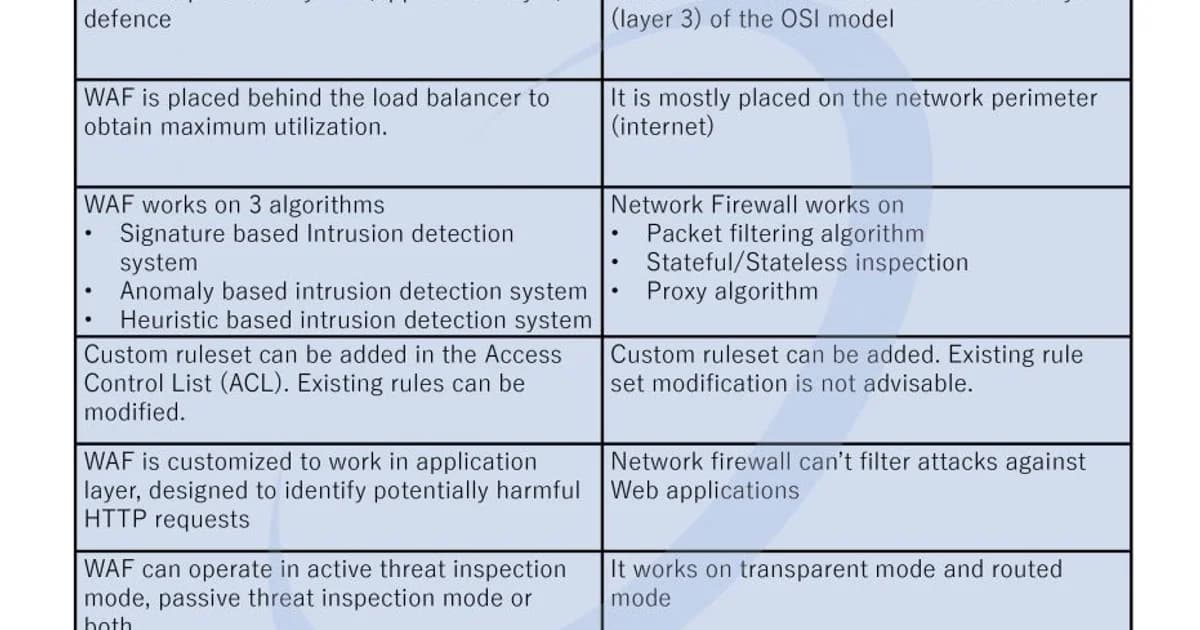
| Aspect | Network Firewall | WAF |
|---|---|---|
| OSI Layer | Layer 3/4 (Network/Transport) | Layer 7 (Application) |
| Inspects | IP addresses, ports, protocols | HTTP content: URLs, headers, body |
| Blocks | Unauthorized network access, port scans | SQL injection, XSS, CSRF, bot traffic |
| Sees encrypted traffic | No (can't inspect TLS payload) | Yes (terminates TLS or uses decryption) |
| Performance impact | Minimal (packet-level) | Moderate (deep content inspection) |
| False positives | Rare (rules are deterministic) | Common (pattern matching is imprecise) |
| Example tools | iptables, AWS Security Groups | AWS WAF, Cloudflare WAF, ModSecurity |
The False Positive Problem with WAFs
This is the biggest operational challenge with WAFs. Pattern-matching rules designed to block attacks also block legitimate traffic. A WAF rule that blocks requests containing SELECT and FROM will block SQL injection attempts -- and also block a blog post discussing SQL queries, an e-commerce search for "select from our collection," or an API payload with those keywords.
Managing False Positives
- Start in detection mode. Deploy the WAF in log-only mode first. Review what it would have blocked before enabling enforcement. This is critical and skipping it will break legitimate traffic.
- Tune rules per endpoint. Disable SQL injection rules on endpoints that legitimately accept SQL-like content (admin tools, content management systems). Apply strict rules to authentication and payment endpoints.
- Use managed rule sets. AWS Managed Rules and Cloudflare's managed rules are maintained by security teams who continuously reduce false positives. They're a better starting point than writing rules from scratch.
- Implement rate limiting separately. Don't rely on WAF rules for rate limiting. Use dedicated rate limiting features that are simpler and don't have the false positive issues that content inspection rules have.
- Review blocked requests weekly. Build a dashboard showing blocked requests by rule. Investigate spikes. Legitimate traffic blocked by the WAF looks like intermittent application errors to users.
Watch out: A WAF in blocking mode with untuned rules will cause more outages than the attacks it prevents. Every WAF deployment must start with a monitoring phase. Anyone who tells you to deploy a WAF and turn it on immediately has never operated one in production.
Managed vs Custom WAF Rules
Managed Rules
Managed rule sets are maintained by the WAF vendor or third-party security providers. They cover common attack patterns (OWASP Top 10, known CVEs, bot signatures) and are updated as new threats emerge. Use them as your baseline.
Custom Rules
Custom rules target application-specific threats. Examples:
- Block requests to admin paths from non-corporate IP ranges
- Require specific headers on API endpoints
- Rate limit login attempts by IP
- Block requests with oversized payloads to file upload endpoints
- Geo-block regions where you don't have customers
{
  "Name": "BlockAdminFromPublic",
  "Priority": 1,
  "Statement": {
    "AndStatement": {
      "Statements": [
        {
          "ByteMatchStatement": {
            "FieldToMatch": { "UriPath": {} },
            "PositionalConstraint": "STARTS_WITH",
            "SearchString": "/admin",
            "TextTransformations": [{ "Priority": 0, "Type": "LOWERCASE" }]
          }
        },
        {
          "NotStatement": {
            "Statement": {
              "IPSetReferenceStatement": {
                "ARN": "arn:aws:wafv2:us-east-1:123456789:regional/ipset/corporate-ips/abc123"
              }
            }
          }
        }
      ]
    }
  },
  "Action": { "Block": {} }
}
Building a Layered Defense
Network firewalls and WAFs aren't alternatives -- they're layers. Here's how to stack them:
- Network firewall (outer layer) -- Block all traffic except the ports your application uses. Restrict database access to application servers only. Block all outbound traffic except what's explicitly needed.
- WAF (middle layer) -- Inspect HTTP traffic for attacks. Use managed rules as a baseline. Add custom rules for your application's specific attack surface.
- Application-level validation (inner layer) -- Parameterized queries, input validation, output encoding. This is your last line of defense and should never be skipped, even with a WAF.
Each layer catches threats the others miss. A network firewall blocks a port scan before the WAF ever sees it. A WAF blocks SQL injection before the application processes it. Application-level parameterized queries prevent injection even if the WAF's rule is bypassed.
Frequently Asked Questions
Can a WAF replace a network firewall?
No. A WAF only inspects HTTP/HTTPS traffic. It can't block SSH brute force attacks, unauthorized database connections, or network-layer DDoS attacks. Network firewalls handle Layer 3/4 threats that a WAF never sees. You need both -- they protect different layers of the stack.
Do I need a WAF if I use parameterized queries?
A WAF adds defense in depth. Parameterized queries prevent SQL injection at the application layer, but a WAF blocks the attack before it reaches your code. It also protects against other attack types (XSS, CSRF, bot traffic) that parameterized queries don't address. Use both.
How much does a WAF cost for a typical application?
Cloudflare offers a free WAF tier that's sufficient for small applications. AWS WAF costs roughly $30-50/month for a typical setup with managed rules and moderate traffic. Enterprise WAFs like Fastly Signal Sciences start at several hundred dollars monthly. The cost depends on traffic volume and rule complexity.
What is the OWASP Core Rule Set?
The OWASP Core Rule Set (CRS) is an open-source set of WAF rules designed to detect common web attacks. It's the most widely used rule set for ModSecurity and other compatible WAFs. CRS covers SQL injection, XSS, local file inclusion, and other OWASP Top 10 attack patterns with regularly updated signatures.
Are AWS Security Groups a firewall?
Yes. AWS Security Groups are stateful network firewalls that operate at the ENI (Elastic Network Interface) level. They filter traffic based on IP addresses, ports, and protocols -- exactly what a Layer 3/4 firewall does. They're included at no additional cost with every AWS resource that has a network interface.
What is the difference between stateful and stateless firewalls?
A stateful firewall tracks connection state -- if it allows an inbound SYN packet, it automatically allows the corresponding response packets for that connection. A stateless firewall evaluates each packet independently without connection context. AWS Security Groups are stateful. AWS Network ACLs are stateless. Stateful firewalls are simpler to configure because you only write rules for the initiating direction.
How do I handle WAF false positives without reducing security?
Tune rules per endpoint rather than globally disabling them. Disable SQL injection rules only on endpoints that legitimately contain SQL-like content. Use managed rule sets that are continuously refined to minimize false positives. Start every WAF deployment in log-only mode and review blocked requests before enabling enforcement. Monitor false positive rates weekly.
Use Both, Configure Both
Network firewalls and WAFs aren't interchangeable. They defend different layers, inspect different data, and catch different attacks. Lock down your network layer first -- restrict ports, isolate tiers, default-deny everything. Then add a WAF to inspect HTTP traffic, starting in detection mode and tuning rules before enforcing them. Neither layer is optional, and neither is sufficient on its own. The breaches that make headlines aren't caused by zero-day exploits -- they're caused by missing or misconfigured security layers that should have been there all along.
Written by
Abhishek Patel
Infrastructure engineer with 10+ years building production systems on AWS, GCP, and bare metal. Writes practical guides on cloud architecture, containers, networking, and Linux for developers who want to understand how things actually work under the hood.
Related Articles
Certificate Management at Scale: Let's Encrypt, ACME, and cert-manager
Automate TLS certificates with Let's Encrypt, ACME protocol, and cert-manager in Kubernetes. Covers HTTP-01, DNS-01, wildcards, private CAs, and expiry monitoring.
9 min read
SecuritySSRF Attacks: What They Are and Why Cloud Environments Make Them Dangerous
SSRF lets attackers reach internal services through your server. Learn how cloud metadata endpoints amplify the risk and how to defend against SSRF.
9 min read
SecuritySQL Injection in 2026: Still a Problem, Here's How to Stop It
SQL injection remains a top vulnerability. Learn how SQLi works, why ORMs are not enough, and how to prevent it with parameterized queries and defense in depth.
9 min read
Enjoyed this article?
Get more like this in your inbox. No spam, unsubscribe anytime.